








You are about to receive your first international payment in USDT, and the sender asks you to provide a TRC20 wallet address. If you have never received USDT before, you may be wondering what a TRC20 wallet address is and how to get one.
It is actually really easy. You only need a few simple steps to get started, so let’s walk you through them. In this guide, you will learn how to get a TRC20 wallet address, where to find one, and how to use it to receive USDT.
What Is a TRC20 Wallet Address?
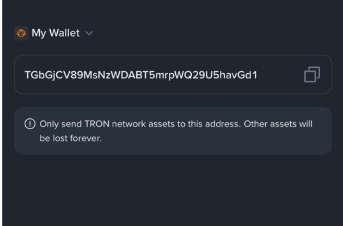
A TRC20 wallet address is an address used to receive USDT on the TRON network. It works like an account number, but for your USDT wallet.
A TRC20 wallet address usually starts with the letter T and is 34 characters long, consisting of letters and numbers. It can look something like this: TQ7mK9xP4vN2rL8sW6aB3cD5eF7gH9jK2
TRC20 is one of the most widely used networks for sending USDT because it is known for fast transactions and low fees. It is also widely supported by crypto wallets and exchanges.
Where Can You Get a TRC20 Wallet Address?
1. Stablecoin Wallets
A stablecoin wallet is a wallet that lets you receive, send, and manage stablecoins. They can be software wallets, such as Trust Wallet and TronLink, or hardware wallets like Ledger. As long as the wallet supports USDT on the TRON network, you can use it to get a TRC20 address for receiving USDT.
If you do not have a stablecoin wallet, start by choosing one that supports USDT on TRON and set it up. Once you have set up the wallet, you can get your TRC20 address by following these steps:
- Open your stablecoin wallet and select USDT.
- Choose Receive.
- Select TRON (TRC20) as the network.
- Copy the wallet address displayed on the screen.
You can then give this address to the person sending you USDT.
2. Crypto Exchanges
You can also get a TRC20 wallet address from a crypto exchange that supports USDT deposits through the TRON network. A crypto exchange is a platform where you can buy, sell, send, and receive cryptocurrency.
Binance is one example of a crypto exchange that supports USDT and provides a TRC20 deposit address for receiving it. If you do not already have a Binance account, you need to sign up first and complete any verification required by the platform. Once your account is ready, you can get your TRC20 deposit address with these simple steps:
- Log in to your Binance account.
- Tap Add Funds.
- Select Deposit Asset.
- Choose USDT.
- Select TRON (TRC20) as the network.
- Copy the deposit address displayed on the screen.
3. Pouchers
Pouchers is a multicurrency wallet that gives you a simple way to receive, hold, and manage USDT. While you can generate a TRC20 address on stablecoin wallets and crypto exchanges, with Pouchers, you can generate a TRC20 address and then use your USDT in different ways after receiving it.
If you are receiving USDT for the first time or getting paid in USDT, chances are you do not plan to just leave it sitting in a wallet or exchange. You may want to convert it to fiat, move the funds to your bank account, spend it with a virtual dollar card, or manage it alongside your other currencies. Pouchers gives you the flexibility to manage all these different needs from one secure platform.
How to Get a TRC20 Wallet Address on Pouchers
Step 1: Download the Pouchers app and sign in
Download the Pouchers app and then sign in to your account.
Step 2: Complete your KYC
Complete the required account verification using your BVN and a selfie. If you need help, you can follow the Pouchers KYC verification guide.
Step 3: Select USD from your dashboard
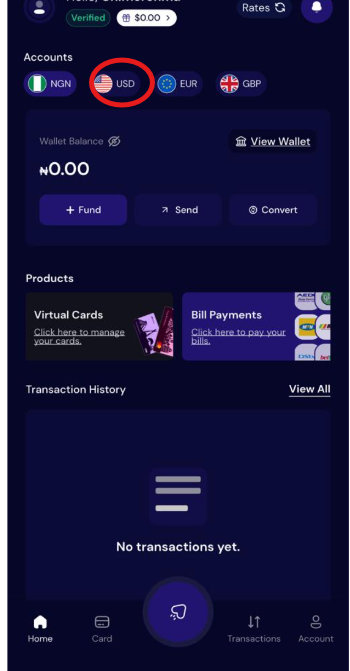
From your Pouchers dashboard, select USD to open your USD Wallet.
Step 4: Select Fund Wallet and choose Stablecoin
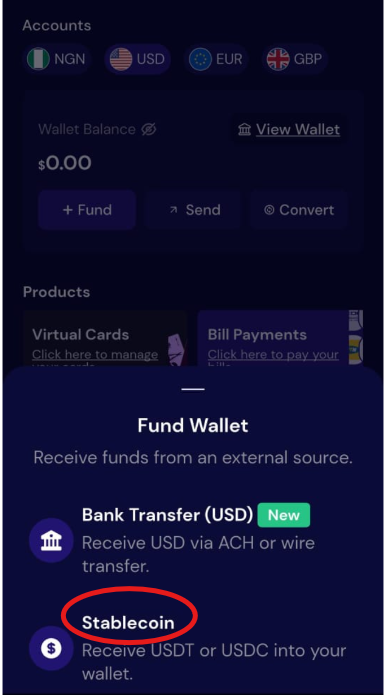
Tap Fund Wallet, then select Stablecoin from the available funding options.
Step 5: Select USDT and generate an address
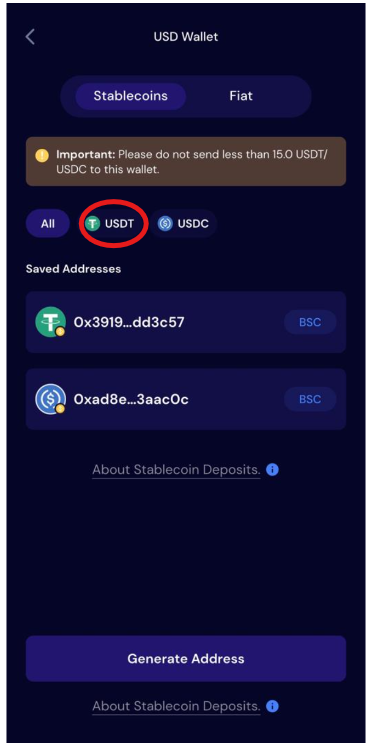
Choose USDT, then tap Generate Address.
Step 6: Select TRON (TRC20)
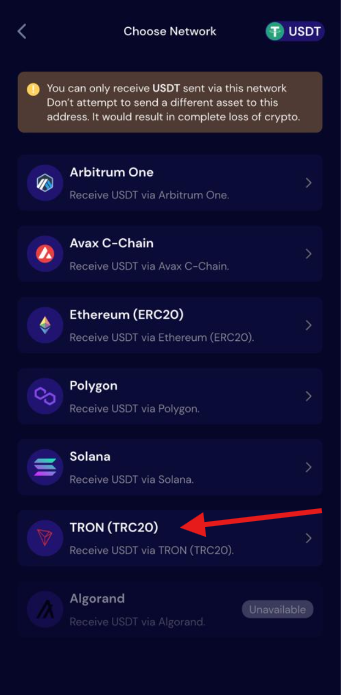
Choose TRON (TRC20) from the available network options.
Step 7: Accept the terms and generate the wallet
Review and accept the terms, then tap Generate Wallet to create your TRC20 address.
Step 8: Copy your TRC20 wallet address
Copy the address displayed on the screen. You can now share this address with the person sending you USDT.
How to Use a TRC20 Wallet Address to Receive USDT
To use your TRC20 wallet address to receive USDT from another wallet or crypto exchange:
- Copy your TRC20 wallet address from your wallet or exchange where you generated it.
- Send the address to the person sending you USDT.
- Tell the sender to select TRON (TRC20) as the network when sending the USDT.
- Wait for the transaction to be confirmed and check your receiving wallet for the USDT.
Frequently Asked Questions
1. How Do I Know If a Wallet Supports TRC20?
Check if the wallet lists TRON (TRC20) as a supported network for USDT. You can usually see the available networks when you select USDT and choose Receive in the wallet.
2. Is It Free to Create a TRC20 Wallet Address?
Yes, creating a TRC20 wallet address is generally free. However, some wallets or platforms may charge fees for other services, such as sending USDT or withdrawing funds.
3. How Do I Choose a Suitable TRC20 Wallet?
Choose a wallet that supports USDT on TRON, has security features you are comfortable with, and is available on your device. You should also consider how easy it is to receive, send, and manage your USDT through the wallet.
4. Are There Any Transaction Fees for Sending USDT Through TRC20?
Yes, sending USDT through TRC20 involves a network fee, which typically falls around $1–$4 per transaction. TRC20 is generally considered a relatively low-cost option for sending USDT, although the exact fee can vary depending on the network and how the transaction is processed.
5. What Happens If I Send USDT to the Wrong Network?
Sending USDT through the wrong network can cause the funds to fail to arrive or become difficult to recover. Always confirm that the sender selects TRON (TRC20) and that the receiving wallet supports USDT on that network before completing the transaction.
6. Can I Use the Same TRC20 Address More Than Once?
Yes, you can generally use the same TRC20 address to receive USDT more than once. However, always copy the address from your wallet and confirm that TRON (TRC20) is the selected network before each transaction.
Conclusion
Receiving USDT through TRC20 does not have to be complicated. Once you have a wallet that supports TRON, getting your address and sharing it with the sender only takes a few steps.
If you want a wallet that gives you more options after receiving your USDT, create your Pouchers account, open your USD Wallet, and generate your TRC20 address to get started.