








Canva Pro gives you access to premium templates, stock images, background removal, Magic Resize, and other design tools that make creating professional content easier. But getting a subscription can be frustrating when your Nigerian bank card keeps declining international payments.
Canva Pro has different payment methods for Nigerians. However, if your bank card is declined or you prefer an alternative payment method, you can use other options, such as a virtual dollar card.
This guide covers Canva Pro pricing in Nigeria, the available payment methods, and how to pay using a Pouchers virtual dollar card
How Much Is Canva Pro in Nigeria?
| Subscription Plans | Monthly Pricing | Annual |
| Free | Free | Free |
| Pro | ₦5,500 | ₦44,000 |
| Business | ₦7,900 | ₦79,000 |
| Enterprise | Contact them | Contact them |
1. Canva Free Package
Canva Free gives you access to basic design tools without paying a subscription fee. You can create social media graphics, presentations, flyers, documents, and other visual content using its free templates and design elements. However, you won’t have full access to premium templates, stock images, background removal, and other Pro features.
2. Canva Pro
Canva Pro is ₦5,500 per month and ₦44,000 per year. Canva Pro is designed for individuals who regularly create visual content and need more advanced design tools.
With this plan, you get access to premium templates, stock photos, videos, graphics, and features such as Background Remover, Magic Resize, and AI-powered design tools. You also get more cloud storage and the ability to schedule social media content directly from Canva.
3. Canva Business
Canva Business costs ₦7,900 per month and ₦79,000 per year. Canva Business offers more advanced features for individuals and growing teams that need additional design, marketing, and collaboration tools.
It includes premium design resources, increased AI usage, advanced brand management, team collaboration features, and tools for tracking advertising performance.
4. Canva Enterprise
The price of Canva Enterprise is customised and based on an organization’s requirements. You have to contact Canva sales team for its price. This plan is designed for large organizations that need advanced design management, security, and collaboration features across multiple departments or teams.
3 Best Ways to Pay for Canva Pro in Nigeria
If you’re wondering how to pay for Canva Pro with a Nigerian card or another payment method, here are three options to consider.
1. Pouchers Virtual Dollar Card
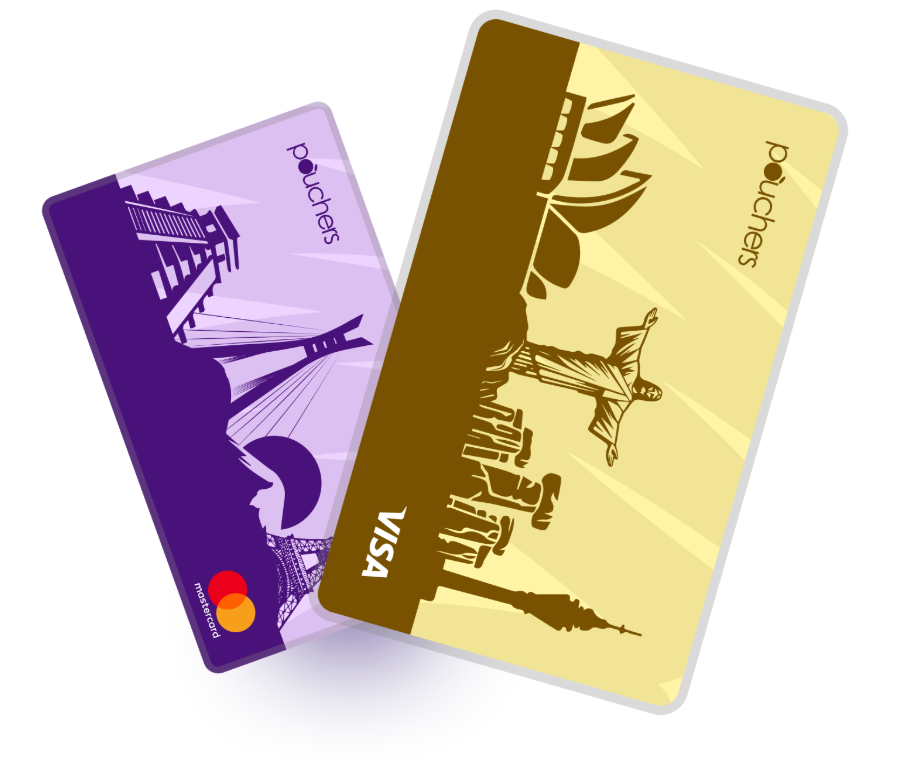
The Pouchers virtual dollar card is the fastest and most convenient way to pay for Canva Pro in Nigeria. You can create a card in minutes, fund it directly from your Naira wallet, and use it to complete your Canva subscription. Here’s what makes the Pouchers virtual dollar card a convenient option:
- Quick card creation: Complete the required verification and create your virtual dollar card in minutes without visiting a bank.
- Easy Naira funding: Fund your card directly from your Pouchers Naira wallet without needing to purchase dollars separately.
- Zero maintenance fees: Keep your virtual dollar card without worrying about recurring card maintenance charges.
- Zero card funding fees: Add money to your virtual card without additional card top-up fees.
- International payments: Pay for Canva Pro and other international subscriptions, including ChatGPT, Adobe, Netflix, and Spotify.
- Flexible funding options: Fund your card with Naira or supported stablecoins, such as USDT and USDC.
- Security and control: Protect your card with encryption, biometric authentication, and fraud monitoring. You can also freeze or unfreeze it instantly whenever necessary.
- 24/7 customer support: Get assistance whenever you encounter problems with your card or transactions.
Beyond Canva Pro, you can use your Pouchers virtual dollar card to pay for online shopping, flight bookings, hotel reservations, and other services that accept international Visa cards
2. App Store Billing
App Store billing allows you to pay for Canva Pro through your Apple App Store or Google Play account instead of entering your card details directly on Canva’s website. When you subscribe through the Canva mobile app, Apple or Google processes the payment using the payment method linked to your account.
3. Third-Party Vendor Slot
These vendors sell subscription slots, invite customers to shared Canva Teams accounts, or help customers activate subscriptions. Some offer monthly and annual packages at prices different from Canva’s direct subscription rates.
However, be careful when choosing this option. Before paying, check the vendor’s reputation and avoid giving strangers your Canva password or verification codes.
How to Pay for Canva Pro With a Pouchers Virtual Dollar Card
If your Nigerian bank card keeps failing at Canva checkout, you can use a Pouchers virtual dollar card instead.
You don’t need to visit a bank or apply for a physical dollar card. You can create and fund your virtual card through the Pouchers app.
Follow these steps:
Step 1: Create a Pouchers account
Download the Pouchers app and register for an account. Complete the required verification process to access its wallet and virtual card features.
Step 2: Create your virtual dollar card
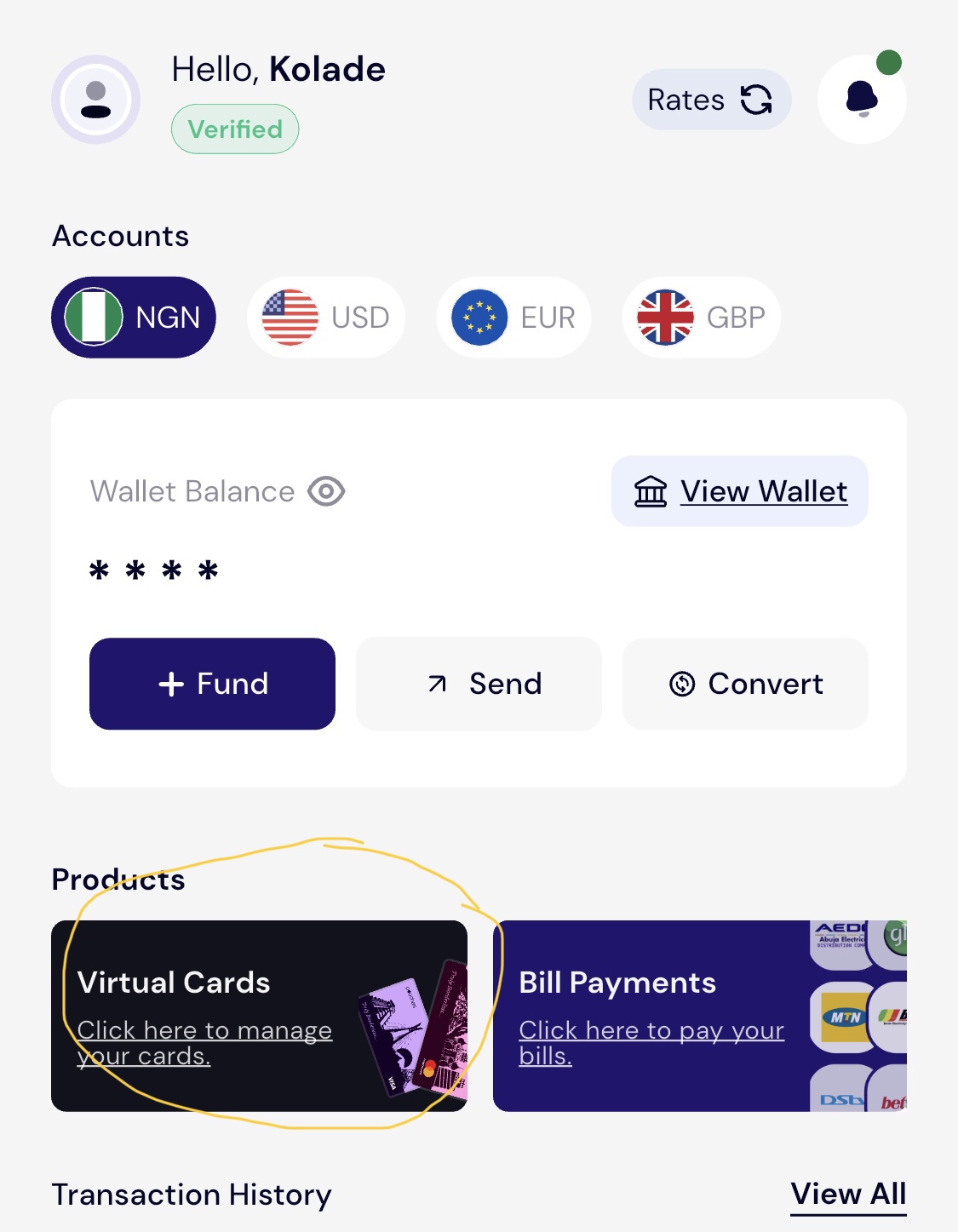
Log in to your account and navigate to the Virtual Card or Cards section.
Select Standard Card and follow the instructions to create your virtual dollar card.
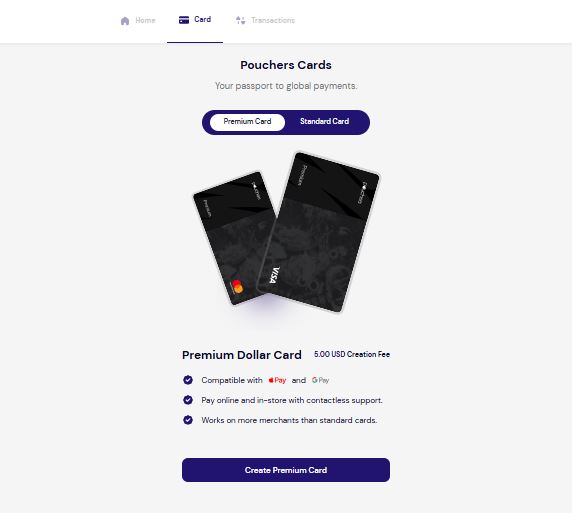
A one-time $2 card creation fee applies. You’ll need at least $4 to create and activate the card.
Step 3: Fund your virtual dollar card
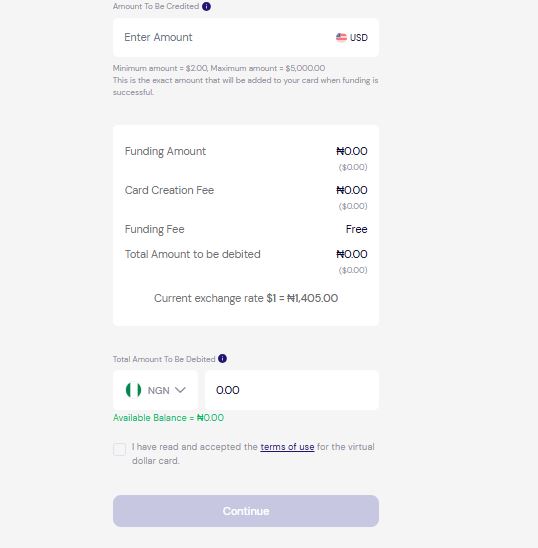
Once your card is ready, you need to add money before using it. Tap Fund Card.
Enter the amount you want to add in USD. Review the Naira equivalent at the displayed exchange rate and confirm the transaction. Your Naira wallet will be debited, and the equivalent dollar amount will be credited to your virtual card.
Make sure you have enough money to cover your Canva Pro subscription before proceeding.
Step 4: Open Canva and select Canva Pro
Visit Canva and log in to your account. Select the option to upgrade to Canva Pro. Choose your preferred subscription duration and proceed to checkout.
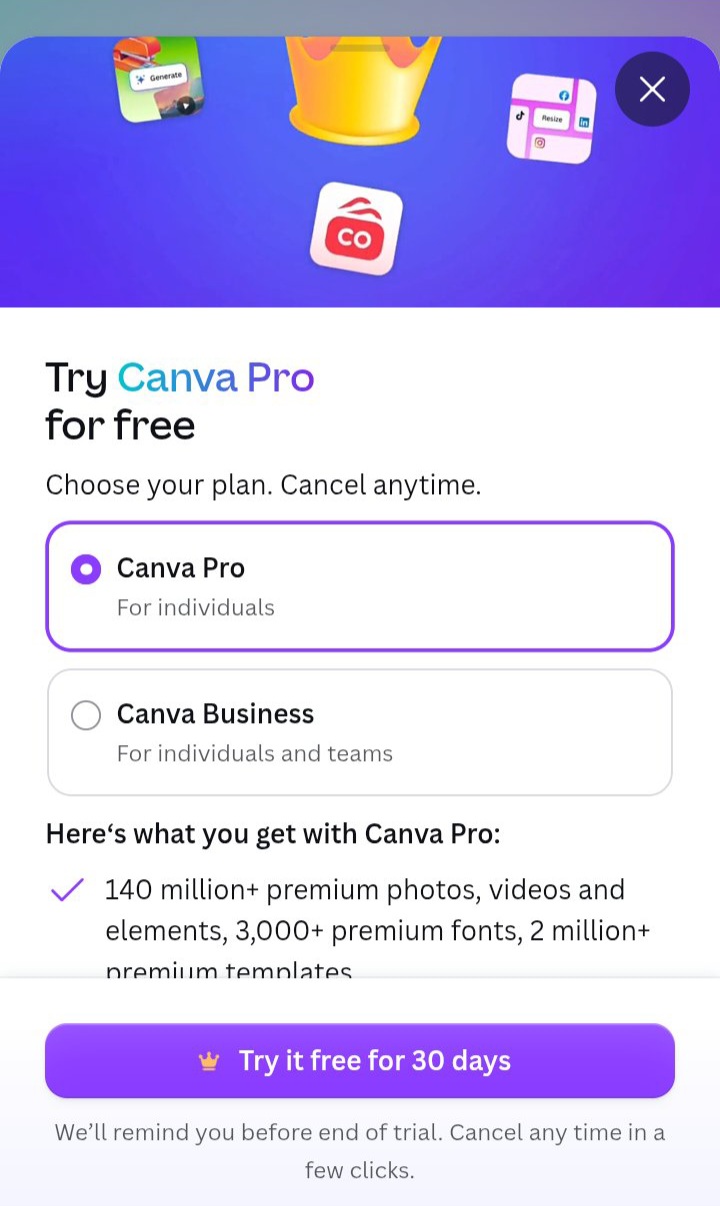
Step 5: Enter your Pouchers card details
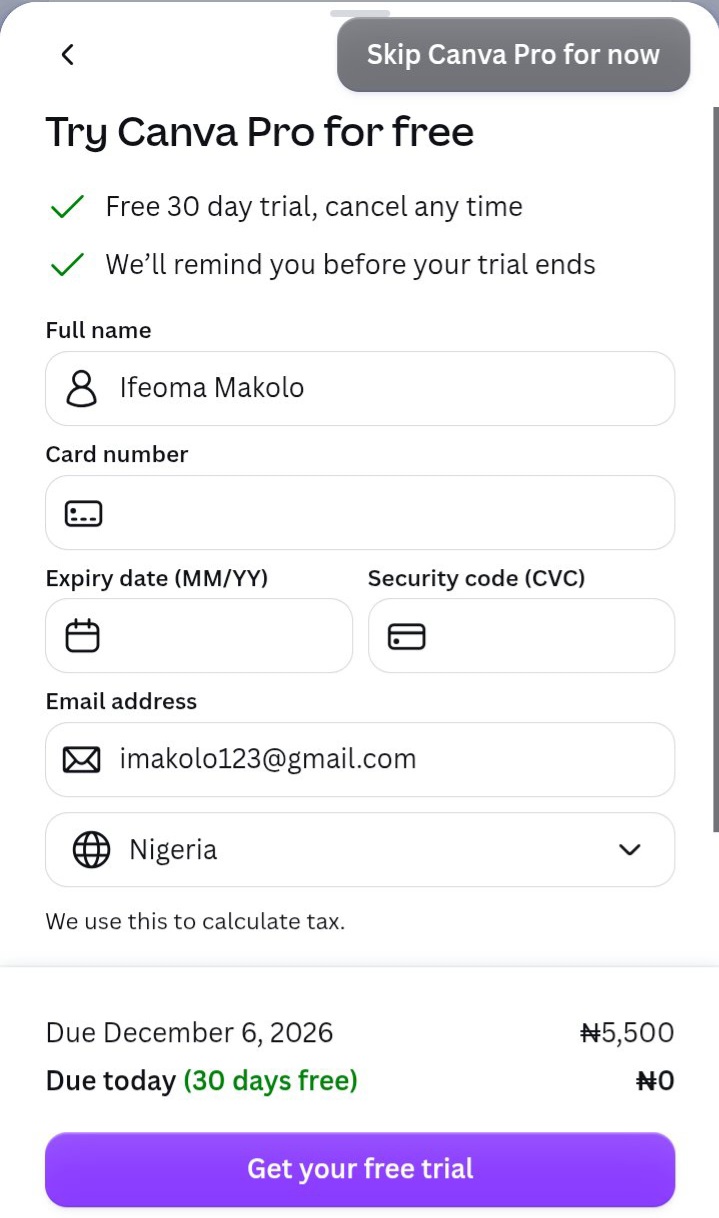
At checkout, select the card payment option.
Open your Pouchers app and copy your virtual card details number, its expiration date, and CVV. Enter these details into the appropriate payment fields on Canva.
Step 6: Confirm your payment
Review your subscription details and complete the payment. If the transaction is successful, Canva should activate your Pro subscription. You can confirm this by checking your account’s billing or subscription settings.
Remember to check your subscription renewal date, especially if you’ve selected a monthly or annual plan.
Why Canva Rejects Nigerian Bank Cards
A declined Canva payment doesn’t necessarily mean your bank account has a problem. Several factors can prevent an international transaction from going through.
Here are some common reasons.
1. International transaction restrictions
Some Nigerian bank cards have restrictions on international online payments. This is often due to foreign exchange limitations, regulatory requirements, or bank-imposed spending limits designed to manage foreign currency transactions and reduce fraud.
2. Insufficient foreign spending limits
Your bank may have a limit on how much you can spend internationally. For example, if your bank sets a $20 monthly limit on international transactions and you’ve already used it, you won’t be able to make further foreign currency payments until the limit resets. If your Canva subscription exceeds that limit, the payment may not go through.
3. Currency restrictions
Some Nigerian Naira cards have restrictions on international transactions, particularly payments processed in US dollars. Even if you have enough money in your account, your bank may decline the payment.
4. Incorrect card details
An incorrect card number, expiration date, CVV, or billing information can cause payment failure. Double-check these details before submitting your payment.
5. Bank security restrictions
Sometimes, your bank may block a Canva payment because it considers the transaction unusual. For example, if you rarely make international payments, your bank’s security system may flag the transaction and decline it until you confirm that you authorised it.
Frequently Asked Questions About How To Pay for Canva Pro
1. Can I pay for Canva Pro with a Naira card in Nigeria?
Yes. Canva supports local payment options in Nigeria, and some Nigerian bank cards may work at checkout. However, successful payment depends on whether your card supports the transaction and whether your bank approves it. If your card is declined, you can try a Pouchers virtual dollar card instead.
2. Does Canva accept cash transfers in Nigeria?
Yes. Canva supports bank transfers in Nigeria for eligible purchases. Select the bank transfer option at checkout if it is available for your subscription. Canva also offers daily and weekly Pro plans that can be useful if you prefer shorter subscription periods.
3. Can I pay for Canva Pro with a debit card?
Yes. Canva accepts supported Visa and Mastercard debit cards, as well as other accepted card networks. Your card must support online payments, and your bank must approve the transaction. If your regular debit card doesn’t work, you can use a Pouchers virtual dollar card.
4. What should I do if my Canva Pro payment is declined?
First, check your account balance, card details, and transaction limits. Confirm that your bank allows online payments and hasn’t blocked the transaction. If the problem persists, contact your bank or try another supported payment method like Pouchers virtual dollar card, which you can fund directly from your Naira wallet.
5. Is Canva Pro billed monthly or yearly?
Yes, Canva Pro is billed monthly and yearly. It offers both monthly and annual subscriptions. You can choose monthly billing if you prefer to pay as you use the service or an annual subscription if you want to commit for a full year.
Conclusion
Paying for Canva Pro in Nigeria doesn’t have to be complicated. You can subscribe through a virtual dollar card, App Store billing, or a third-party vendor, depending on your budget and how much control you want over your subscription.
For a fast and convenient payment experience, get a Pouchers virtual dollar card. Create your card in minutes, fund it directly from your Naira wallet, and pay for Canva Pro without relying on your regular Nigerian bank card. You can also use it for other international subscriptions, software, online shopping, and travel bookings.
Download the Pouchers app to create your virtual dollar card today
Sources: