









Using a virtual dollar card for online payments can make it easier to pay for international subscriptions, software, shopping, and other services. But when you use the same card for everything, it can be difficult to keep track of your spending. Multiple virtual dollar cards let you separate payments by purpose, making your expenses easier to manage.
This article explains what multiple dollar cards are, how they work, and how you can create and use them in Nigeria.
What Are Multiple Dollar Cards?
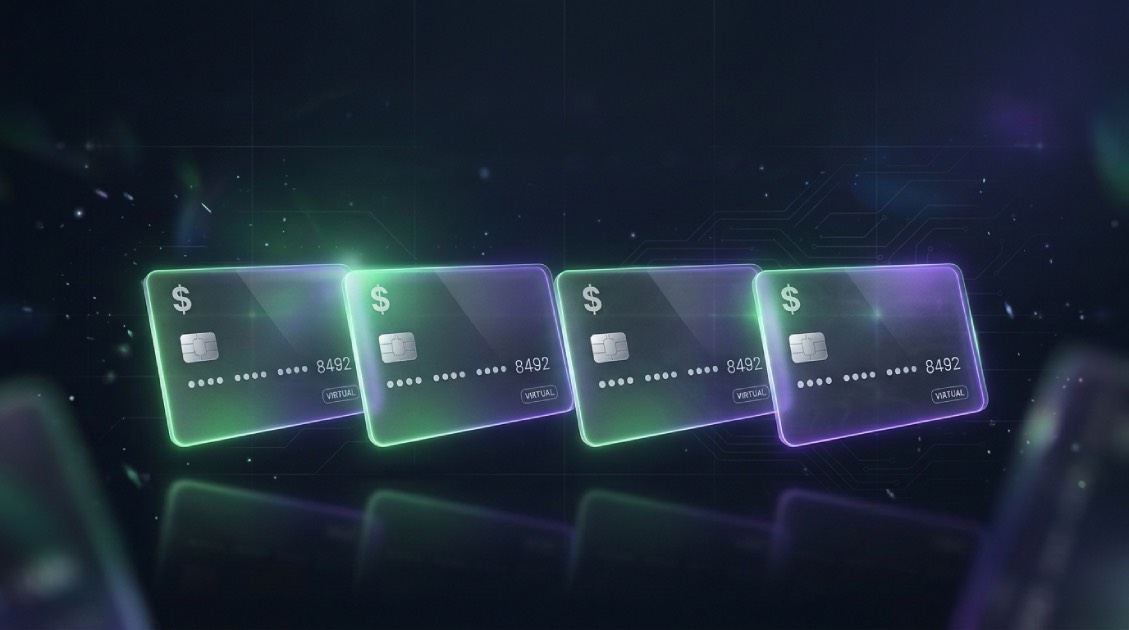
Multiple dollar cards means having more than one virtual card denominated in US dollars under the same account. Each card has its own card details, which you can use to pay online without carrying a physical card.
You can assign each card a different purpose, such as subscriptions, business tools, or online shopping. This helps you separate payments and review your spending more easily.
Can You Create Multiple Dollar Cards in Nigeria?
Yes. You can create multiple dollar cards under one account, so you don’t have to use a single card for every payment. For example, you could keep one card for subscriptions, another for business expenses, and another for online shopping.
Pouchers is one major platform that enables you to create multiple virtual dollar cards. The Pouchers virtual dollar card exists in two options: Standard and Premium. You can create up to two Standard cards and two Premium cards, with one Visa and one Mastercard available for each type.
You can fund your cards from your Pouchers USD wallet or through your Naira wallet on the platform.
Benefits of Using Multiple Virtual Dollar Cards
1. Helps to separate personal and business expenses
Having multiple virtual dollar cards helps you to hold cards for different purposes. You can use one card for personal purchases and another for work-related payments. Keeping these expenses separate can make it easier to review your spending and identify business costs. You can assign one card to subscriptions, another to business expenses, and another to shopping or travel.
2. Set spending limits for different needs
You can load only the amount you want to spend onto each card. This helps you control how much you spend on a particular type of payment without using your entire dollar balance.
3. Reduce the impact of a card issue
If one dollar card is declined, compromised, or needs to be replaced, you may still be able to use your other cards for payments. You would need to update any subscriptions or services linked to the affected card.
4. Keep payment details separate
Using different cards means you don’t have to share the same card details with every website or service. If you stop using a particular service, you can stop funding or using the card assigned to it.
5. Improve spending control
Using separate cards for different expenses makes it easier to keep track of your spending. You can set aside a card for everyday purchases and another for specific expenses, helping you stay organized and avoid overspending.
How to Create Multiple Dollar Cards on Pouchers
Step 1: Create a Pouchers account
Download the Pouchers app from Google Play Store or App Store. Create an account or if you already have an account, log in to the app. and click on “Virtual Cards” on the homepage.
Step 2: Choose virtual dollar card
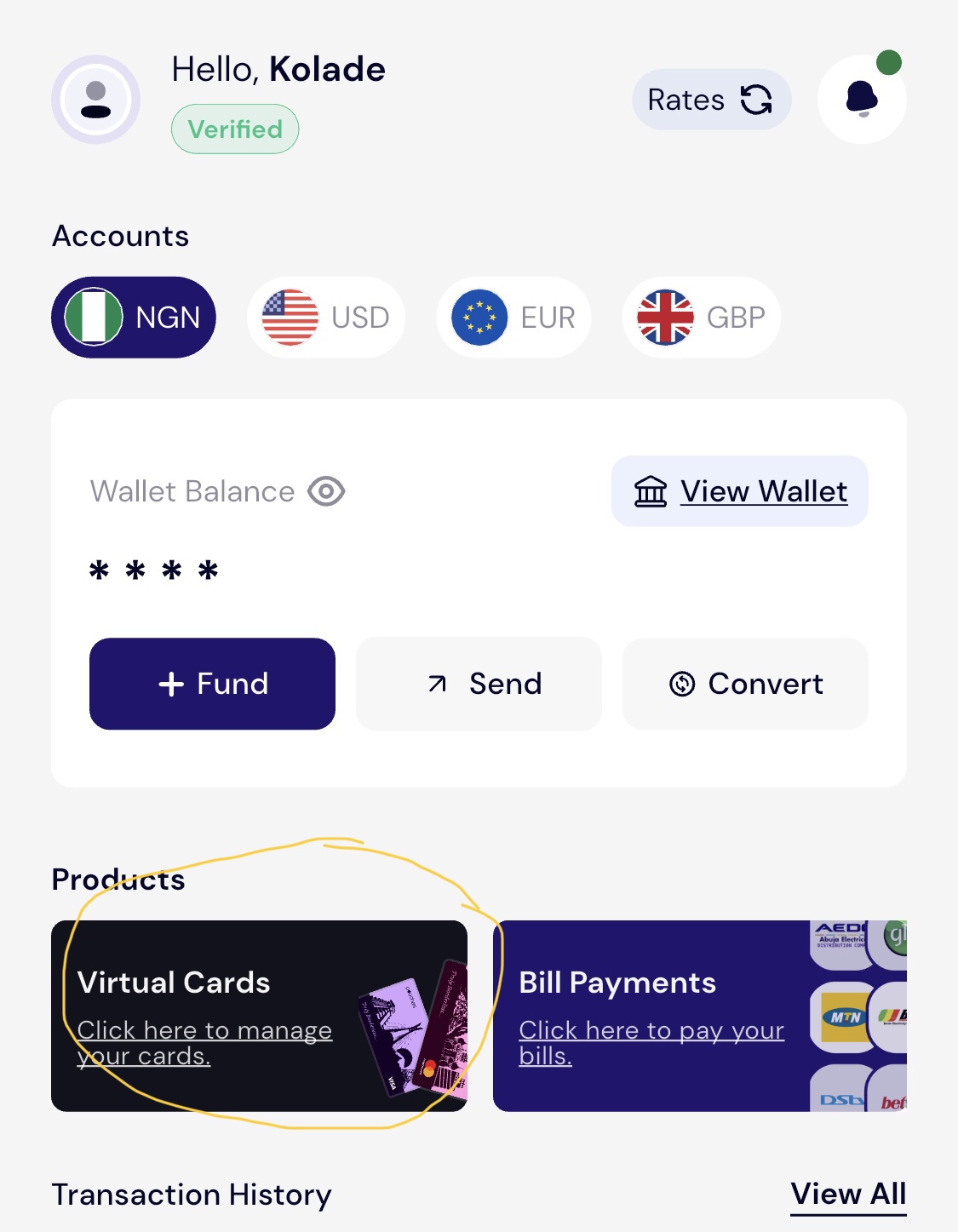
Click “Virtual Cards” on the homepage to get started.
Step 3: Choose your preferred brand
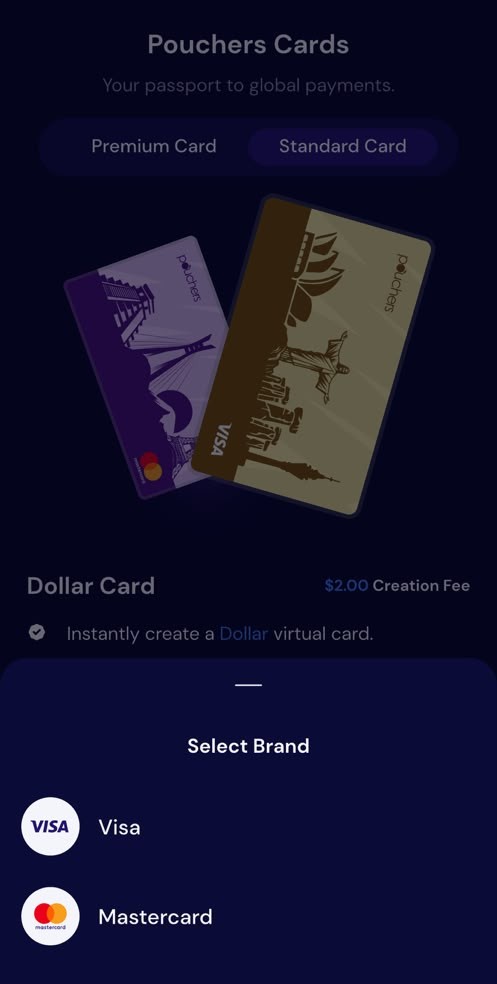
After choosing your card type, click on “Create Premium Card” or “Create Virtual Card” depending on which type of card you chose. Then choose your preferred card brand from Visa and MasterCard.
Step 4: Enter your details
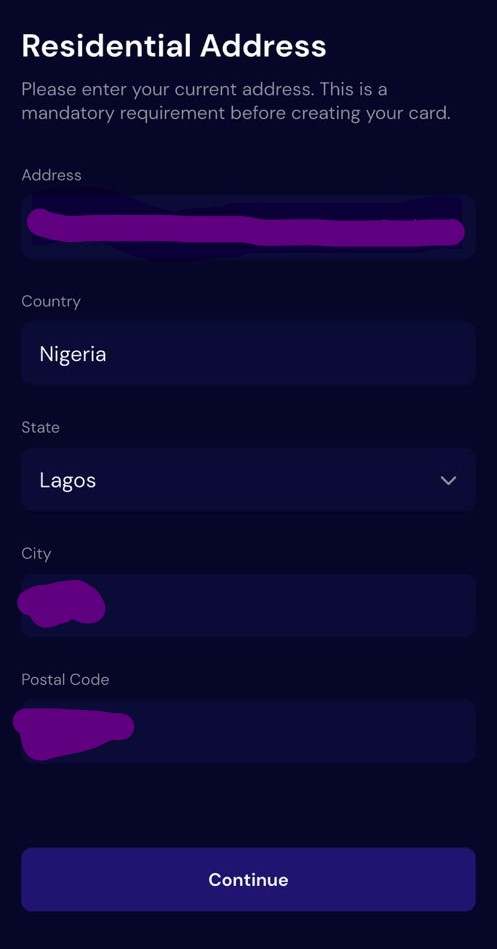
If you choose a Standard card, you’ll need to choose your preferred card design before proceeding. After choosing your preferred design, click on “Continue,” then enter your details. If you choose a Premium Card, you can enter your details straightway after selecting your card brand then click on.
Step 5: Create your card
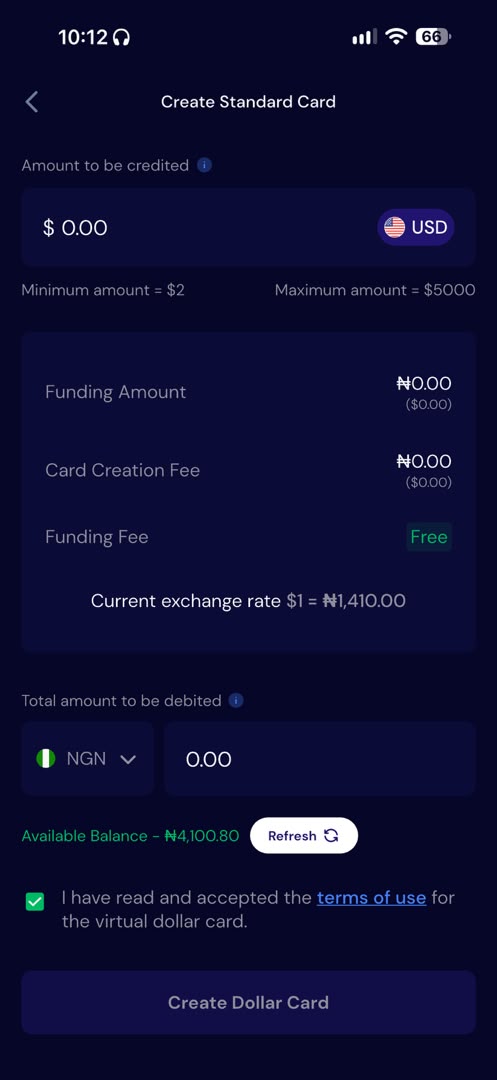
Enter the amount you want to fund your card with, then accept the terms and conditions and click on “Create Dollar Card.”
Step 6: Create Additional Cards
Repeat the process to create another card, choosing the available card type and network. You can create up to two Standard Virtual Dollar Cards and two Premium Cards.
How to Use Multiple Dollar Cards Effectively
1. Assign a role to each dollar card
Give each card a clear purpose, such as subscriptions, everyday online purchases, or travel bookings. This makes it easier to identify what each card is used for when you review your transactions.
2. Freeze cards and set spending limits
If a card is not in use, freeze it where that option is available. You can also control spending by transferring only the amount you need to each card, rather than keeping your full dollar balance on every card.
3. Separate personal and business expenses
Use different cards for personal purchases and business payments. This can make it easier to review work-related costs and keep them separate from your personal spending.
4. Track fees and funding charges
Check the cost of creating and funding each card, as well as any charges for declined transactions or other card activity. Keeping track of these fees helps you understand the full cost of using multiple cards.
How Much Does It Cost to Create Multiple Dollar Cards on Pouchers?
| Card-Related Service | Fee |
| Standard Virtual Dollar Card creation | $2 per card |
| Premium Card creation | $5 per card |
| Card top-up | Free |
| Withdrawal funds from card | Free |
Creating two Standard Virtual Dollar Cards costs $4 in creation fees. Creating one Standard Card and one Premium Card costs $7. A $0.50 fee applies to transactions declined due to insufficient funds. Check Pouchers’ latest fees and terms before creating additional cards.
Common Mistakes to Avoid When Using Multiple Dollar Cards
1. Creating more cards than you need
Having multiple cards is useful, but creating too many without a clear reason can make your finances harder to manage. You might lose track of which card you use for certain payments or struggle to monitor your expenses.
Start with the cards you actually need and assign each one a specific purpose, such as subscriptions, business expenses or personal shopping.
2. Forgetting to fund your card
Before making a payment, check that your card has enough money to cover the transaction. A lack of funds can cause your payment to fail, and Pouchers charges $0.50 for each transaction declined due to insufficient funds.
Make it a habit to check your balance before paying for subscriptions, shopping or other online services to avoid unnecessary charges and failed payments.
3. Ignoring card limits
Every Pouchers card has transaction and spending limits. Overlooking these limits could result in a payment being declined, even when you have enough money in your account.
Familiarise yourself with the applicable limits and consider them when planning large purchases or recurring payments.
4. Mixing up your cards
When you have multiple virtual cards, it is easy to use the wrong one for a payment, especially if you do not keep track of their purposes. For example, you might accidentally use your shopping card to pay for a business subscription.
Give each card a clear name or purpose and use it consistently. This makes it easier to identify transactions, review expenses and understand where your money goes.
5. Overlooking recurring subscriptions
Subscriptions can easily go unnoticed, particularly when you pay for several services with different cards. You might continue paying for a streaming platform, software or online service long after you have stopped using it.
Review your recurring payments regularly, check which services are still useful and cancel those you no longer need. This helps you avoid unnecessary charges and keep more of your money.
Frequently Asked Questions
1. How many dollar cards can I create on Pouchers?
You can create up to two Standard Virtual Dollar Cards and two Premium Cards: one Visa and one Mastercard for each card type.
2. Can I have multiple virtual dollar cards in Nigeria?
Yes. Pouchers offers Standard and Premium virtual dollar cards to eligible users in Nigeria, subject to its card limits and terms.
3. How much does it cost to create a dollar card on Pouchers?
A Standard Virtual Dollar Card costs $2 to create. A Premium Card costs $5. These are one-time creation fees.
4. Can I fund multiple cards from my Pouchers wallet?
Yes. You can fund each card from your Pouchers naira wallet or, where supported, your USD wallet.
5. Can I use multiple dollar cards for different subscriptions?
Yes. You can assign separate cards to different subscriptions or payment categories to help organise your spending.
6. What are the transaction and spending limits on Pouchers cards?
Each Pouchers card has the following transaction and spending limits: Single transaction limit of $10,000 for both tokenized and non-tokenized cards, daily cumulative spending limit of $50,000 per card, and a monthly spending limit of $400,000 per card. These limits apply to each card individually.
Conclusion
Managing multiple online payments becomes easier when you have cards for different purposes. Whether you’re paying for subscriptions, handling business expenses or shopping online, Pouchers gives you the flexibility to create Standard and Premium virtual dollar cards, with up to two of each type available to eligible users.
Give each card a purpose, keep your spending organised and enjoy a simpler way to manage your online payments. Explore Pouchers and create your virtual dollar cards to get started.
Download the Pouchers app to create your multiple dollar cards.