








Virtual dollar cards have made international payments easier for Nigerians, especially when a regular naira card refuses to work on a foreign website. So, it can be frustrating when your virtual dollar card gets declined too, even when you have enough money to cover the payment.
But a declined payment doesn’t always mean there is a problem with your card. Before you panic, there could be other reasons for the failed transaction, and many are easy to fix once you know what to look out for.
In this article, we’ll explore why your virtual dollar card may be declined and how to troubleshoot common issues so you can get your payment through.
Reasons Your Virtual Dollar Card May Be Declined

1. Insufficient Funds on Your Card
Sometimes, your payment declines because you funded your card with the exact amount you need, without leaving anything extra. This can be an issue if the website adds taxes or other charges.
For example, if you’re trying to pay $15 for a subscription and you have exactly $15 on your card, the payment could fail if extra charges or a temporary hold push the total above your balance.
How to fix it: Check your card balance and confirm the total amount you are expected to pay, including any applicable taxes, conversion charges, or fees. If your balance is short, fund your card with enough money to cover the difference and try again.
2. Incorrect Card Details or Billing Address
A small mistake when entering your details can be enough to stop a payment. You might enter the wrong card number, get the expiry date mixed up, mistype your CVV, or enter a billing address that doesn’t match the details linked to your card. Any of these could cause your payment to be declined.
How to fix it: Check your card number, expiry date, and CVV carefully before submitting the payment. If you’re asked for a billing address, follow your card provider’s instructions on which details to enter. Correct any mistakes and try the payment again.
3. Merchant Restrictions on Virtual or Prepaid Cards
Some merchants don’t accept certain types of virtual or prepaid cards, even when the card is active and has enough funds. This can happen with hotel bookings, car rentals, and some subscription services. A car rental company may require a physical credit card in the driver’s name to cover a security deposit, while a subscription service may not accept certain prepaid cards for recurring payments.
How to fix it: Check the merchant’s payment policy or contact its support team to confirm whether it accepts your type of virtual dollar card. If the merchant doesn’t accept it, you’ll need to use another payment method.
4. Card Status, Security Checks, or Transaction Limits
Your card may be declined if it has not been activated, has been frozen, or has reached its spending limit. Your payment may also be blocked if your provider flags it or temporarily blocks it to verify that it’s really you making the transaction.
How to fix it: Check your card status and spending limits in your provider’s app. If your card is frozen or a payment has been blocked for security reasons, follow the provider’s instructions or contact customer support for help.
5. Currency or Country Restrictions
Having a virtual dollar card doesn’t automatically mean you can use it on every international website. Some cards have restrictions on the countries they support. You might be able to pay for a US-based software subscription with your card, but find that a website that requires a locally issued UK card rejects it. The issue here is the card’s issuing country and not your balance.
How to fix it: Check your card provider’s terms to confirm which countries and transaction types are supported. You can also ask the merchant whether it accepts cards issued outside its country. If the merchant requires a specific card-issuing country, you may need another payment method that meets its requirements.
6. Subscription or Payment Processing Issues
Sometimes, your card is working fine, but the website you’re trying to pay on may be experiencing a payment processing issue. This could happen if the payment system is temporarily down or the service has trouble verifying your transaction.
For example, you may be trying to renew your Netflix subscription, but the payment fails even though your card is active and everything is in order. The issue could be a temporary glitch with the payment system rather than your card.
How to fix it: Wait a few minutes and try again. You can also check if the website has reported any payment issues or contact its support team for help. If the payment keeps failing, reach out to your card provider to confirm whether the transaction is reaching them or being declined before it gets through.
What to Look for in a Reliable Virtual Dollar Card
Here are four things to look for when choosing a reliable virtual dollar card:
1. Transparent Fees
Before choosing a virtual dollar card, check the fees that come with using it. Find out if you need to pay to create or fund the card, and whether there are transaction, maintenance, or conversion fees. This helps you know what to expect and avoid unexpected charges when making payments.
2. Convenient Funding
Choose a card that’s easy to fund whenever you need to make a payment. Confirm the available funding methods, the minimum amount you can add, and how long it takes for the money to reflect on your card. The Pouchers virtual dollar card, for example, supports instant funding, so your money reflects in seconds.
3. Security and Fraud Protection
Your card should have security measures to help protect your funds and details. Find out whether the provider offers features such as transaction alerts, card freezing, or extra verification for payments. These features can help you spot suspicious activity and take action if something seems wrong.
4. Accessible Customer Support

Even a reliable card can run into payment issues, so accessible customer support matters. Choose a provider that gives you a clear way to report failed transactions, ask about unexpected charges, or resolve account restrictions. Helpful support can save you time when you need to complete an important payment.
Best Virtual Dollar Card for International Payments
The Pouchers Virtual Dollar Card is one of the best virtual dollar cards for Nigerians who want to make international payments. You can create your card in seconds and fund it instantly from your Pouchers Naira or USD wallet.
You can also deposit supported stablecoins into your USD wallet and use the balance to fund your card. Then you can use it to shop online, pay for digital tools, online subscriptions, and advertising services on major international platforms.
Pouchers offers Standard and Premium virtual dollar cards, with Visa and Mastercard options. The Standard card is suitable for everyday online payments, while the Premium card includes additional features, such as Apple Pay and Google Pay. Both cards have a one-time creation fee and no monthly maintenance fee.
Here are some features that make the Pouchers Virtual Dollar Card the top choice for international payments:
- Visa and Mastercard options for different payment needs.
- Standard and Premium cards, depending on the features you need.
- Instant card funding from your Pouchers Naira or USD wallet, with support for USDT and USDC deposits into your Pouchers wallet.
- No monthly maintenance fees, with a one-time creation fee of $2 for Standard and $5 for Premium.
- Apple Pay and Google Pay support on Premium cards for compatible payments.
- In-app controls to manage, freeze, or unfreeze your card when needed.
- Security features, including encryption and fraud monitoring, to protect your account and transactions.
- 24/7 customer support for help with your card and payment issues.
How to Create a Virtual Dollar Card on Pouchers
To create a Pouchers virtual dollar card, simply follow these steps:
Step 1. Download the Pouchers App or Log In
Download the Pouchers app. If you already have an account, log in with your details. Otherwise, register and complete the account setup.
Step 2. Fund Your Pouchers Wallet
Before creating your card, make sure you have enough money in your Pouchers wallet. You can fund your card through your fiat wallet with currencies such as naira, USD, or stablecoins, if you prefer.
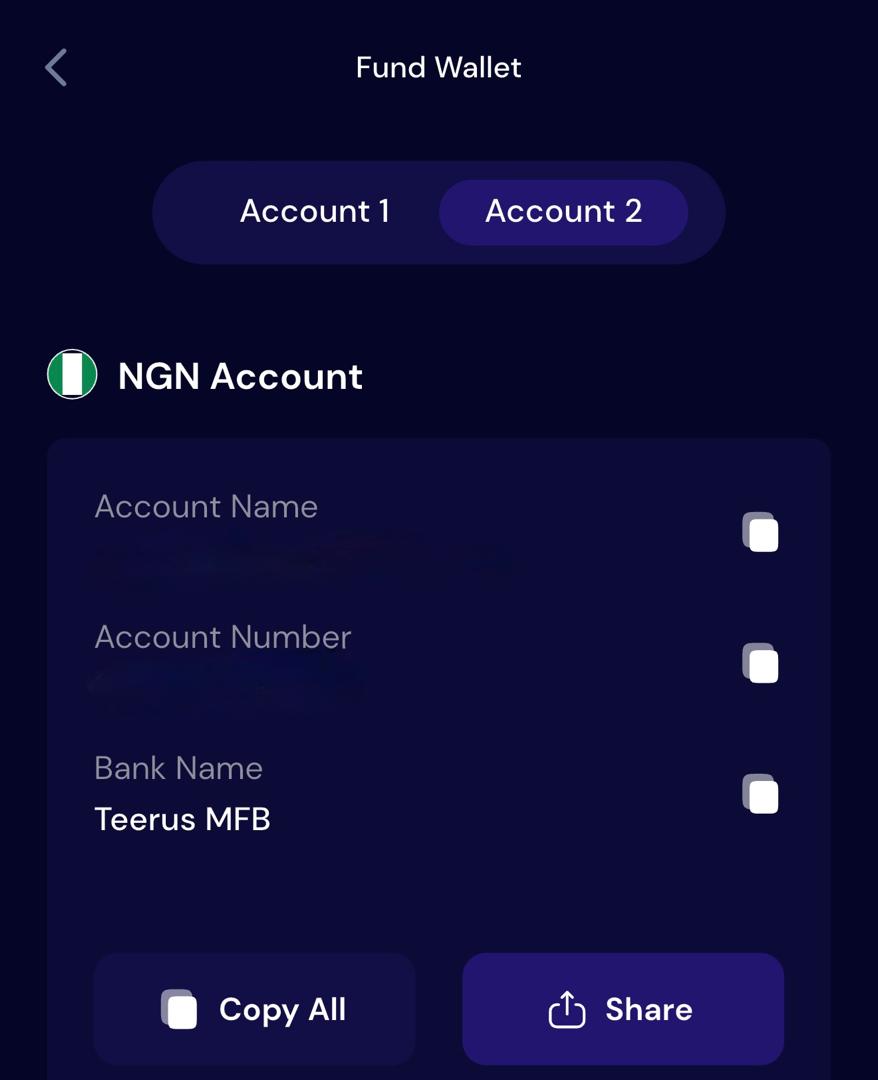
See the full breakdown of how to fund with both naira and stablecoins here.
Step 3. Open the Virtual Cards Section
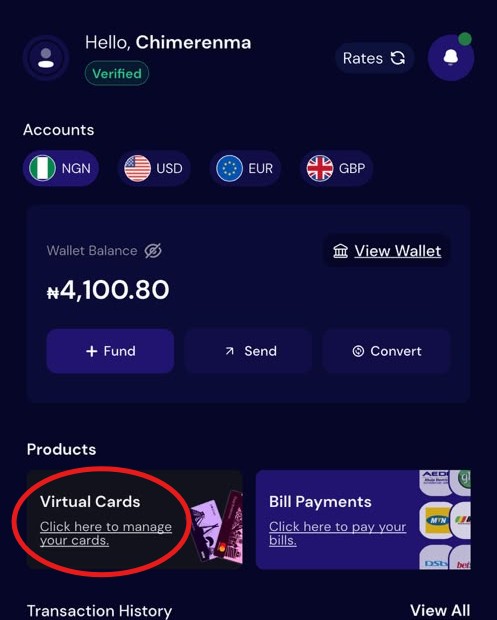
From the Pouchers homepage, tap Virtual Cards or select Cards at the bottom of the app. You should see the available options.
Step 4. Choose Your Card Type and Network
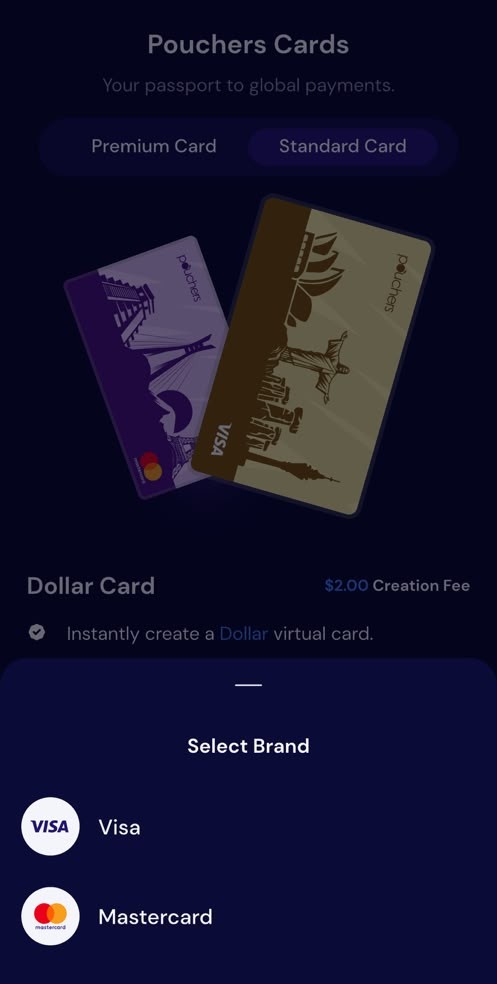
Select either the Standard or Premium Card, depending on the features you need. Then choose your preferred card network, Visa or Mastercard, when prompted.
Step 5. Enter Your Address Details
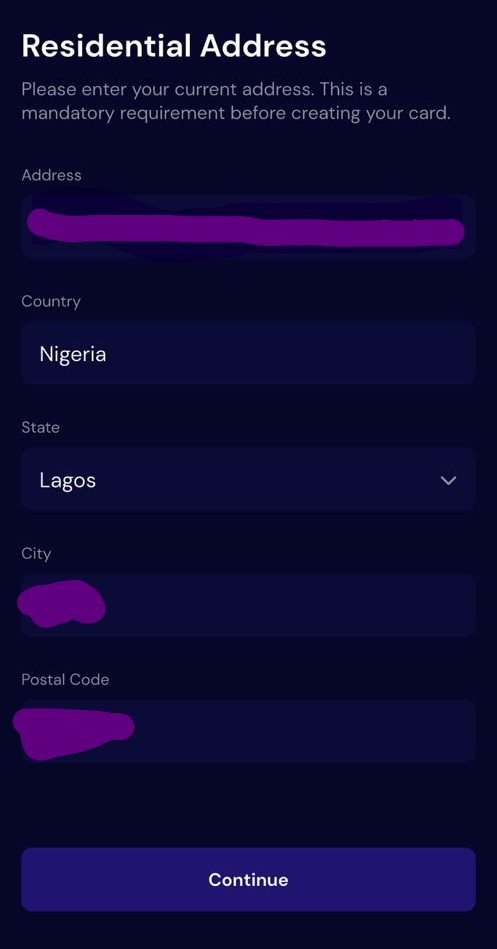
Fill in your residential address and any other information requested on the screen, then tap Continue to proceed.
Step 6. Review the Fee and Fund Your Card
Follow the prompts to confirm the card creation fee and enter the amount you want to fund the card with. Review the details and accept the terms before proceeding to create your card.
Frequently Asked Questions
1. Why is my virtual dollar card declined even with funds on the card?
Your card may be declined because of spending limits, incorrect billing details, merchant restrictions, or security checks. To identify and fix the problem, just follow the troubleshooting steps outlined in this article.
2. Why does my card work on some websites but not others?
Different websites have different payment policies and restrictions on virtual cards. A website may reject your card because it doesn’t accept prepaid cards or requires an authentication feature your card doesn’t support. Check the website’s accepted payment methods or contact its support team to find out why the payment failed.
3. Will I be charged a fee if my virtual dollar card is declined?
Whether you’re charged a fee depends on your card provider. Some providers charge fees for declined transactions, while others don’t, so check your provider’s fee schedule to confirm.
4. What happens if money is deducted but my payment fails?
If money is deducted but your payment fails, check your transaction history to see if the payment is still pending or has been completed. The money may be refunded automatically, but if it doesn’t return after a while, contact your card provider for help.
Set Up Your Virtual Dollar Card with Pouchers
Using the Pouchers Virtual Dollar Card gives you another option for making international payments, with instant card funding, security features, and customer support when you need help with payment issues. You can create and manage your card from your phone and use it for eligible international subscriptions, online services, and other purchases. Set up your Pouchers Virtual Dollar Card today and make your online payments with ease.
Sources Used:
- Why Was My Card Declined? Common Causes and Fixes – Pouchers Help Center
- Card Fees and Limits for Your Pouchers Cards – Pouchers Help Center
- How to Create a Standard Virtual Dollar Card on Pouchers – Pouchers Help Center
- How to Fund Your Card with Your USD Account – Pouchers Help Center