








It can be frustrating when you want to renew your Netflix subscription, but your payment keeps getting declined despite using the same regular debit card that works perfectly for other everyday transactions. Fortunately, there are seamless methods for users to pay for Netflix in Nigeria, and the right option depends on the payment method available to you and whether it is accepted for the transaction.
In this guide, we’ll show you how to pay for Netflix in Nigeria, the different payment methods you can use, how much a Netflix subscription costs, and what to do instantly if your payment is declined.
How Much Is a Netflix Subscription in Nigeria?
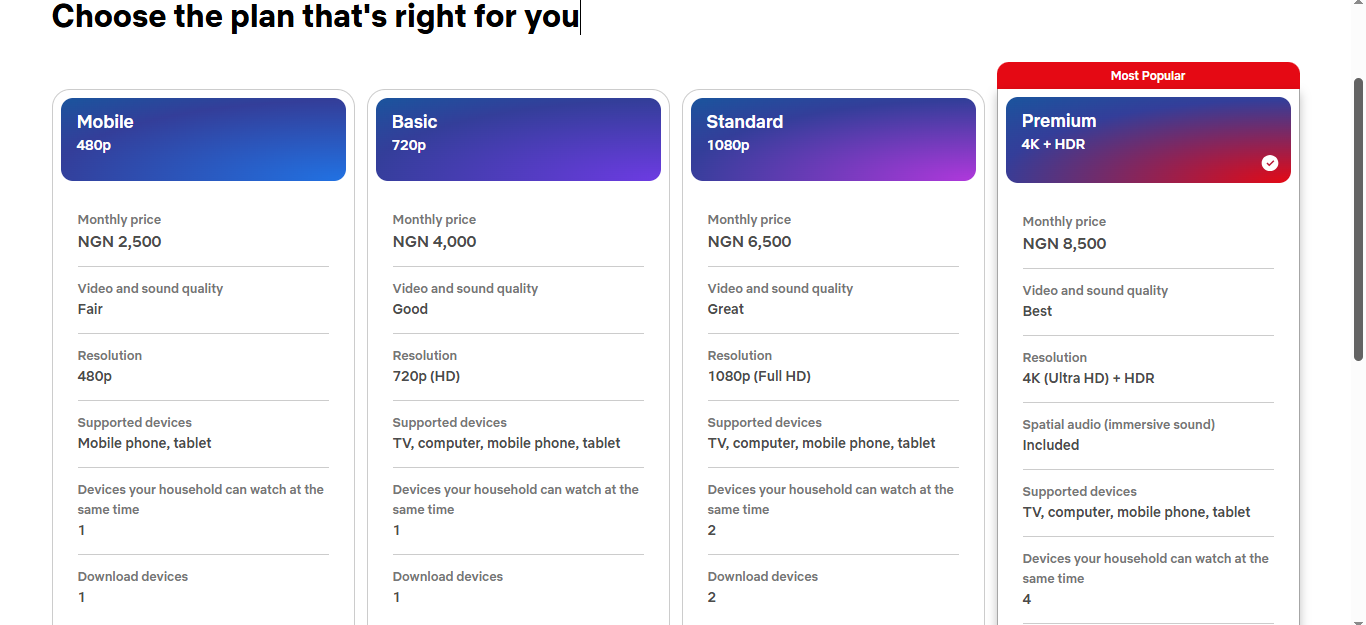
| Netflix Plan | Monthly Price | Video Quality | Supported Devices | Simultaneous Household Devices | Download Devices |
| Mobile | ₦2,500/month | 480p | Mobile phone, tablet | 1 | 1 |
| Basic | ₦4,000/month | 720p (HD) | TV, computer, mobile phone, tablet | 1 | 1 |
| Standard | ₦6,500/month | 1080p (Full HD) | TV, computer, mobile phone, tablet | 2 | 2 |
| Premium | ₦8,500/month | 4K (Ultra HD) + HDR | TV, computer, mobile phone, tablet | 4 | 6 |
Netflix currently has four subscription plans available in Nigeria, with monthly prices ranging from ₦2,500 to ₦8,500. The plans differ mainly in video quality, supported devices, and the number of devices that can stream or download content at the same time.
1. The Mobile Plan
This costs ₦2,500 per month. It offers 480p video quality and is designed for watching Netflix on a mobile phone or tablet. You can stream on one device at a time and download content on one device, making it a suitable option if you mainly watch Netflix on your phone.
2. The Basic Plan
It costs ₦4,000 per month and offers 720p HD quality. Unlike the Mobile plan, it supports TVs, computers, mobile phones, and tablets. You can watch on one household device at a time and download content on one device.
3. The Standard Plan
Netflix’s Standard Plan is ₦6,500 per month and comes with 1080p Full HD quality. It supports TVs, computers, mobile phones, and tablets, while allowing up to two household devices to watch at the same time. You can also download content on two devices.
4. The Premium Plan
Premium plan costs ₦8,500 per month and offers Netflix’s highest listed video quality in Nigeria: 4K Ultra HD with HDR. It supports TVs, computers, mobile phones, and tablets, allows up to four household devices to watch simultaneously, and supports downloads on up to six devices.
5 Smart Ways to Save on Netflix in Nigeria
1. Choose the Right Netflix Plan
Consider how you actually watch Netflix and select the plan that provides the features you need. If you mainly watch on your phone or don’t need the highest video quality, a lower-priced plan may be enough.
Upgrading only when you need additional features, such as higher video quality and additional supported devices, can help keep your monthly entertainment costs low.
2. Split the Cost With Your Household
If your preferred Netflix subscription plan allows multiple users to watch, sharing the cost with members of your household can reduce how much each person contributes.
However, make sure your arrangement follows Netflix’s current household and account-sharing rules.
3. Avoid Unnecessary Payment Fees
Depending on your payment method, certain transaction fees can increase the total amount you will pay for your subscription.
If you use a payment method designed for international transactions, you will be able to understand and manage the costs associated with Netflix.
4. Keep Your Payment Method Funded
A failed Netflix subscription renewal can interrupt your subscription. Keeping enough funds available before your billing date helps you avoid unnecessary payment problems.
5. Use One Virtual Dollar Card for Multiple Subscriptions
Instead of managing separate payment methods for each international subscription, you can use one virtual dollar card to pay for services like Netflix, Spotify, and other recurring subscriptions. This makes your payments easier to manage in one platform.
Different Ways to Pay for Netflix in Nigeria
| Payment Method | Key Benefit | Potential Limitation |
| Nigerian Debit Card | Simple and convenient if your card is accepted. | The payment may be declined if your card issuer doesn’t approve the transaction or the card doesn’t support the required payment type. |
| Virtual Dollar Card | Provides a convenient alternative to a Naira card and can help you manage recurring international payments. | You need to fund the card before Netflix can process the payment. |
| Netflix Gift Card | Allows you to pay without directly linking a bank card to your Netflix account. | Gift cards can have country or currency restrictions, and they may be less convenient for recurring monthly payments. |
| Third-Party Payment Service | Useful if you don’t have a suitable dollar card. | Service fees and payment terms vary, so you need to check the provider’s charges before paying. |
1. Pay With a Nigerian Debit Card
This is the card you already use for ATM withdrawals and POS payments. For Netflix to accept it, the card must be MasterCard or Visa and have international transactions enabled. Verve cards won’t work because they’re limited to domestic use. Even then, payments can still be declined if your bank blocks recurring international charges or if you’ve hit your card’s international spending limit.
2. Pay With a Virtual Dollar Card
A virtual dollar card is one of the easiest ways to pay for Netflix in Nigeria without relying on your local Naira debit card. Instead of dealing with recurring international payment failures, you can use a virtual dollar card, like Pouchers virtual dollar card, which is designed for online international transactions. This makes it the best option for paying for your Netflix subscription and keeping your entertainment uninterrupted.
3. Pay With a Netflix Gift Card
A Netflix gift card is simply a prepaid code you buy and redeem to add credit to your Netflix account. Instead of charging your bank card every month, Netflix deducts your subscription fee from that Netflix gift card credit until it runs out.
Gift cards can be useful if you don’t want to connect a bank card to your Netflix account, but they can be less convenient than having a reusable payment method for recurring monthly subscriptions.
4. Pay Through a Third-Party Payment Service
Some services can also facilitate Netflix subscription payments. This method works by paying a third-party service, such as a payment agent or digital subscription platform, to subscribe to your Netflix account.
This can be convenient if you don’t have a dollar card. Make sure you check their service fee and payment terms before using them.
Why Is It Better to Use a Virtual Dollar Card to Pay for Netflix in Nigeria?
1. No Declined International Payments.
One of the biggest advantages is having an alternative when your regular bank card is declined. Nigerian banks have different policies and limits around international transactions. So, a naira card that works for everyday local payments may not always work for an international subscription. As long as you have sufficient funds in your dollar wallet, your virtual dollar won’t decline during international transactions.
2. Make International Subscription Payments More Convenient
Netflix isn’t the only service Nigerians may need to pay for internationally. You may also have subscriptions for Spotify, Canva, ChatGPT, Adobe, or other digital services.
A virtual dollar card gives you a dedicated payment method for these types of transactions.
3. Pay for Netflix Without Searching for a New Payment Method Every Month
Once your virtual dollar card is successfully added to Netflix, you can keep it as your payment method for future billing cycles.
This makes it more convenient than repeatedly looking for gift cards or relying on someone else to make the payment for you.
How to Pay for Netflix With a Pouchers Virtual Dollar Card: Step-by-Step
Step 1: Create a Pouchers Account
Download the Pouchers app and start by creating your Pouchers account. Complete the required account setup. Once your account is ready, you can access all the features available in the app.
Step 2: Create Your Pouchers Virtual Dollar Card
From your Pouchers account, create your Virtual Dollar Card. Once it is available, you will have the card details needed to make online payments, including the card number, expiry date, and CVV.
Step 3: Fund Your Virtual Dollar Card
Add enough funds to cover your Netflix subscription. Make sure you know the subscription price so that the available balance is sufficient when Netflix attempts to process the payment.
This is particularly important because Netflix subscriptions are recurring. Netflix users are charged monthly, so you need to maintain enough funds for subsequent payments.
Step 4: Go to Netflix and Choose Your Plan
Visit Netflix and sign in to your account, or create a new account if you are subscribing for the first time.
If you’re creating a new account, Netflix’s sign-up process involves choosing a plan, creating your account, and entering a payment method.
Choose the Netflix plan you want and continue to the payment section.
Step 5: Enter Your Pouchers Card Details
When Netflix asks for your payment information, enter the details of your Pouchers Virtual Dollar Card:
- Card number
- Expiry date
- CVV
- Any other billing information requested by Netflix
Make sure you double-check the details before submitting your payment.
Step 6: Complete Your Netflix Payment
Submit the payment and wait for Netflix to process the transaction. If the payment is approved, your Netflix membership will become active, and you can start streaming.
If you’re adding the card to an existing Netflix account, you can manage or update your payment method from the Manage payment info section of your Netflix account.
Step 7: Keep Your Card Funded for Future Renewals
Netflix is a recurring subscription, so paying once isn’t the end of the process. Keep enough funds available on your Pouchers card before your next billing date to avoid an unsuccessful renewal.
Why Is My Netflix Payment Being Declined, and What to Do?
1. You Have Insufficient Funds
Netflix may decline the payment if your card doesn’t have enough available funds to cover your subscription. Check your balance and make sure there is enough money available for the full charge.
2. Your Card Details Are Incorrect or Outdated
Entering an incorrect card number, expiry date, or CVV can cause your payment to fail. Also, an expired card or one that has been replaced by your bank can prevent Netflix from processing your subscription.
Go to your Netflix payment settings and check that your card information is accurate and up to date.
3. Your Bank Declined the Transaction
Sometimes, Netflix isn’t the source of the problem. Your bank or card issuer may decline the transaction because of its security controls or restrictions on certain online, international, or recurring payments.
If your card details and balance are fine but the payment still fails, contact your bank to find out whether it is blocking the transaction.
4. Your Card Isn’t Supported for the Payment
Netflix may also decline a card if it isn’t supported for the type of transaction. Netflix recommends using another supported payment method if your card isn’t accepted.
This is one reason having an alternative payment method, like a virtual dollar card, can be useful when paying for international subscriptions from Nigeria.
How to Fix a Declined Netflix Payment
If your Netflix payment fails, work through these steps:
- Check your card balance and ensure you have enough funds available.
- Verify your card details, including the card number, expiry date, and CVV.
- Confirm that your card is still active and hasn’t expired or been replaced.
- Contact your bank if you suspect it has declined or blocked the transaction.
- Update your payment information in your Netflix account.
- Try another supported payment method if the problem continues.
Frequently Asked Questions
1. What is the best way to pay for a Netflix subscription in Nigeria?
The best way to pay for Netflix in Nigeria is by using a virtual dollar card, like Pouchers virtual dollar card.
2. Can I pay for Netflix with a virtual dollar card?
Yes, you can pay for Netflix with a virtual dollar card
3. What is the best dollar card in Nigeria that I can use to subscribe to Netflix?
The best dollar card in Nigeria that you can use to subscribe to Netflix is Pouchers Virtual Dollar.
4. Can I use Pouchers to pay for Netflix?
Yes. You can use a Pouchers Virtual Dollar Card to pay for Netflix.
5. Does Netflix offer a yearly subscription?
No. Netflix currently charges for its plans monthly rather than offering a separate annual subscription. Your subscription renews each month based on your billing date, so you can calculate the yearly cost by multiplying the monthly plan price by 12.
6. Can You Pay for Netflix in Nigeria?
Yes, you can pay for Netflix in Nigeria. Netflix offers several payment options, including eligible Nigerian debit cards and other supported payment methods. If your regular card is declined, you can switch to another supported option, such as a virtual dollar card, to complete your subscription
Conclusion
Paying for Netflix in Nigeria doesn’t have to become a struggle every time your subscription is due. A Naira card can work, but a virtual dollar card is the more reliable fix when payments keep failing. Before you subscribe, check the current plan prices, confirm any fees on your payment method, and make sure your funds are ready for renewal.
When you use the right payment method, you will enjoy uninterrupted access to your favourite Netflix shows and movies.
Download the Pouchers app to start paying for Netflix with a virtual dollar card.