








You’ve worked, the client paid, and now your money is sitting right there in your Payoneer balance, visible but still out of reach. Getting it into your Nigerian bank account without losing a chunk of it to fees is the part nobody really explains well.
Here’s the truth most people don’t understand: the withdrawal method you choose determines exactly how much of that fund actually gets to you. Two people could withdraw $1,000 on the same day, use two different methods, and end up with very different amounts, whether they’re converting to Naira or keeping it in dollars.
That difference comes down to the fees and exchange rates built into the option they chose.
This guide breaks down every way to move your money from Payoneer to Nigeria, what each route actually costs, and how to pick the right one.
3 Ways to Withdraw from Payoneer in Nigeria
There are three main ways to withdraw funds from your Payoneer balance in Nigeria. The right choice depends on the currency you want to receive: Naira (NGN) or USD. You can transfer money directly to a local Nigerian bank account in Naira, send it to a domiciliary account, or transfer it to an external USD account you control. Each option carries different fees, exchange rates, and processing times.
Each option carries different fees, exchange rates, and processing times.
| Method | Currency you receive | Payoneer fees | How long it takes | Best for |
|---|---|---|---|---|
| Nigerian Naira bank account | NGN (Nigerian Naira) | Up to 2%, built into the exchange rate | 1-3 working days | Anyone who needs Naira now |
| A USD account you control (for example, Pouchers) | USD (United States Dollar) | A percentage fee, but no exchange rate markup. Payoneer publishes 1.2% to 4% for this route | 1-3 working days | Anyone who wants to keep dollars as dollars |
| Nigerian domiciliary account | USD (United States Dollar) | Up to 2%, plus whatever your bank charges | 2-5 working days | People already running a domiciliary account |
1. Withdraw to a Naira Bank Account
Withdrawing directly to a Naira bank account is the most direct option. By linking a local bank account, such as GTBank, Zenith, Access, or UBA, you can request a withdrawal and receive Naira directly in your account within a few business days.
While convenient, Payoneer sets its own currency exchange rate for dollar-to-Naira conversions, which includes a markup over the mid-market rate. This can lower the total amount you receive compared to other withdrawal methods.
2. Withdraw to a USD Account You Own
Instead of letting Payoneer convert your dollars to Naira, you can send them straight to a USD bank account for Nigerians, like a Pouchers USD account. The money arrives in dollars and stays in dollars.
From there, you decide when to convert it, or whether to convert it at all. This matters most once you fund a Pouchers virtual dollar card from that balance, since the card is what actually spends the money. You can use it to pay for services billed in dollars, like Prime Video, Spotify Premium, Canva, ChatGPT Plus, or AWS, without ever converting back to Naira first.
Here’s one thing to know about Payoneer’s cheapest fee. Payoneer charges a flat $1.50 on some withdrawals. But this flat fee only applies when your receiving bank is in the same country as the address on your Payoneer profile. So if your Payoneer profile says Nigeria, and your USD account is based in the United States, the flat fee does not apply to you. You’ll pay a percentage fee instead.
The upside is that this route involves no currency conversion, so there is no exchange rate markup added on top.
3. Withdraw to a Nigerian Domiciliary Account
A domiciliary account is a foreign currency account at a Nigerian bank. Payoneer can send dollars there, but this route is usually slower than the other two, often taking several extra days to clear.
The flat $1.50 fee does not apply here either, but for a different reason than the USD account route. Payoneer only charges that flat fee when the receiving account is in a country where that currency is the official one.
Since Nigeria’s official currency is the Naira, a dollar account at a Nigerian bank doesn’t meet that condition. On top of Payoneer’s own fees, your Nigerian bank may also deduct its own handling charges before the money lands in your account.
That covers all three routes. Of the three, two are the ones most people actually use day to day: the Naira bank account and the USD account you control, so those are the ones we’ll walk through in detail next, starting with the familiar one.
How to Withdraw from Payoneer to a Nigerian Bank Account
This takes about four minutes the first time, and under a minute after that.
Step 1: Link Your Nigerian Bank Account
Log in to your Payoneer account. Go to Manage, then Your Bank Accounts, then Add Bank Account. Enter your bank name, your account number, and your account type.
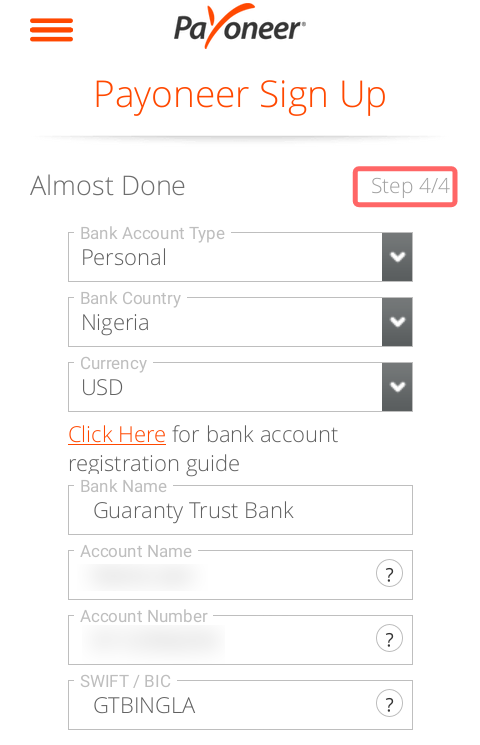
There is one rule you must get right. The name on your bank account has to match the name on your Payoneer account exactly, with no shortcuts or nicknames.
For example, if your Payoneer account says “Chidinma Oluchi Nwosu,” your bank account cannot say “Chidi O. Nwosu.” Payoneer checks this automatically, and a name mismatch is the most common reason a first withdrawal gets stuck.
Step 2: Choose the Balance and Amount
Go to Withdraw, then To Bank Account. Pick the currency balance you want to withdraw from: USD, GBP, or EUR. Then pick your linked Naira account.
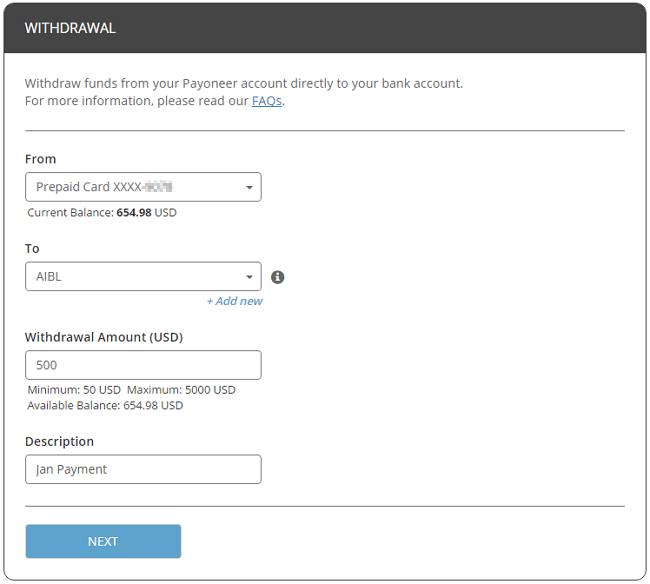
Type in the amount you want to withdraw. Payoneer will show you two things before you confirm: the exchange rate it’s using, and the exact amount in Naira you’ll receive. Check that Naira figure carefully.
Step 3: Confirm and Wait for Settlement
Tap Confirm. Your withdrawal now goes into processing. Most Nigerian withdrawals arrive within one to three working days after that.
Weekends and public holidays don’t count as working days. So if you withdraw on a Friday evening, Payoneer starts counting from the next working day, which is usually Monday. That means your money could land anywhere from Monday to Wednesday, not Friday.
What This Method Costs You
When Payoneer converts your dollars into Naira, it charges you up to 2% for that conversion. But you will not see this 2% listed as a separate fee anywhere. Instead, it’s built into the exchange rate itself. Payoneer simply offers you a slightly worse rate than the real market rate, which is why this cost feels invisible, even though you’re paying it.
Here’s what that looks like in real money. On a $1,000 withdrawal, that hidden 2% costs you roughly ₦26,000 before the money even reaches you. On a $3,000 month, it costs you closer to ₦80,000. And this isn’t a one-time cost. You pay it every single month you withdraw this way.
This raises a fair question: what if you never let Payoneer do the converting at all?
How to Withdraw From Payoneer to Your Pouchers USD Account
On this route, Payoneer sends your dollars as dollars, with no conversion along the way. Once the transfer lands in your Pouchers USD account, it is up to you to decide when to convert it, or whether to convert it at all.
Step 1: Open Your USD Account on Pouchers
Download the Pouchers app and sign up for an account. Then open the USD Wallet, switch to the Fiat tab, and tap Activate Wallet.
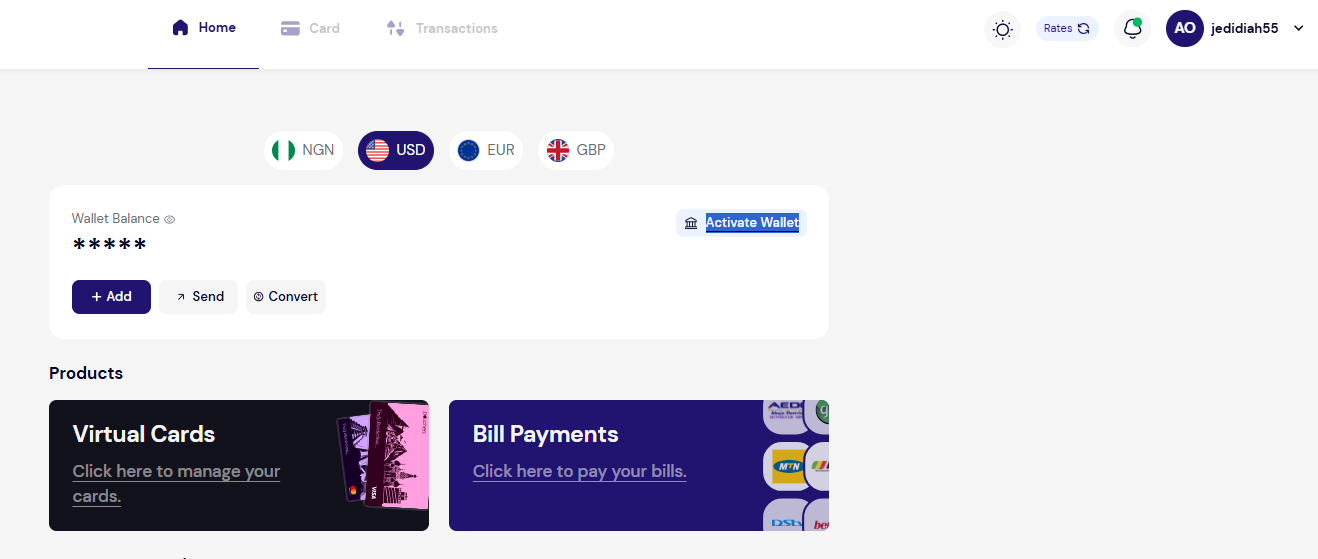
Next, complete verification. This means providing your personal details, a government-issued ID, and a selfie. You do not need to visit a bank branch. You do not need referee forms. And there is no minimum balance required.
Step 2: Copy Your USD Account Details
Once verified, your account shows a full set of US transfer details: account name, account number, routing number, bank name, and bank address, issued in your own name. Copy these into Payoneer in the next step.
Note: This account accepts ACH, FedNow, and wire transfers, but not SWIFT. If anyone asks for a SWIFT code, give them the account and routing number instead.
Step 3: Add It as a Withdrawal Destination in Payoneer
Go to Payoneer → Manage → Your Bank Accounts → Add Bank Account. Select United States as the country and USD as the currency. Enter your Pouchers account details exactly as they appear in the app.
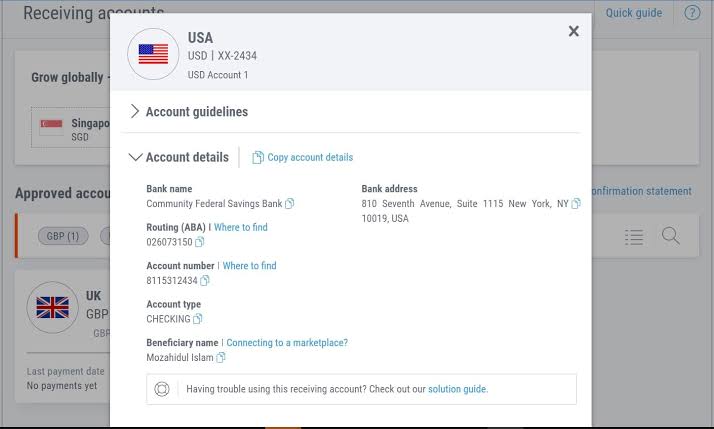
Payoneer will verify the account, which usually takes about a day. After that, your Pouchers USD account will show up as a withdrawal option, right alongside your Naira account.
Step 4: Withdraw, Then Decide What Happens Next
Withdraw as usual, but this time choose your Pouchers USD account as the destination.
Two separate fees apply on this route. First, Payoneer charges its own percentage fee and shows you that exact figure before you confirm, so check it carefully. Second, once the money reaches Pouchers, Pouchers charges 0.7% on the deposit. This fee has a minimum of $2 and a maximum of $10, no matter how large your withdrawal is.
Once your dollars land in your Pouchers account, you have three choices for what to do next:
- Hold them: Keep your earnings in dollars, and convert to Naira only when the exchange rate works in your favour.
- Convert them: Switch your dollars to Naira inside the app, with no conversion fee, then send that Naira to your Nigerian bank account.
- Spend them: Load a Pouchers virtual dollar card in Nigeria and pay directly for things like Netflix, Spotify, or software subscriptions, without ever converting to Naira.
What a $1,000 Withdrawal Actually Costs, Side-by-Side
For this comparison, assume a mid-market rate of ₦1,320 to $1. The mid-market rate is the real exchange rate, the same one you’d see on Google, before any bank or platform adds its own markup. Your actual rate on the day you withdraw may be different. What matters here is not the exact numbers, but the pattern they reveal.
| Naira bank account | Pouchers USD account | Domiciliary account | |
|---|---|---|---|
| Payoneer’s fee | Up to 2%, hidden inside the rate (about $20) | A percentage, published at 1.2% to 4% (about $12 to $40) | Up to 2% (about $20) |
| Exchange rate markup | Yes, Payoneer converts your money | None, no conversion happens | None, no conversion happens |
| Other fees | None | Pouchers deposit fee of 0.7%, capped at $10 (about $7) | Your bank’s landing or correspondent charges, often up to $10 |
| What you end up holding | About ₦1,293,600 | About $953 to $981, in dollars | About $970 to $980, in dollars |
| Who decides your exchange rate | Payoneer, on the day you withdraw | You, whenever you choose to convert | Your bank, at its domiciliary rate |
Comparing these withdrawal routes shows that controlling the currency conversion can significantly affect your payout. With a direct Naira withdrawal, Payoneer converts your money automatically at its specified exchange rate. Holding dollars in an external USD account allows you to choose when and how to convert your funds.
You can convert next week instead of today, convert only part of it, or never convert at all and simply spend the dollars as they are. Pouchers does not charge anything extra for the conversion itself, whenever you choose to do it. If you receive dollars every month and spend them gradually, this control offers a significant advantage.
But none of this matters if the withdrawal never arrives in the first place. So let’s talk about what can go wrong.
Why Payoneer Withdrawals Fail or Get Delayed in Nigeria
Most delayed or failed Payoneer withdrawals stem from a few common issues, most of which are easy to resolve prior to submitting a request.
- The name does not match: Payoneer compares your bank account name against your Payoneer profile. Initials, middle names, and married names all cause problems. Fix whichever record is wrong, so both read identically.
- Unverified account status: Payoneer requires identity verification for Nigerian users, such as a government-issued ID. Unverified accounts may receive funds but experience withdrawal holds.
- You are below the minimum: Payoneer sets a minimum withdrawal amount, and it varies by account and currency. Your exact minimum appears on the withdrawal screen. Below it, nothing moves.
- Compliance checks are running: Larger amounts, or a first withdrawal to a new destination, can sit in review for a day or two. This is routine, not a problem.
- Incorrect banking details: A typo in your account or routing number can cause transfers to be reversed or delayed for up to a week while funds return to your balance.
- You are withdrawing in small amounts: Percentage fees come with minimum charges, so a small withdrawal costs you proportionally more. Batch your withdrawals, and the fixed part of the cost shrinks against the total.
Clear those six, and withdrawals become reliable, which is exactly what you want.
Which Method Should You Use?
There is no single right answer. The best method depends on how you earn and how you spend.
- Use the Naira bank route if: you need Naira quickly, you withdraw irregularly rather than every month, and you prefer one simple step over a slightly cheaper but longer process.
- Use a USD account you control if: you earn in dollars every month, you want to choose when to convert your money, or you already pay for international subscriptions and tools. This route works well for freelancers, remote workers, and creators with steady dollar income.
- Use a domiciliary account if: you already have one open and you specifically need your dollars to sit inside the traditional banking system. Outside of that specific case, the fees and the wait are hard to justify.
Frequently Asked Questions
1. Is Payoneer legal in Nigeria?
Yes. Payoneer operates in Nigeria. Nigerians can open accounts, receive international payments, and withdraw to local banks. Verification requires a government-issued ID, such as your NIN (National Identification Number) slip, international passport, or driver’s licence.
2. What is the minimum amount I can withdraw from Payoneer?
It depends on your account and the currency you are withdrawing. Payoneer sets your minimum and shows it on the withdrawal screen. Some platforms set their own minimum too. Fiverr, for example, requires $20 for bank transfers through Payoneer. Small withdrawals cost you proportionally more, so batching them is the cheaper habit.
3. Can I withdraw from Payoneer to Kuda, OPay or Moniepoint?
Only if the bank appears in Payoneer’s list and your name matches exactly. Digital banks work for some users and get rejected for others, and a rejection ties up your money for days. For Payoneer specifically, a traditional bank like GTBank, Zenith, Access or UBA is the safer default.
4. Can I set up automatic Payoneer withdrawals?
Yes. Payoneer supports automatic withdrawals on a schedule in most regions. Set it once and your balance moves on its own. Point it at whichever destination costs you least, because automation locks in whatever route you picked.
5. Can I access my Payoneer money without linking a bank account?
You can spend directly with a Payoneer Mastercard, but it is the most expensive option. Cash withdrawals at an ATM (Automated Teller Machine) cost $3.15 per transaction, plus up to 3.5% when currency conversion is involved. Moving dollars into an account you control and spending from a virtual card there costs considerably less.
Conclusion
Withdrawing from Payoneer in Nigeria comes down to one decision: who converts your dollars, and when.
Let Payoneer convert for you, and you pay a hidden cost of up to 2% on every withdrawal. Move your dollars into a USD account in your own name instead, and you control that decision entirely, converting when you choose, or never converting at all.
Your earnings already crossed borders to reach you. The final step shouldn’t cost you more than it has to.
For more detailed step-by-step information and support on managing your funds, visit the Pouchers Help Centre.
Download the Pouchers app to get your USD bank account.
Sources used: