








Deel is a global payments and payroll platform that helps businesses pay contractors and employees in different countries. For Nigerian contractors, the next question is simple but carries weight: once you get paid, how do you get your money out?
This platform offers several withdrawal methods, but they differ in fees, processing times, exchange rates, and where your money ends up.
This guide breaks down how to withdraw from Deel in Nigeria so you can choose the option that fits how you want to receive and use your money.
7 Ways to Withdraw from Deel in Nigeria
| Category | Method | Deel Fee | Processing Time | Best For |
| Regular currency | Bank Transfer | $0 | Minutes | Direct bank withdrawal |
| Regular currency | Wise Wallet | $0 | Minutes | Receiving and managing foreign currency |
| Regular currency | Revolut | $0 | Minutes | Receiving and managing foreign currency |
| Regular currency | Payoneer | 1% | Minutes | Contractors already using Payoneer |
| Regular currency | PayPal | 2.5% | Minutes | Contractors already using PayPal |
| Regular currency | SWIFT Transfer | 5–50 | Up to 3 business days | International bank transfers |
| Crypto | Stablecoin Transfer | 2% + $1 network fee | Instant | Fast crypto settlement |
| Crypto | Coinbase | 1.5% | Dynamic ETA (Estimated Time of Arrival | Contractors comfortable with crypto |
Deel’s withdrawal methods depend on the currency you choose. Under Regular Currencies, you can select the currency you want to withdraw and see the methods available for your account. For foreign currencies such as USD, these may include Wise, Revolut, Payoneer, PayPal, or SWIFT, depending on your account and currency.
Deel also has a separate Cryptocurrencies section for withdrawals through methods such as Stablecoin Transfer and Coinbase. Fees, minimums, and processing times vary depending on the method you choose.
1. Bank Transfer
Bank Transfer lets you withdraw your Deel earnings directly to a bank account. This method depends on the withdrawal currency you select. When you choose NGN, Deel shows Local Bank Transfer, which lets you send your money directly to a Nigerian bank account for a $0 Deel withdrawal fee and a $10 minimum withdrawal.
On the other hand, when you choose USD or another supported foreign currency, Deel shows international withdrawal methods such as SWIFT Transfer, which lets you send the funds to an eligible bank account in another country through the SWIFT network.
SWIFT withdrawals have a $100 minimum, and Deel shows the applicable fee and processing time before you confirm the withdrawal.
2. Stablecoin
Stablecoin withdrawal is one of the fastest ways to get your money out of Deel. You can withdraw your earnings as USDT or USDC directly to a compatible wallet without needing expert crypto knowledge. Deel charges a 2% service fee plus a $1 network fee, with a $5 minimum, and withdrawals can settle within minutes.
Deel supports several networks, including Ethereum, Tron, BNB Smart Chain, Polygon, Base, and Solana, depending on the stablecoin. Pouchers also support USDT and USDC across multiple networks, where you can receive the stablecoins, convert them to USD, and then to Naira when you need it.
3. Payoneer
Payoneer gives you a separate balance for receiving your Deel earnings before you move the money to your Nigerian bank account. You need an eligible Payoneer account that can receive the payment. Deel charges 1% per withdrawal, with a $12 minimum fee, and the minimum withdrawal amount is $50.
Deel generally processes the withdrawal within 1–3 business days. Once the money reaches Payoneer, you still need to withdraw it to your Nigerian bank account, with Payoneer’s own withdrawal fees and exchange rate applying at that stage.
4. PayPal
Deel lets you move your earnings into your PayPal account instead of directly to a bank account. You need a PayPal account that can receive the payment and a reliable way to withdraw or use the balance afterward.
Deel charges 2.5%, with a $0.25 minimum fee. For Nigerian contractors, check that your PayPal account supports the receiving and withdrawal features you need before choosing this method.
5. Coinbase
If you already have a Coinbase account or are comfortable trading cryptocurrency, you can withdraw supported crypto from Deel directly to Coinbase. Deel charges 1.5% for BTC, ETH, SOL, and DASH, while USDC costs $5 below $300 and 1.6% above $300. The minimum withdrawal is $10, except SOL, which has a $20 minimum.
Once the crypto reaches Coinbase, you can sell it through an available cash-out provider. If you receive USDC, you can also transfer it to Pouchers, convert it to Naira, and withdraw the money to your Nigerian bank account.
6. Revolut
Revolut lets you receive your Deel earnings into your Revolut account, with no Deel withdrawal fee. However, Revolut does not currently list Nigeria among the countries where you can open an account, so this option is generally relevant only if you already have an eligible Revolut account from a supported country.
Deel shows the estimated arrival time for your specific withdrawal before you confirm it.
7. Wise Wallet
Wise Wallet lets you withdraw your Deel earnings to Wise and convert the money to Naira before sending it to your Nigerian bank account. Deel charges $0 for Wise withdrawals, while Wise charges its own conversion and transfer fees.
The caveat is that Wise does not currently provide USD account details in every country, including Nigeria, so confirm that your Wise account supports the receiving details required by Deel. Wise supports sending USD to Nigeria, with the recipient receiving Naira in a local bank account.
How to Withdraw Money From Deel via Local Bank Transfer
If you want to receive your Deel earnings directly in Naira, you can use Deel’s Local Bank Account option to send the money to a supported Nigerian bank account. You’ll need to verify your Deel account and provide your Nigerian bank details before you can add the withdrawal method.
Here is how to withdraw from Deel to a bank account:
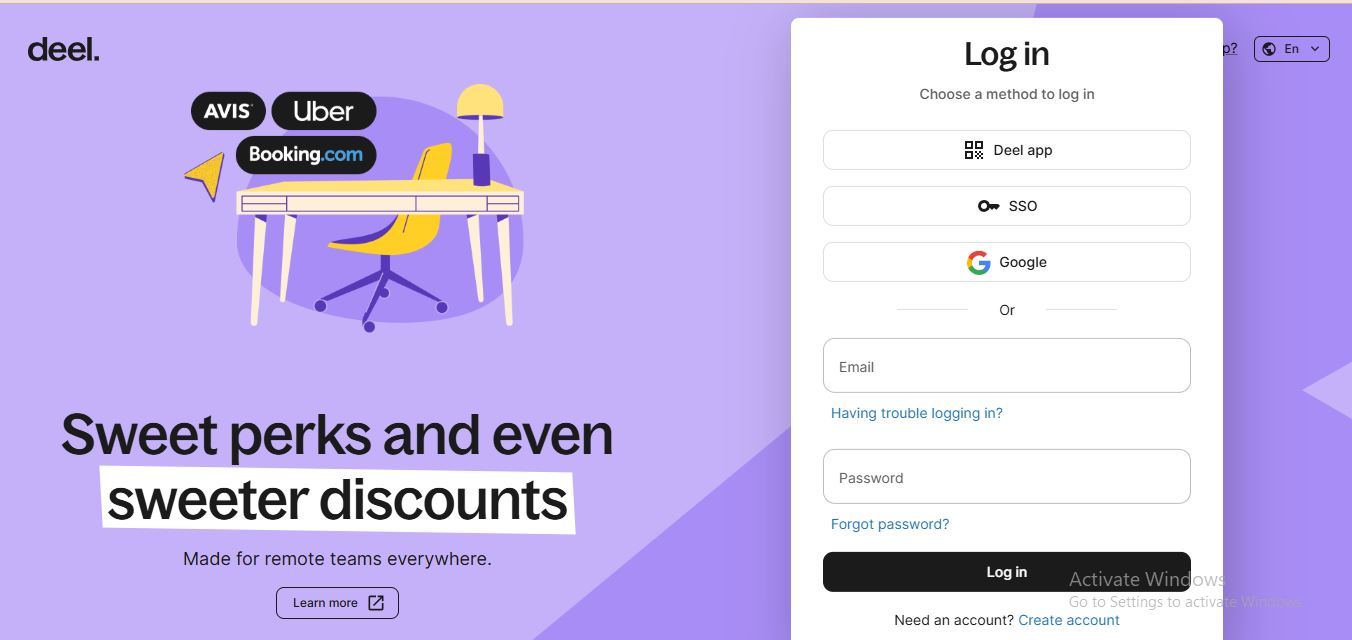
Step 1: Log in to Deel and verify your account first if you have not yet.
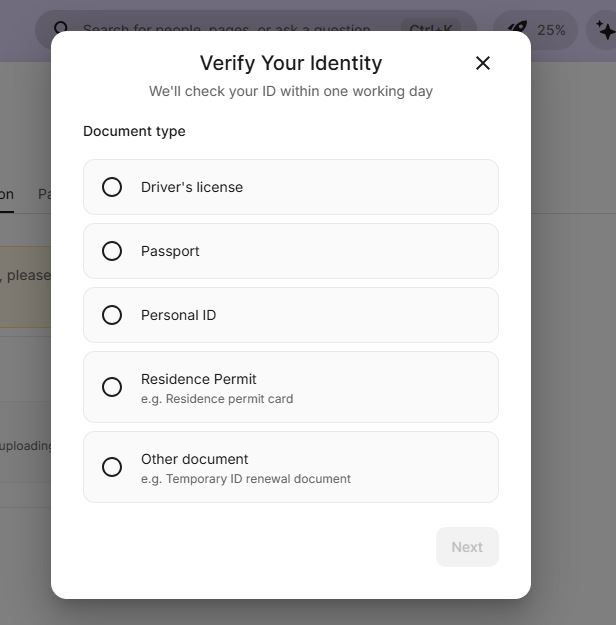
Tap the Verify button and choose the ID you want to use.
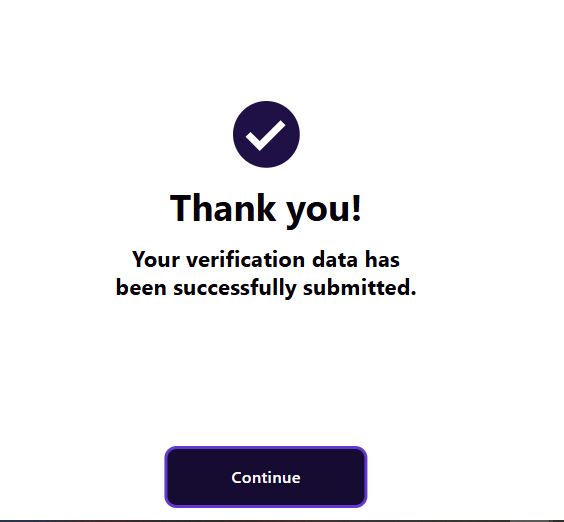
Tap Continue once your account is verified.
Step 2: Go to Withdrawal Methods under Finances and add a withdrawal method.
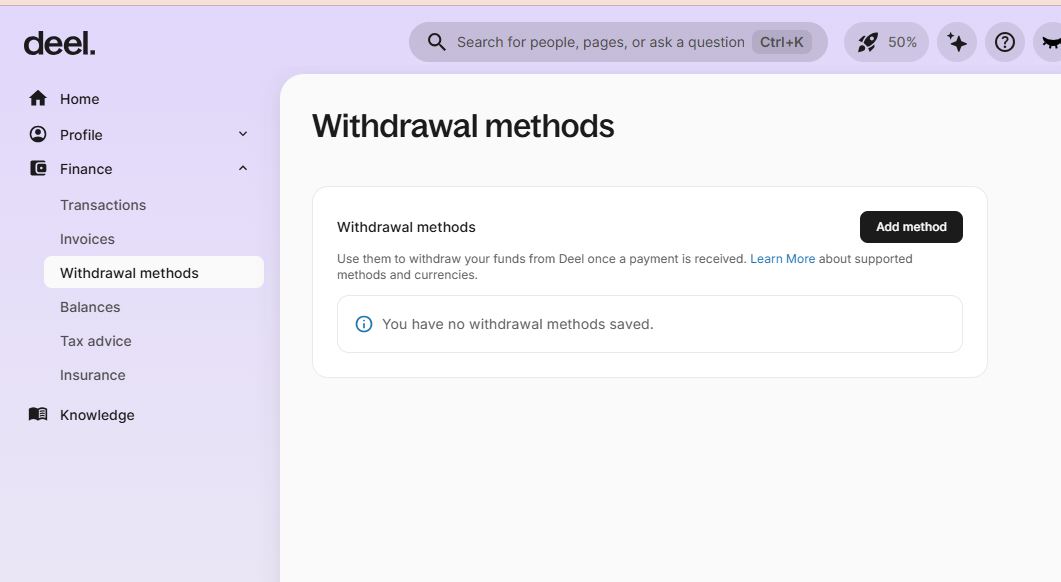
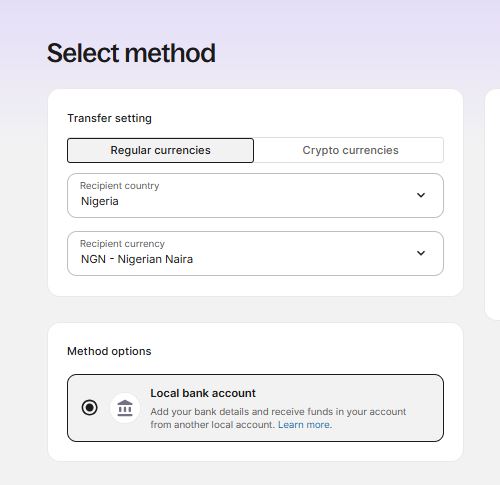
Under Regular Currencies, choose Nigeria as the country, select NGN as the currency, and choose Local Bank Account as the payment method.
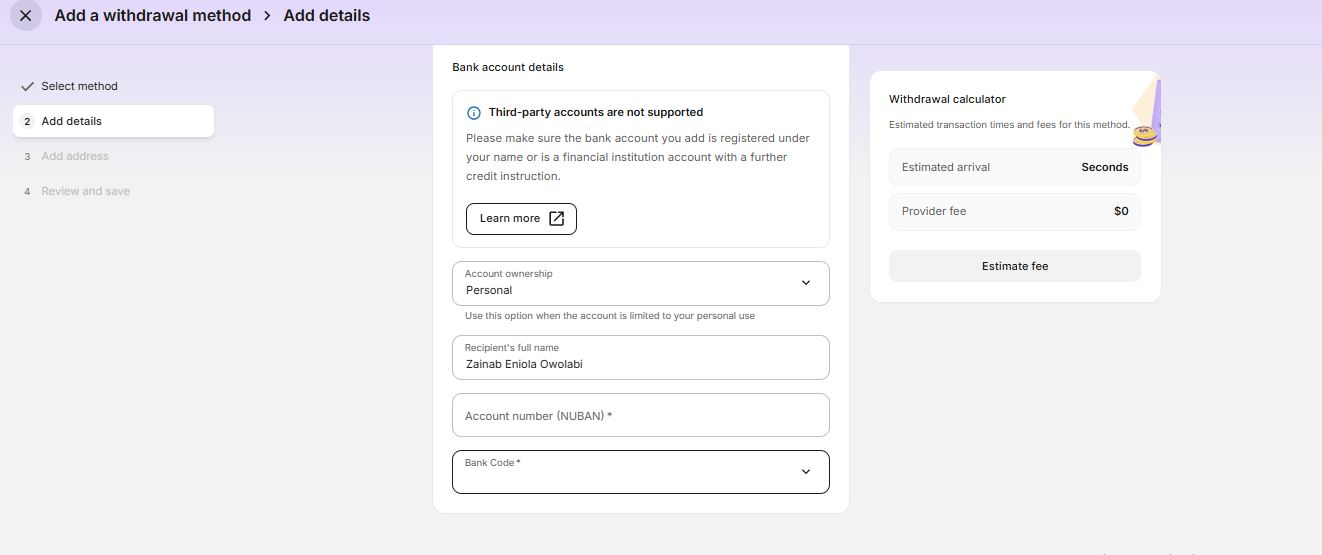
Step 3: Select Local Bank Account and add your bank details, including your account number and bank name. Deel supports a select number of Nigerian banks.
Step 4: Add your address details.
Step 5: Review your details and tap Save.
Step 6: Deel will ask you to set up automatic withdrawals. Once your earnings are available, the selected amount will be transferred to your Nigerian bank account.
Note: If your Deel contract is in a currency other than NGN, withdrawing to a Nigerian bank account may involve currency conversion. Deel applies the exchange rate available at the time of withdrawal, and your bank may also charge a conversion fee if the destination account currency differs from the withdrawal currency.
How to Withdraw From Deel via Payoneer
If your bank isn’t supported by Deel, you can receive your money in a USD bank account and later convert it to Naira. This can also be useful if you want to save in dollars or use your USD balance for international payments with a virtual dollar card.
Step 1:Download the Pouchers app and create an account. Activate your Pouchers USD account and get your routing number and account number.
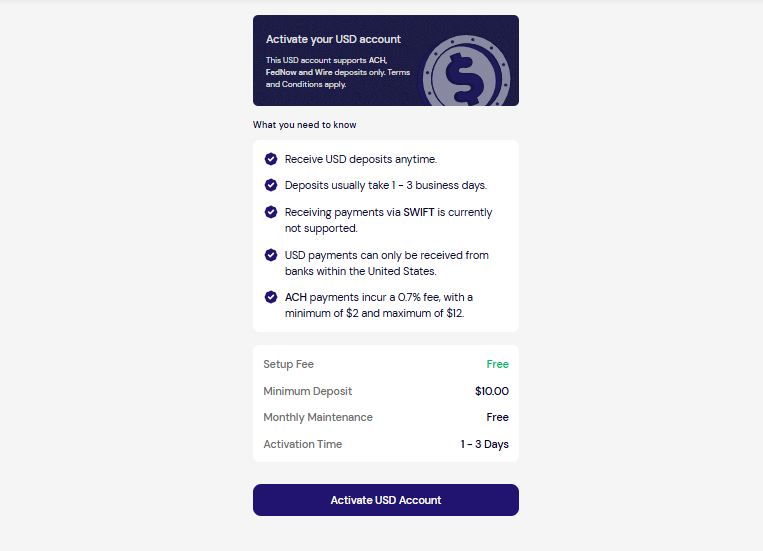
Step 2: Sign up for Payoneer and add your Pouchers USD bank account during setup.
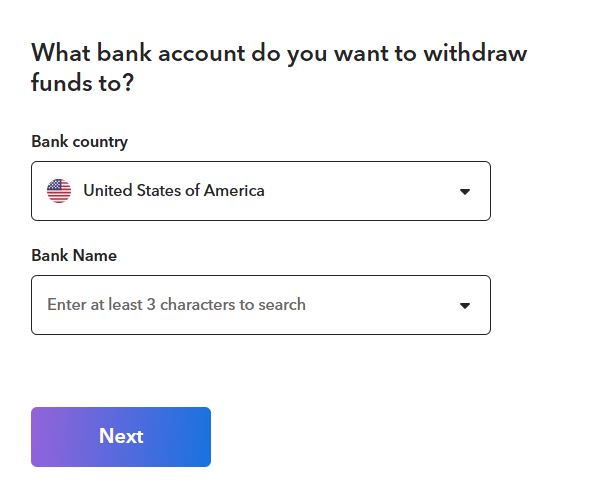
Step 3: Log in to Deel. On the Add Withdrawal Method page, go to Regular Currencies, choose Nigeria as the country, and select USD as the currency. Then choose Payoneer as the payment method and tap Continue.
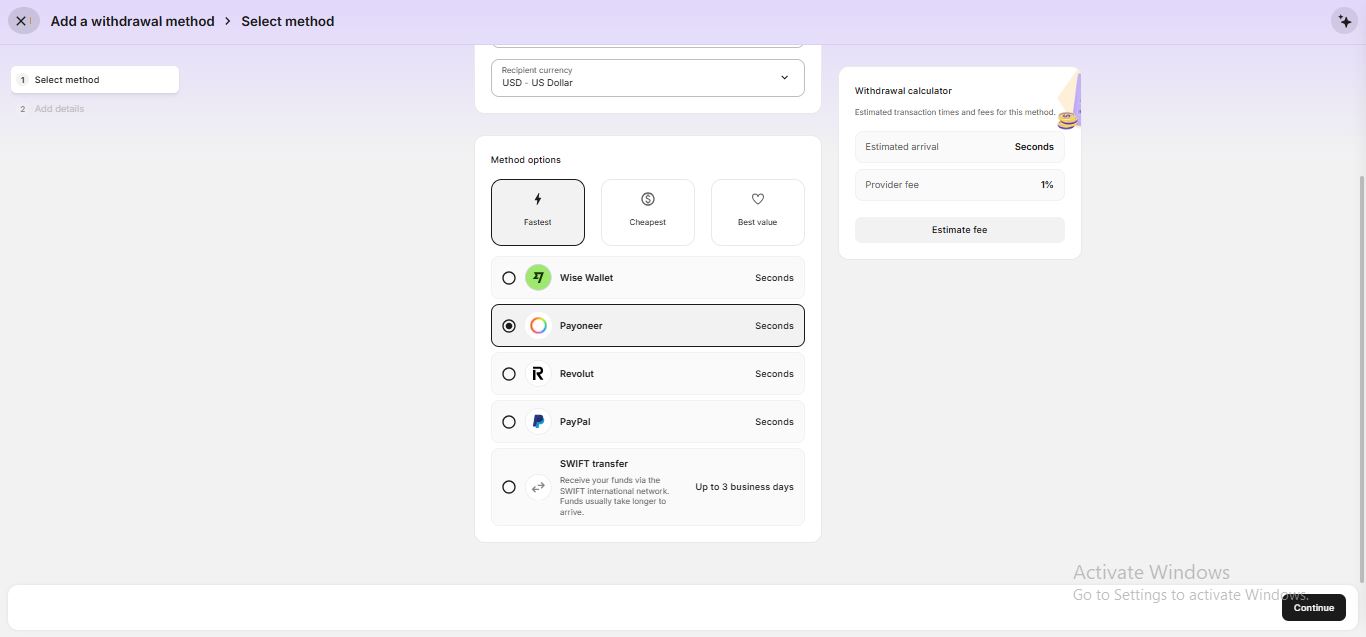
Step 4: Name the account and tap Go to Payoneer. You will be asked to enter a verification code sent to your email before being redirected to the Payoneer tab.
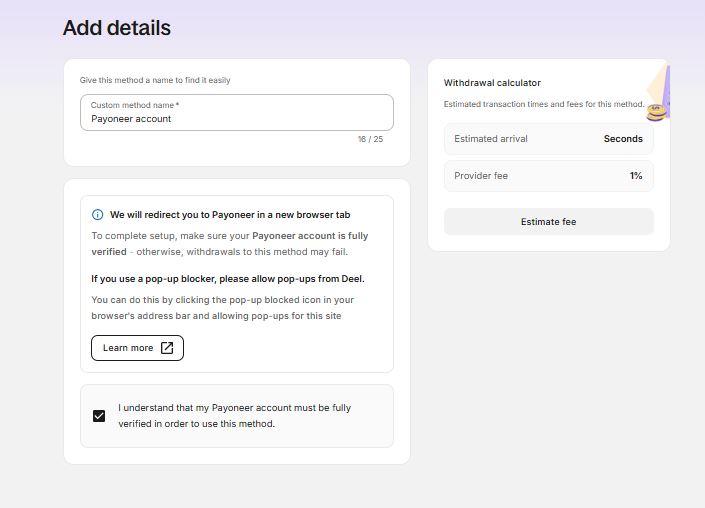
Step 5: Sign up for Payoneer if you don’t already have an account, or connect your existing Payoneer account.
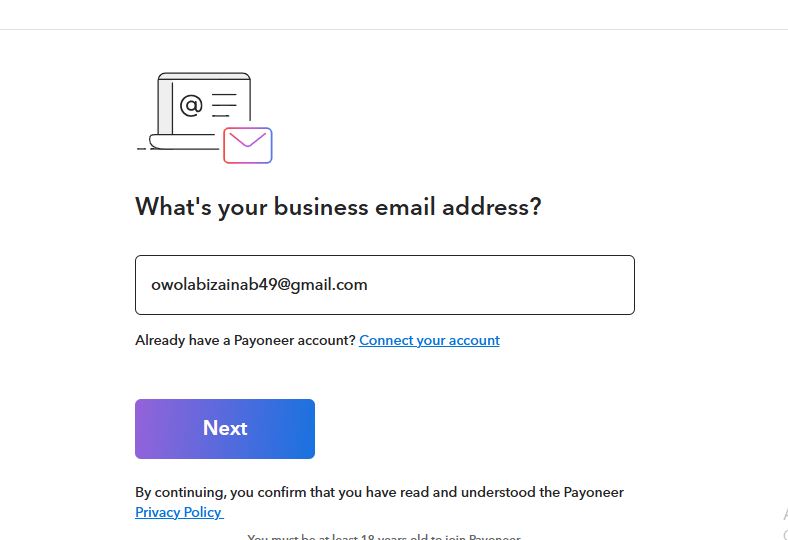
Step 6: You can set up automatic payments and choose how much of your Deel earnings you want to receive. This can be 50% or any other percentage you choose.
Step 7: Once the money reaches your Pouchers USD account, you can convert it to Naira or use the USD balance to fund your Pouchers virtual dollar card for international payments.
How to Withdraw From Deel to Stablecoin Wallet (Pouchers)
If you want to receive your Deel earnings as USDT or USDC, you can send them directly to your Pouchers stablecoin wallet. Here’s how to set it up:
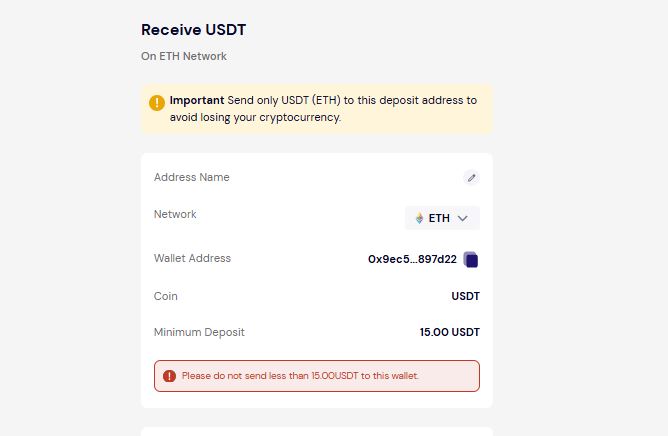
Step 1: Open Pouchers, go to your USD wallet, and generate a stablecoin wallet address.
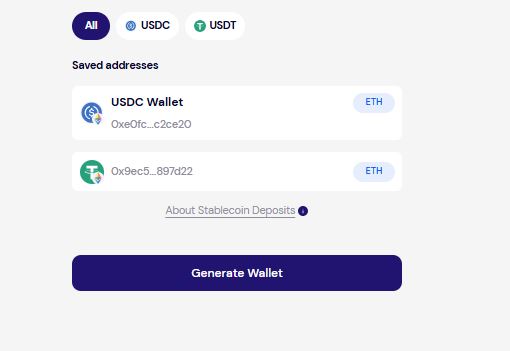
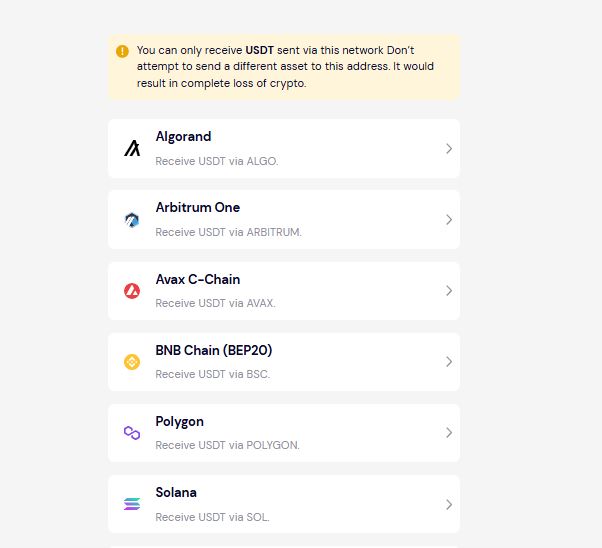
Step 2: Select the stablecoin you want to use, such as USDT or USDC, and choose your network. Make sure the network you select matches the network supported on Deel.
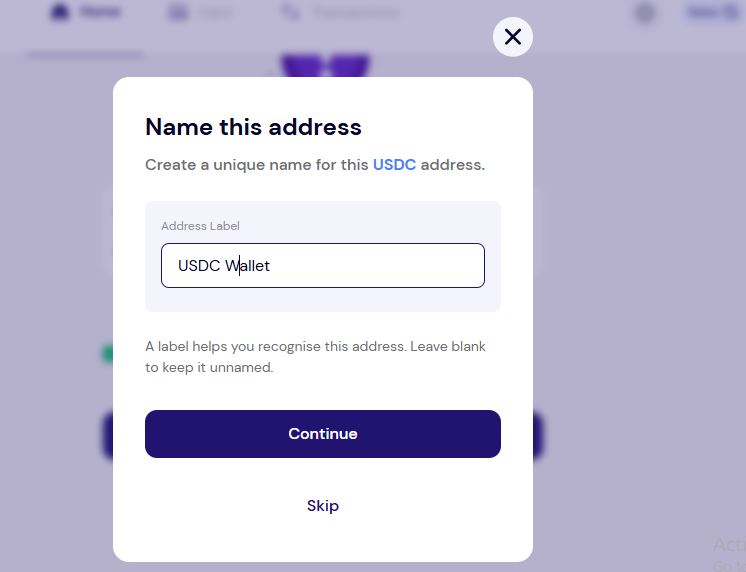
Name the address if you want.
Step 3: Log in to Deel and go to Withdrawal Methods.
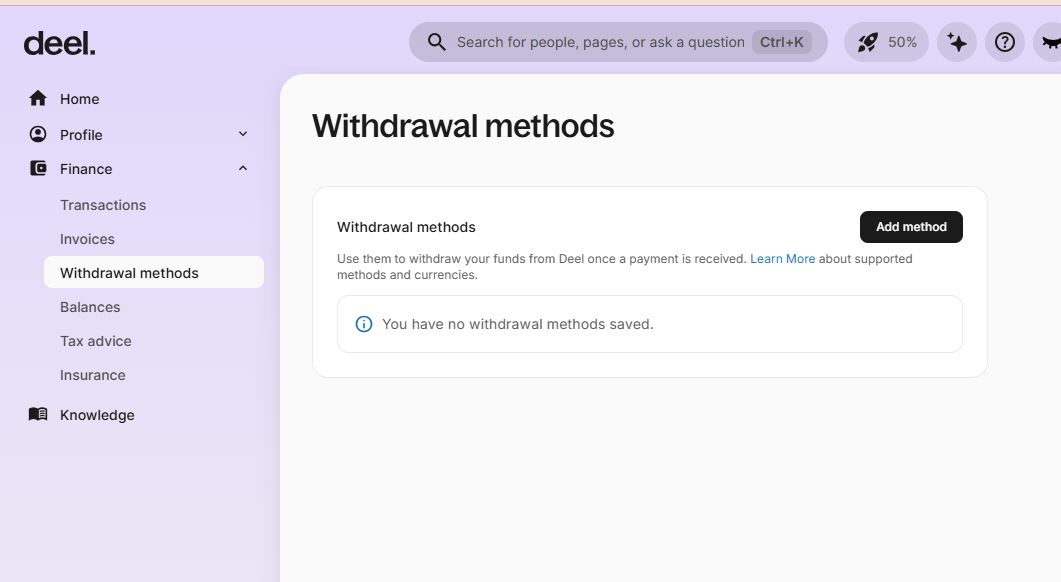
Add your withdrawal method and go to the Cryptocurrencies tab. Tap Continue.
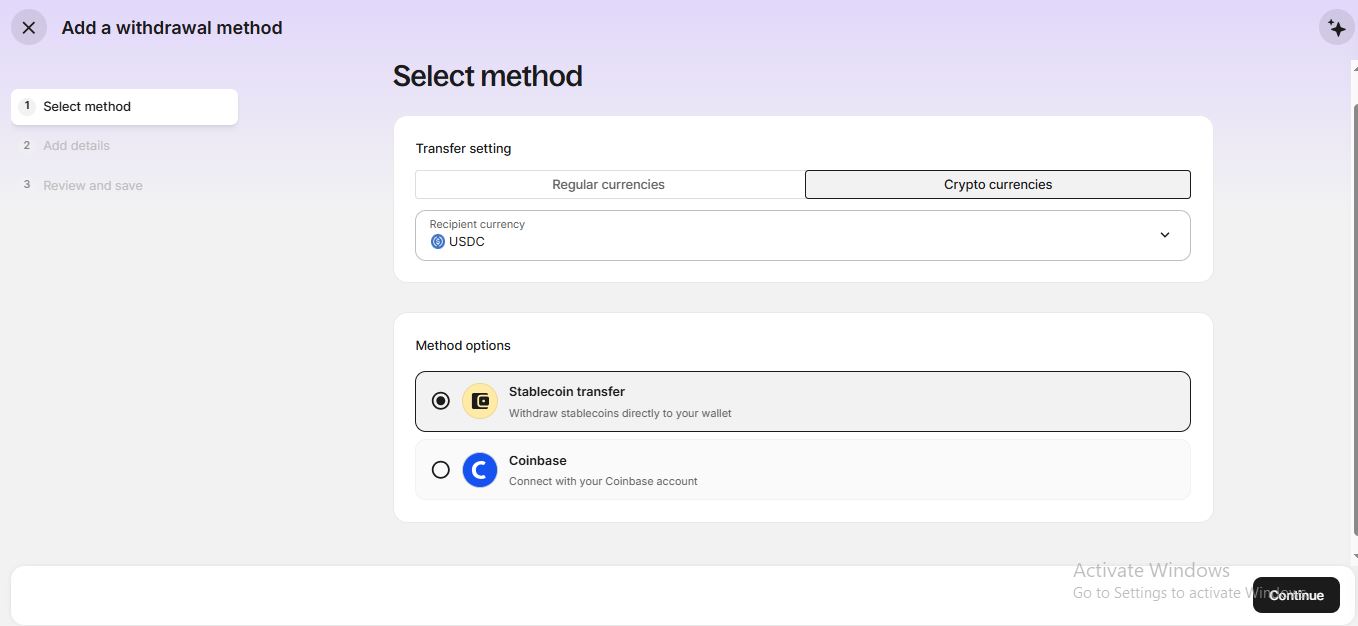
Step 4: Choose Enter details manually.
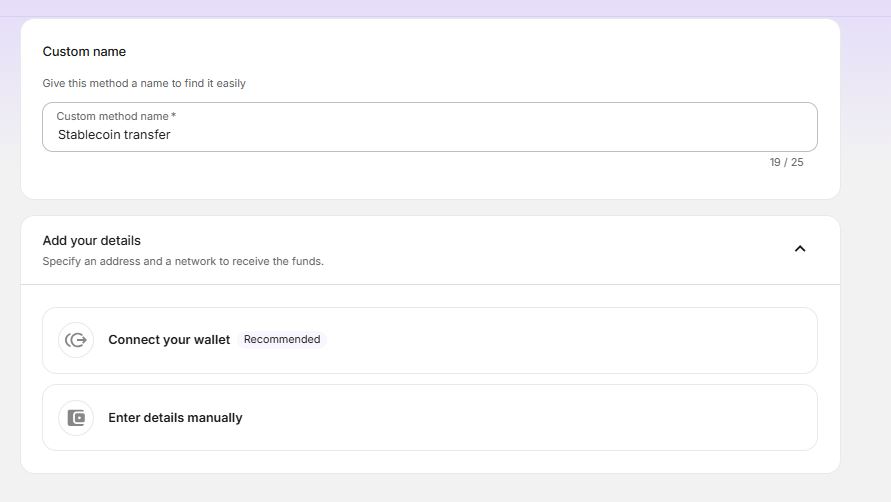
Return to Pouchers to copy and paste the details, including the stablecoin and network, and paste the wallet address you generated from Pouchers. Tap Continue.
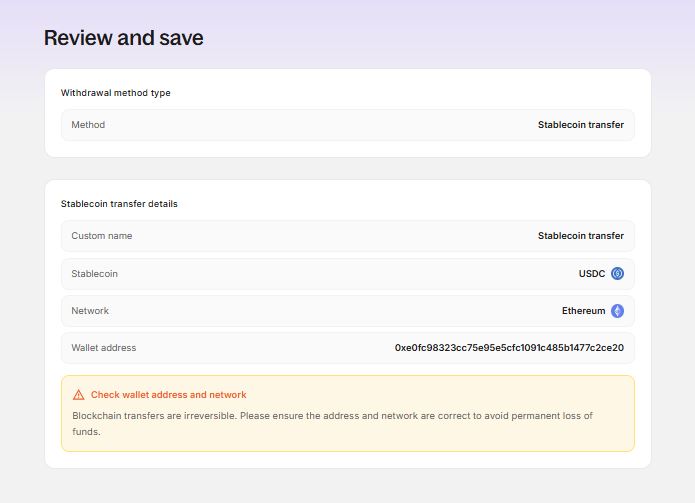
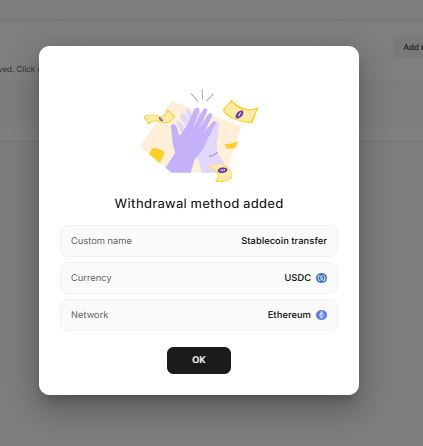
Step 5: Review your details and save the withdrawal method. Enter the verification code sent to your email if prompted.
Step 6: Deel will prompt you to set up automatic withdrawals. Once you get paid on Deel, the payment will be sent to the stablecoin wallet you selected. You can also choose the percentage of your earnings you want to withdraw automatically.
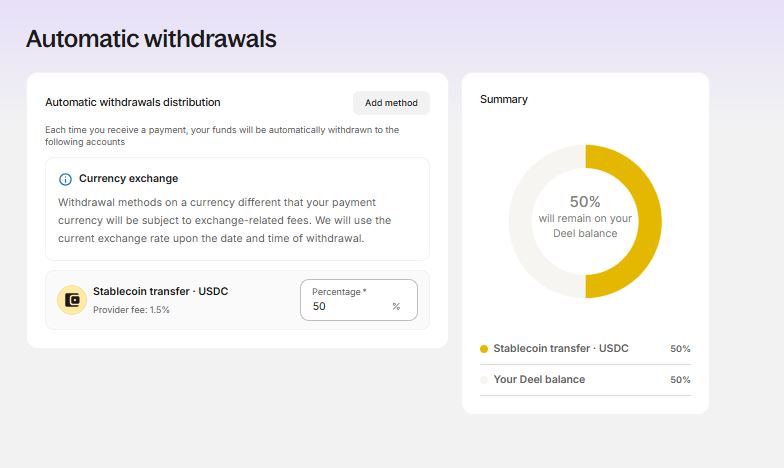
Withdrawal method successful.
Step 7: Once the money is in your Pouchers wallet, tap Convert inside your USD wallet to convert it to Naira. You can then withdraw the Naira to your Nigerian bank account.
Important: Always confirm that the network matches before submitting a transaction. Sending funds through the wrong network can result in permanent loss of funds.
Deel Withdrawal Methods Compared
If you’re withdrawing Deel earnings in Nigeria, you have three main options to consider: Local Bank Transfer, Payoneer + Pouchers USD Account, and Stablecoin Transfer via Pouchers. Each option has different fees, processing times, currencies, and ways to access your money.
| Factor | Local Bank Transfer | Payoneer + Pouchers USD Account | Stablecoin Transfer via Pouchers |
| Withdrawal currency | NGN / local currency | USD | USDT or USDC |
| Where the money goes first | Nigerian bank account | Payoneer, then Pouchers USD account | Pouchers USD wallet |
| Limitation | Few Nigerian banks supported | Extra steps and cost | None, since you can convert it to naira |
| Final destination | Nigerian bank account | Nigerian bank account, Pouchers USD balance, or Pouchers virtual dollar card | Nigerian bank account after conversion, or Pouchers USD balance after conversion |
| Account required | Nigerian bank account | Payoneer account + Pouchers USD account | Pouchers account with a stablecoin wallet |
| Can hold USD | No, if you withdraw directly in NGN | Yes | Yes, after converting the stablecoin to USD in Pouchers |
| Can receive USD | No, if using NGN local bank withdrawal | Yes | No, you receive USDT or USDC |
| Naira withdrawal | Yes, directly to your Nigerian bank account | Yes, after converting USD to Naira | Yes, after converting the stablecoin to Naira |
| Deel withdrawal fee | $0 | 1%, minimum $12 | 2% + $1 network fee |
| Pouchers receiving fee | None | 0.7% for ACH, minimum $2, maximum $10 | Depends on the stablecoin transfer route |
| Pouchers USD-to-Naira conversion fee | Not applicable | No conversion fee | No conversion fee when converting supported currencies |
| Pouchers Naira withdrawal fee | Not applicable | ₦100 | ₦100 |
| Payoneer fees | Not applicable | Payoneer withdrawal fees can vary by route, with some bank withdrawals charged 1.2%–4% | Not applicable |
| Minimum Deel withdrawal | $10 | $50 | $5 |
| Processing time | Minutes | Up to 1 business day to Payoneer | Instant |
| Can use the money in USD | No | Yes | Yes, after converting the stablecoin to USD |
| Virtual dollar card | No | Yes, through Pouchers | Yes, through Pouchers |
| International spending | Not directly from the bank withdrawal | Use the Pouchers USD balance to fund a virtual dollar card | Convert to USD in Pouchers and fund a virtual dollar card |
| Extra account setup | No additional account required | Requires both Payoneer and Pouchers | Requires Pouchers |
| Additional steps | Add your Nigerian bank details and withdraw | Deel → Payoneer → Pouchers → convert to NGN or spend in USD | Deel → Pouchers stablecoin wallet → convert to NGN or USD → withdraw/spend |
| Best suited for | Receiving money directly in Naira | Holding USD and using it for international payments | Fast stablecoin settlement and flexible conversion |
Note: The total cost of the Payoneer route depends on how the money moves after it leaves Deel. Deel’s Payoneer withdrawal fee is 1%, with a $12 minimum. If the payment is then received into a Pouchers USD account through ACH, Pouchers charges 0.7%, with a $2 minimum and $10 maximum. Payoneer’s own bank withdrawal fees are separate and depend on the withdrawal route.
When to Choose Each Withdrawal Method
You want to receive your earnings directly in Naira: choose Local Bank Transfer.
Deel sends the money directly to your Nigerian bank account, so you don’t need another payment platform or extra conversion step. However, Deel supports just a few Nigerian banks.
You want to receive and hold your earnings in USD: choose Payoneer + Pouchers.
You can receive your Deel earnings in USD, hold the balance in your Pouchers USD account, and convert to Naira when you’re ready. You can also use the USD balance to fund your Pouchers virtual dollar card for international payments.
You want your Deel earnings as fast as possible: choose Stablecoin via Pouchers.
Funds can arrive in your Pouchers wallet in minutes. From there, you can convert to Naira and withdraw directly to your Nigerian bank account without using a separate crypto exchange.
You want one account for receiving, converting, and spending your money: choose Pouchers.
Pouchers lets you receive USD, hold your balance, convert it to Naira, withdraw to a Nigerian bank account, or fund a virtual dollar card for subscriptions, software, advertising, and other international payments.
When Can You Withdraw Your Deel Earnings?
Your Deel earnings become available according to the scheduled payment date set in your contract, rather than immediately after you complete the work.
You can set up automatic withdrawals for a percentage of your earnings, including any amount below 100%, so the remaining balance stays in your Deel account.
If a withdrawal fails, Deel returns the funds to your Deel balance within 3 to 5 business days.
What to Know Before Withdrawing From Deel
These are a few things to keep in mind before withdrawing your Fiverr earnings:
- Check your name: The name on your Deel account should exactly match the name on your withdrawal account. A mismatch can cause the withdrawal to fail or be returned.
- Check available methods: Not every withdrawal method is available to every Deel account. Check your Deel settings to see which options are available to you.
- Check your billing address: Your billing address on Deel should match the address associated with your withdrawal account.
- Check stablecoin networks: If you’re using a stablecoin withdrawal, make sure the network selected on Deel matches the network on your receiving wallet. Sending funds through the wrong network can result in permanent loss.
Frequently Asked Questions
1. How do I withdraw from Deel in Nigeria?
You can withdraw your Deel earnings to a Nigerian bank account through Deel’s Local Bank Transfer option. You can also use Pouchers to receive your earnings in USD or stablecoins, convert them to Naira, and withdraw to your Nigerian bank account.
2. What is the cheapest way to withdraw from Deel in Nigeria?
The cheapest option depends on the withdrawal method and any applicable provider fees. Deel’s Local Bank Transfer has a $0 Deel withdrawal fee, while Pouchers lets you receive, convert, and withdraw your funds from one platform.
3. How long does a Deel withdrawal to Nigeria take?
The timing depends on your withdrawal method and the payment date set in your Deel contract. Once your earnings become available, Deel shows the estimated arrival time for your selected withdrawal method in the Withdrawal Tracker.
4. Can I withdraw Deel earnings directly to a Nigerian bank account?
Yes. Deel supports Local Bank Transfers to eligible Nigerian bank accounts. You can also use Pouchers if you want to receive your earnings in USD or stablecoins first, then convert them to Naira and withdraw to your Nigerian bank account.
Conclusion
Deel gives Nigerian contractors several ways to access their earnings, including Local Bank Transfer and alternative options through Pouchers. With Pouchers, you can receive your money in USD or stablecoins, convert to Naira at the rate shown upfront, and withdraw directly to your Nigerian bank account. You can also hold your earnings in dollars or use your USD balance to fund a virtual dollar card for international payments.
[Download the Pouchers app to get started]
Sources
- Deel: How Contractors can move funds from Deel
- Deel: About Withdrawal Fees and Withdrawal Minimums
- Deel: About Supported Withdrawal Methods and Currencies
- Deel: How to Withdraw Money Using Stablecoins Transfer
- Deel: Contractor Account Overview
- Deel: Frequently Asked Questions about Withdrawals
- Revolut Help: Where you can sign up for Revolut