








I have seen people zone out so many times when someone tries to explain blockchain to them. Even something as simple as “send your USDT wallet address” can sound like rocket science if you are new to the system. Sometimes, you’re not even new; you have just forgotten the steps.
So what do you do when you don’t know where to start, but you’re about to get paid in USDT and need that wallet address? That’s where this guide comes in. We will walk you through what you need to know about USDT wallet addresses, how to get one, and how to use it safely.
What Is a USDT Wallet Address?
A USDT wallet address is simply the address used to send or receive USDT. It is a unique combination of letters and numbers that tells the blockchain where to send the funds, and usually has between 34 and 42 characters, depending on the network used.
When someone needs to send you money, you give them your account details. The same idea applies here, except the transfer goes through a blockchain instead of a bank. A blockchain network is the system that processes and records these transactions.
Your USDT wallet and your wallet address are not the same thing, though. Your wallet is where you manage your USDT, while the wallet address is what you share to receive it.
Types of USDT Wallet Addresses
USDT can move through different blockchain networks. The three networks you are most likely to encounter are TRC-20, ERC-20, and BEP-20. Each network processes transactions differently, uses a different address format, and can have different fees
1. TRC-20 (TRON Network)
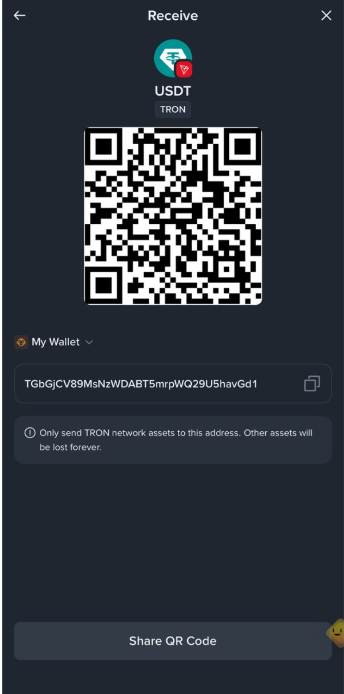
TRC-20 is the name used for USDT that runs on the TRON network. When someone sends you USDT through TRC-20, the transaction goes through TRON.
A TRC-20 wallet address starts with the letter “T,” is 34 characters long, and looks something like this: TJRabPrwbZy45sbavfcjinPJC18kjpRTv8. This makes it easy to recognise a TRC-20 address at a glance. TRC-20 is commonly used for USDT transfers because it generally costs less than sending USDT through Ethereum. However, the actual fee can change depending on network conditions.
2. ERC-20 (Ethereum Network)
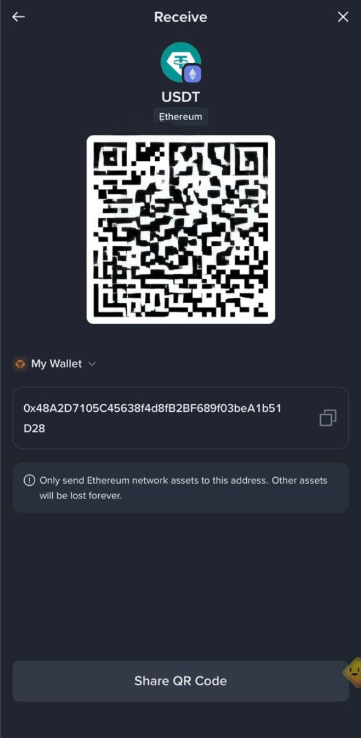
ERC-20 is the name used for USDT that runs on the Ethereum network. When someone sends you USDT through ERC-20, the transaction goes through Ethereum.
An ERC-20 wallet address starts with “0x” and is 42 characters long, including the “0x” prefix. For example: 0x5e97870f263700f46aa00d967821199b9bc5a120. Ethereum transaction fees can be higher, especially when many people are using the network at the same time.
3. BEP-20 (BNB Smart Chain)
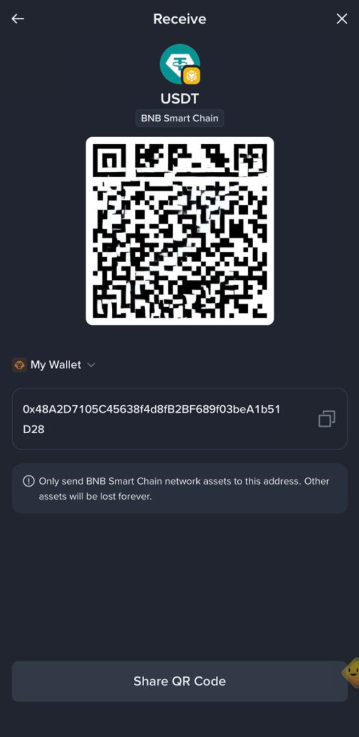
BEP-20 is the name used for USDT that runs on BNB Smart Chain. When someone sends you USDT through BEP-20, the transaction goes through the BNB Smart Chain.
A BEP-20 wallet address starts with “0x,” is 42 characters long, and looks something like this: 0x5e97870f263700f46aa00d967821199b9bc5a120. It looks exactly like an ERC-20 address because both networks use the same address format.
This can be confusing when you encounter them, so pay close attention to the network you select when sending or receiving USDT. The network you select determines which network your transaction will use.
How to Get Your USDT Wallet Address on Pouchers
The steps to getting a USDT wallet address vary by platform, and Pouchers is one of the easiest platforms to use. Pouchers is a fintech platform that does more than help you receive and hold your USDT. It gives you a simple and secure way to manage your funds, convert USDT to other currencies, spend your funds, and cash out to fiat when you need it.
The platform also gives you a simple way to generate your USDT deposit address directly from your USD Wallet in minutes.
Here is how to get your USDT wallet address on Pouchers:
Step 1: Download the Pouchers app and sign in
Download the Pouchers app from the Google Play Store or Apple App Store.
Step 2: Complete your KYC
Verify your account using your BVN and a selfie. You can follow the Pouchers KYC verification guide if you need help.
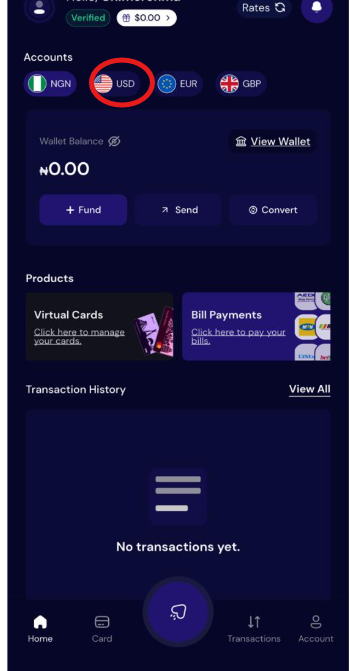
Step 3: Select USD from your dashboard
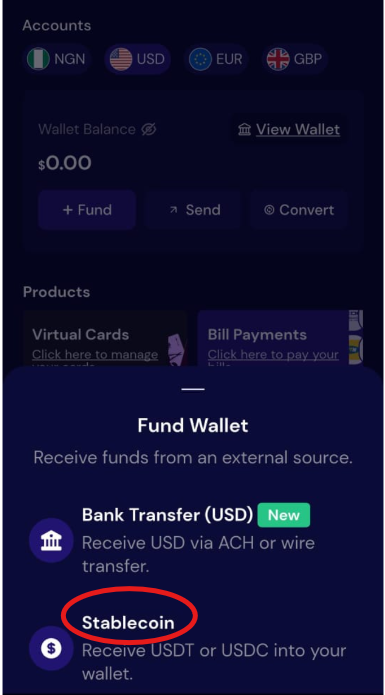
Step 4: Choose Fund Wallet, then select Stablecoin
Step 5: Select USDT and tap Generate Address
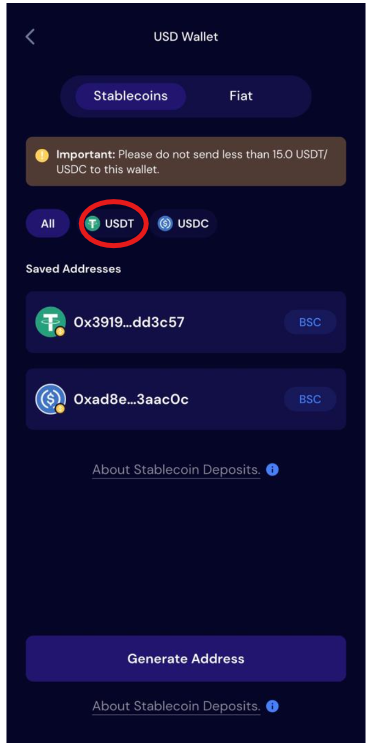
Step 6: Choose the network you want to use from the available options
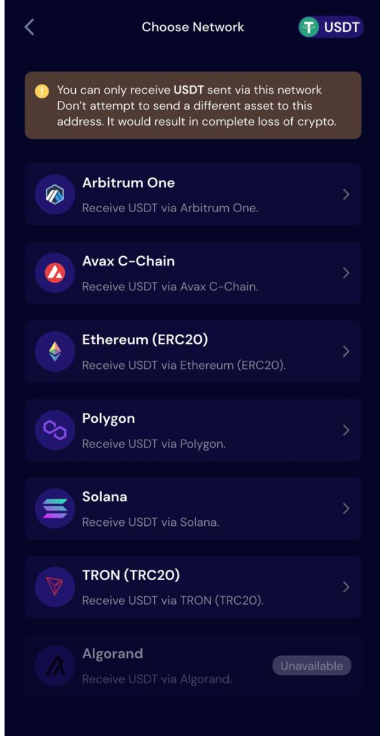
Step 7: Accept the terms, then tap Generate wallet
Step 8: Copy the address
How to Safely Send USDT to a Wallet Address
- Before sending USDT, double-check the address you are about to send the USDT to against the address the recipient gave you, and make sure every character matches. One wrong character could send your USDT to the wrong address.
- Make sure the sending and receiving networks match by checking the network selected on both sides before confirming the transfer. For example, if the recipient gives you a TRC-20 address, select TRC-20 when sending the USDT.
- Copy and paste the exact address generated by the receiving wallet or platform instead of typing it out yourself. This reduces the chance of mistakes, especially since wallet addresses can be long and easy to get wrong.
- Check the transaction fee before you confirm the transfer. The network will charge a fee for processing the transaction, and the amount can change depending on the network and how busy it is. If you want the recipient to receive 15 USDT, for instance, make sure you have enough extra to cover the network fee.
- If you are not sure or are new to sending USDT, consider sending a small test amount first when you are making a large transfer. Once you confirm that the funds have reached the right wallet, you can send the rest.
- Never share your private key or recovery phrase. You only need the recipient’s wallet address to send USDT. Keep your private key and recovery phrase to yourself.
- Be careful with wallet addresses that someone sends you in unofficial messages. When possible, get the address directly from the recipient’s wallet or trusted platform instead of relying on an address shared through Telegram, WhatsApp, or social media.
How to Track a USDT Transaction
You can track a USDT transaction using a transaction ID (TxID). A transaction ID is a unique code assigned to a USDT transfer on the blockchain. You can usually find it in your wallet or exchange’s transaction history.
To track the transfer, copy the TxID and enter it into a blockchain explorer for the network you used. If you used the TRC-20 network, you can track your transaction using TRONSCAN, and if you used ERC-20, you can track your transaction using Etherscan.
Once you have found your explorer, follow these simple steps to track your transaction:
- Open your wallet or exchange and go to your transaction history. Look for a section labelled Transactions, Activity, or History.
- Find the USDT transfer and copy its TxID.
- Go to the blockchain explorer for the network used.
- Paste the TxID into the search bar.
- Check the transaction status and details.
Frequently Asked Questions
1. Can I share my USDT wallet address with anyone?
Yes, you can share your USDT wallet address with anyone who needs to send you USDT. Anyone with your wallet address can send USDT to it, but they cannot access the funds in your wallet.
2. Can someone steal my USDT with my wallet address?
No, someone cannot steal your USDT just by having your wallet address. Your private key or recovery phrase is what gives access to your wallet.
3. Does a USDT wallet address expire?
No, a USDT wallet address does not expire. You can continue using the same address to receive USDT.
4. Can I use one USDT wallet address for different networks?
You can use the same wallet address on different networks if the wallet supports USDT on those networks. However, you must select the network that matches the one supported by the receiving wallet when sending USDT.
5. What happens if I send USDT to the wrong address?
Sending USDT to the wrong address can result in permanent loss because blockchain transactions generally cannot be reversed. If you make a mistake, contact the receiving platform or wallet provider immediately, although they may not be able to recover the funds.
Conclusion
Getting a USDT wallet address is simple as long as you know the correct steps for the platform you are using. Once you have an address for receiving USDT, you are ready to start using it for your digital payments and transfers.
Pouchers makes this simple by giving you a USDT address directly from your USD Wallet. Get your Pouchers USD Wallet today and start receiving USDT with ease.