








Most people understand that they need a bank account to receive money. When someone wants to send you dollars, you may also need a domiciliary account. But what do you need when someone wants to send you USDT? A USDT wallet. That is the simple answer.
But that simple answer can leave you with a few questions, especially if you are receiving USDT for the first time. How does a USDT wallet work? How do you get one in Nigeria? And what should you look for when choosing one? This guide answers those questions, explains the different types of USDT wallets, and walks you through how to create one.
What Is a USDT Wallet?
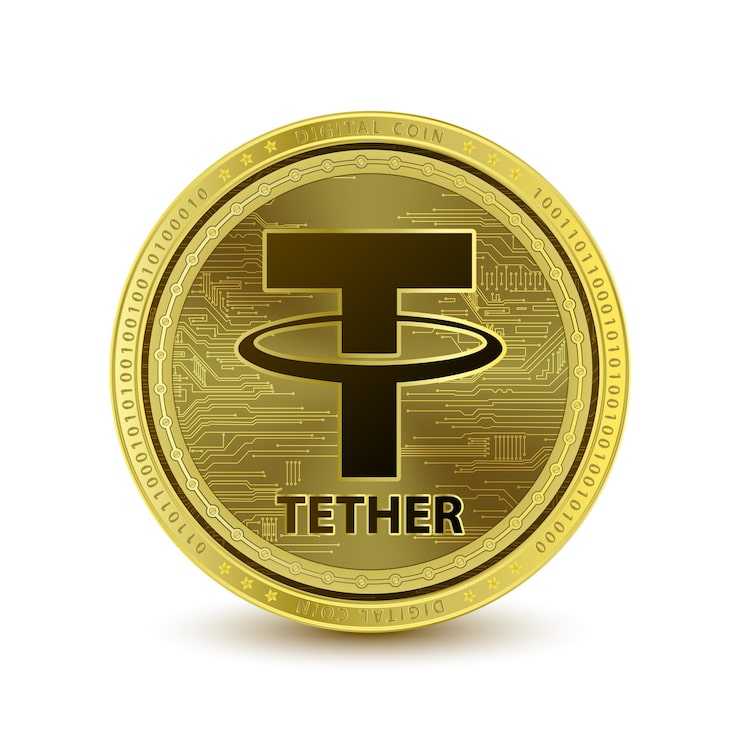
A USDT wallet is a digital wallet that allows you to receive, hold, and send USDT (Tether). It gives you a wallet address that you can share with someone who wants to send you USDT, and the tools and credentials you need to access your USDT on a blockchain.
A USDT wallet is different from a traditional bank account. Your bank account holds your money, but a wallet does not literally hold your USDT. Your USDT is recorded on the blockchain, while the wallet gives you access to it and lets you manage your funds.
How Does a USDT Wallet Work?
To understand how a USDT wallet works, you need to know the important parts involved when you send or receive USDT. Each one has a different job. Let’s break them down.
1. Wallet Address
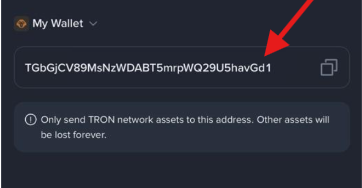
Your wallet address is the destination for your USDT. When someone wants to send USDT to you, you give them your wallet address, and they use it to send the funds to that address on the blockchain. It is similar to sharing your bank account number when someone wants to send you money.
2. Private Keys
Private keys give you control over the assets connected to your wallet. They allow you to authorise transactions, such as sending USDT to another wallet. Anyone with access to your private keys may be able to move the assets in the wallet, so they should always remain private.
3. Blockchain
The blockchain is the network and public record that processes and records USDT transactions. When you send or receive USDT, the network verifies the transaction and records it on the blockchain. This creates a permanent record of the transfer that can be checked later.
How They Work Together
When someone sends USDT to your wallet address, the blockchain processes and records the transaction. Once the transfer is confirmed, the USDT is reflected in your wallet balance.
When you want to send that USDT to someone else, you enter their wallet address and the amount you want to send. Your wallet uses your private key to authorise the transaction, while the blockchain processes and records the transfer.
Types of USDT Wallets
USDT wallets can be classified in two ways: who controls the private keys and how those keys are stored. Let’s break them down:
Custodial vs Self-Custodial USDT Wallets
- A custodial wallet is a wallet where a company keeps the private keys for you. You simply log in to your account to access your USDT.
- A self-custodial wallet, on the other hand, puts you in charge of the private keys; this makes you responsible for keeping them safe. If you use a self-custodial wallet and lose the recovery details needed to access it, there may be no company that can reset your access for you.
Hot vs Cold USDT Wallets
Hot and cold wallets are another way to classify wallets. This time, the difference is whether your wallet is connected to the internet.
- A hot wallet is connected to the internet, making it easy to access and use your USDT whenever you need it. This makes it suitable for frequent transactions. Trust Wallet and MetaMask are examples of hot wallets.
- A cold wallet keeps its private keys offline, usually on a physical device. This can make it a better option for someone who wants to keep their USDT for a long time. Ledger is a common example.
Understanding USDT Networks
A network is the blockchain that carries your USDT from one wallet to another. USDT can run on different networks, and each network processes transactions differently.
Some common networks you may see are:
- ERC-20: Ethereum
- TRC-20: Tron
- BEP-20: BNB Smart Chain
These networks can differ in speed, transaction fees, and compatibility. For example, you might find that TRC-20 charges a lower fee than ERC-20 for a USDT transfer, but that does not make it the right choice for every transaction. You also need to consider whether the receiving wallet or platform supports that network.
Why Must the Network Match?
The sender and recipient must use the same network for a USDT transfer to work correctly. If your wallet supports USDT through TRC-20, the sender needs to select TRC-20 when sending the funds.
Using a different network can cause problems if the receiving wallet does not support it. That is why compatibility comes first.
Factors to Consider when Choosing a USDT Wallet in Nigeria
To choose the best USDT wallet for your needs, here are a few things to look out for:
1. Custody and Control
Consider how much control you want over your USDT and who is responsible for securing it. Some wallets handle the technical side for you, while others give you direct control over your wallet and its access details.
Think about which option suits how you plan to use and protect your funds.
2. Security
Security should be a major consideration when choosing a USDT wallet because you are trusting it with your funds. Look for wallets with features such as two-factor authentication, encryption, and secure account recovery.
You should also consider how the wallet protects your private keys and recovery details, especially when choosing a self-custodial wallet. These measures can help prevent unauthorised access to your account.
3. Supported USDT Networks
A wallet that supports multiple networks gives you more flexibility when using USDT, especially when switching between different wallets and exchanges.
For example, you may receive USDT through TRC-20 from one platform and BEP-20 from another. A wallet that supports both networks can handle these transactions without limiting you to one option.
4. Fees and Ease of Use
Depending on the wallet, you may pay fees when sending USDT, converting it, or withdrawing your funds. These costs can add up if you use your wallet regularly, so it helps to know what you will be charged before choosing one.
The wallet should also be easy to use. You should be able to find your wallet address, check your balance, and send or receive USDT without unnecessary steps.
5. What You Can Do With Your USDT
A useful wallet should make it easy to convert, withdraw, or spend your funds. For Nigerian users, access to Naira and other local payment options can also make a wallet more practical.
How to Create a USDT Wallet in Nigeria
Creating a USDT wallet can mean different things depending on the type of wallet or platform you choose. Generally, you can create a standalone crypto wallet or use a platform that provides a USDT wallet as part of its services.
1. Create a Standalone USDT Wallet
You can create a standalone USDT wallet with a wallet provider such as Trust Wallet, which supports USDT across multiple blockchain networks. To get started, simply download or open the wallet, create your wallet, set up your security details, and back up your recovery information.
2. Create a USDT Wallet on Pouchers
Pouchers gives you a straightforward way to receive USDT without adding another complicated crypto wallet to your life. You can receive USDT and USDC directly into your USD Wallet from an external wallet or exchange, then access the funds from your Pouchers account. Once the transaction receives the required blockchain confirmations, the funds appear in your USD Wallet, ready for whatever you need to do next.
To create and fund your USDT wallet on Pouchers:
- Download the Pouchers app from the Google Play Store or Apple App Store.
- Complete your KYC using your BVN and a selfie. The process should only take a few minutes.
- From the dashboard, select USD Wallet.
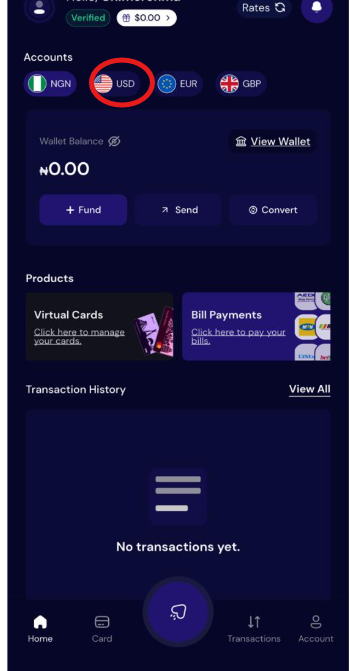
- Select Fund Wallet, then choose Stablecoin.
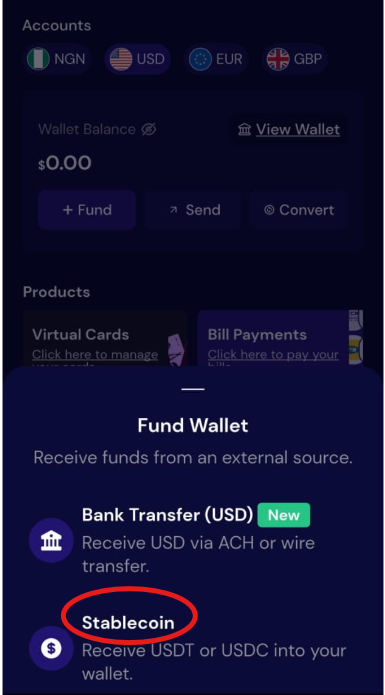
- Choose USDT.
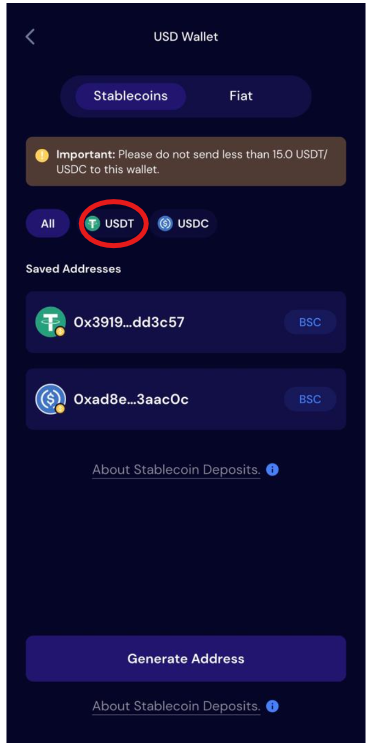
- Select the USDT network you want to use.
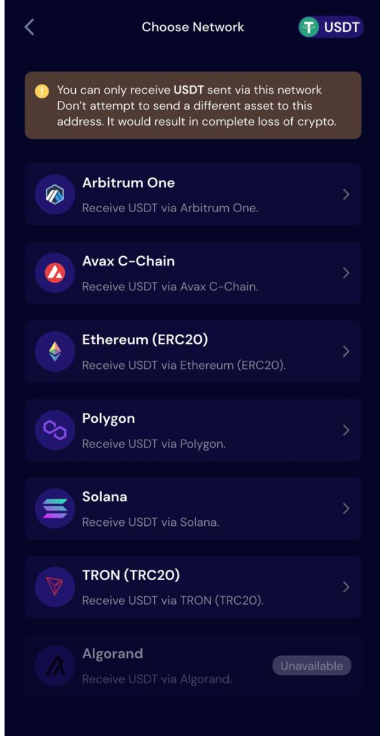
- Click Generate Wallet to create your unique USDT wallet address, then copy the address.
That is it. Your Pouchers USD Wallet is ready to receive USDT, and you have your deposit address ready to use.
Why Choose Pouchers for Your USDT Wallet?
Pouchers is a digital platform that combines stablecoin-powered wallets with everyday financial tools, so you can receive USDT without having to become a crypto expert just to use your money.
Instead of worrying about losing a recovery phrase or carrying a hardware device everywhere, Pouchers handles security through advanced features such as encryption, biometric verification, two-factor authentication (2FA), and AI-powered fraud monitoring.
You also do not have to worry about your funds being slowly chipped away when you leave them in your Pouchers wallet. Pouchers does not charge you for keeping your funds in your wallet, so you can leave your balance there without wondering if it will quietly shrink while you are not using it.
But security and fees are only part of the picture. Here are other things that make using Pouchers worthwhile. You can:
1. Turn USDT Into a Usable Dollar Balance
When you fund your Pouchers USD Wallet with USDT, the funds become part of your USD balance. This gives you a simpler way to work with your money without having to keep thinking about the stablecoin sitting on a blockchain.
2. Spend With a Virtual Dollar Card
When you need to pay for a subscription, shop online, or cover another dollar-based expense, you can fund your Pouchers virtual dollar card from your wallet and use it for online payments.
3. Keep Your Currencies in One Place
Pouchers is a multicurrency wallet, so you can keep your USD alongside Naira, Euro, and GBP. This makes things much easier when you receive money in different currencies or need to move between them.
Common USDT Wallet Mistakes and How to Avoid Them
1. Sharing Your Recovery Phrase or Private Keys
Your private keys and recovery phrase can give someone access to your wallet and the funds inside it. Scammers may pretend to be customer support or offer to help you fix a wallet problem, then ask for these details. Keep your recovery details private and never share them with anyone, even if they claim to be from customer support.
2. Sending USDT to the Wrong Wallet Address
A single wrong character can send your USDT to the wrong address, and blockchain transactions usually cannot be reversed. Copy the wallet address carefully and check it before confirming the transaction.
3. Failing to Back Up a Self-Custody Wallet
Creating a self-custody wallet without backing up your recovery phrase can become a problem when you lose your phone, delete the app, or switch to another device. Back up your recovery phrase when you create the wallet and store it somewhere safe and offline. Do not save it in screenshots, chats, emails, or other places where someone else could access it.
4. Using the Wrong Network
Sending USDT through an unsupported network can cause you to lose access to your funds. You should always confirm that the sender and receiving wallet support the same network before sending USDT.
Frequently Asked Questions
1. Can I send or receive USDT without a USDT wallet?
No, you need a wallet or platform that supports USDT to send or receive it. You can use a crypto exchange, a digital platform like Pouchers, a custodial wallet, or a self-custodial wallet that supports USDT.
2. Can I store USDT in a regular crypto wallet?
Yes, you can store USDT in a regular crypto wallet as long as the wallet supports USDT and the network your USDT uses.
3. Can I put US dollars in a USDT wallet?
Not necessarily, because a USDT wallet is designed to hold and transact with USDT rather than fiat US dollars. However, platforms like Pouchers give you a USD Wallet that you can fund with USDT, so you can manage your dollar balance without keeping your USDT and USD in separate places.
4. Which network should I use for USDT?
USDT works across several blockchain networks, including TRC-20, ERC-20, BEP-20, Solana, and Polygon. Choose the network supported by the receiving wallet or platform, and make sure the sender and recipient use the same network.
5. Which wallet is best for USDT?
The best USDT wallet depends on how you plan to use your funds, the networks you need, and how much control you want over your wallet. Pouchers is the best option if you want to receive USDT, hold your balance in a USD Wallet, and use your funds for everyday financial needs.
Conclusion
A USDT wallet gives you a simple way to receive, hold, and send USDT, but choosing the right wallet means looking beyond the ability to store USDT.
Once you understand how USDT wallets work and what to look for, you can choose an option that fits your needs and use it with confidence. Ready to put your USDT to work? Create your Pouchers account and get started.