








Facebook has had a massive Nigerian audience for years. People use the social media platform for many purposes — content creation, group creation, and even shopping on the Facebook marketplace. Together, these users make up a large and active community.
Over the years, businesses have been leveraging the power of this social media platform to increase visibility and in turn, grow sales. As such, with the right campaign, your business can reach the target audience through Facebook ads. But to run these ads, you need a reliable way to pay for them.
This guide covers the most reliable ways to pay for Facebook Ads in Nigeria and get your campaign up and running.
4 Ways to Pay for Facebook Ads in Nigeria
You have a few options for paying for Facebook Ads in Nigeria. These include the Pouchers virtual dollar card, Naira debit cards, domiciliary account cards, and bank transfers.
Here’s a quick comparison of how each option works, its advantages, and its limitations.
| Payment method | How it works | Advantages | Limitations |
| Pouchers Virtual Dollar Card | Create a virtual dollar card, fund it, and add its details to your Meta Ads billing settings. | Supports international online payments and can be funded with Naira, USD, or stablecoins. | Requires a one-time creation fee of $2 for Standard and $5 for Premium cards. |
| Naira debit cards | Add an eligible Nigerian Visa or Mastercard to your Meta Ads account. | Convenient if you already have an eligible bank card. | International payment restrictions and spending limits may cause transactions to fail. |
| Domiciliary account cards | Link an eligible foreign-currency debit card to your Meta Ads account. | Allows you to pay using foreign currency held in your domiciliary account. | Requires a domiciliary account and an eligible card. Bank charges and transaction limits may apply. |
| Bank transfers | Select bank transfer under Add Funds in your eligible Meta ad account, then transfer the amount to the account details provided. | Allows you to pay for ads directly from your Nigerian bank account without using a debit card. | Only available on eligible NGN ad accounts set up for manual payments. You must fund the account in advance, and your ads will pause when the balance runs out. |
1. Pouchers Virtual Dollar Card- A Convenient Way to Pay for Facebook Ads
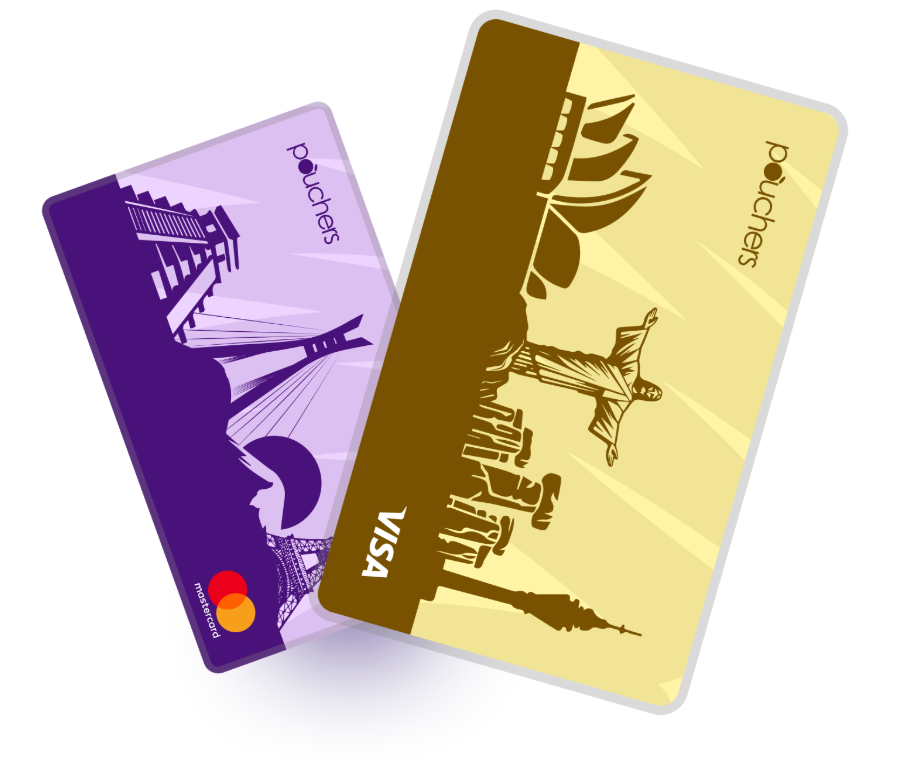
The Pouchers virtual dollar card is one of the most convenient ways to pay for Facebook Ads and other online platforms. It is easy and quick to create and has no monthly maintenance or card top-up fees, making it one of the cheapest virtual dollar cards in Nigeria. You only pay a one-time creation fee of $2 for a Standard card or $5 for a Premium card.
Pouchers offers both Visa and Mastercard cards, so you can create one on each network. This gives you more flexibility and another card option to try if Meta declines one of your cards.
You can fund your card directly with Naira from your Pouchers wallet or top it up using your USD wallet if you have dollars, USDT or USDC. The card also comes with security features such as AI-powered fraud monitoring, transaction verification and the option to freeze and unfreeze your card in the app.
2. Naira Debit Cards
You can also pay with your Nigerian Naira debit card, provided it supports international online transactions. Simply add your Visa or Mastercard details to your Meta Ads billing settings. However, some Nigerian banks restrict international payments on their Naira cards, so your transaction may be declined even when you have enough funds in your account.
3. Domiciliary Account Cards
If you have a domiciliary account, you can use the physical dollar card linked to it to pay for Facebook Ads. Since the account holds foreign currency, you can make payments in dollars without relying on your Naira card for international transactions.
However, opening a domiciliary account comes with extra requirements, and your bank may charge card issuance, maintenance, or transaction fees.
4. Bank Transfers
Bank transfer is another payment method, but this option is not available to every advertiser. Meta only offers local manual payment methods to eligible ad accounts set to Nigeria and Nigerian naira (NGN), so automatic billing does not work here. To use this method, you need to select the local payment option when setting up your ad account.
If your account supports bank transfers, you can select the option in your payment settings and send money to the bank details provided by Meta. The fund is added to your ad account balance, and Meta deducts your advertising costs from it as your campaigns run.
How to Pay for Facebook Ads With Pouchers Virtual Dollar Card
Step 1: Create and verify your Pouchers account
Download the Pouchers app and sign up with your name, email address, and phone number. Verify your email and complete your identity verification.
Step 2: Fund your Pouchers wallet
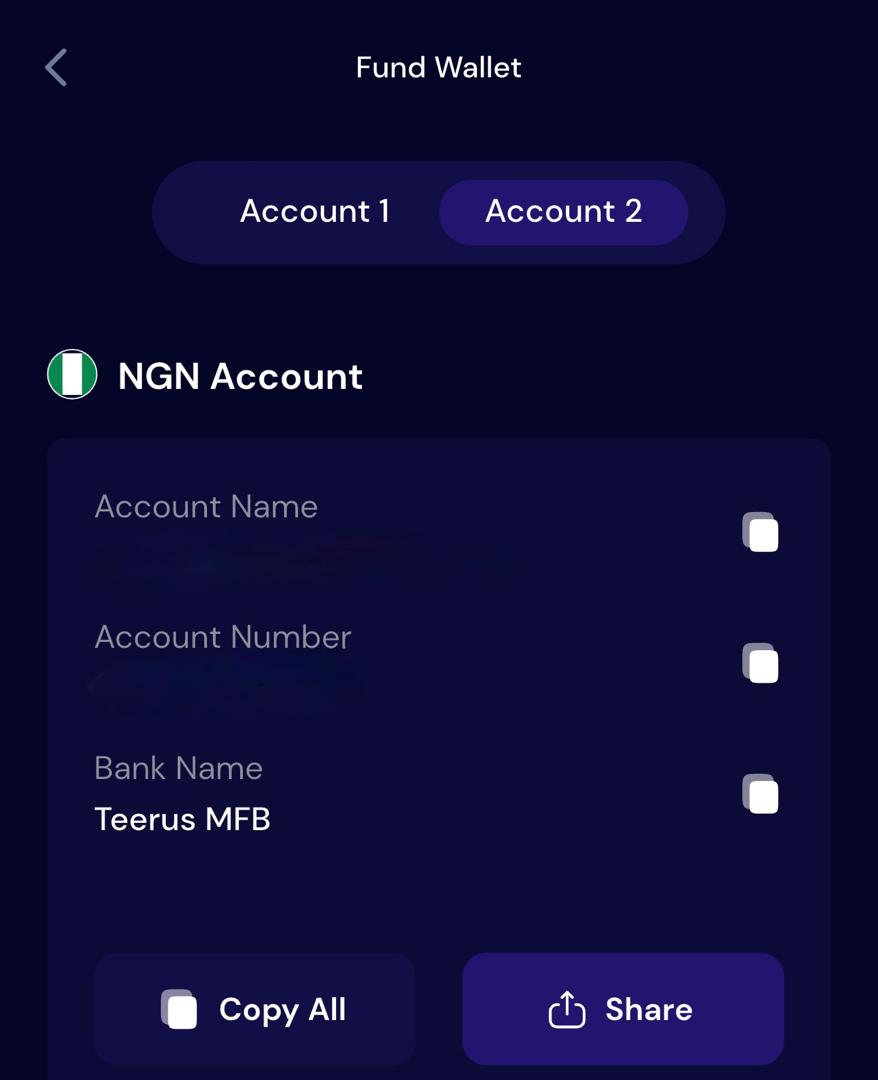
Add enough money to your Pouchers wallet to cover the card creation fee and initial balance. To fund your Naira wallet, open the wallet and tap Receive to view your account details. Copy the details and use them to make a bank transfer from an account linked to your BVN.
If you have USDT or USDC, you can fund your USD wallet with them instead. Open the USD wallet, select Fund, choose Stablecoin, and follow the instructions to deposit USDT or USDC.
Step 3: Create your Pouchers Virtual Dollar Card
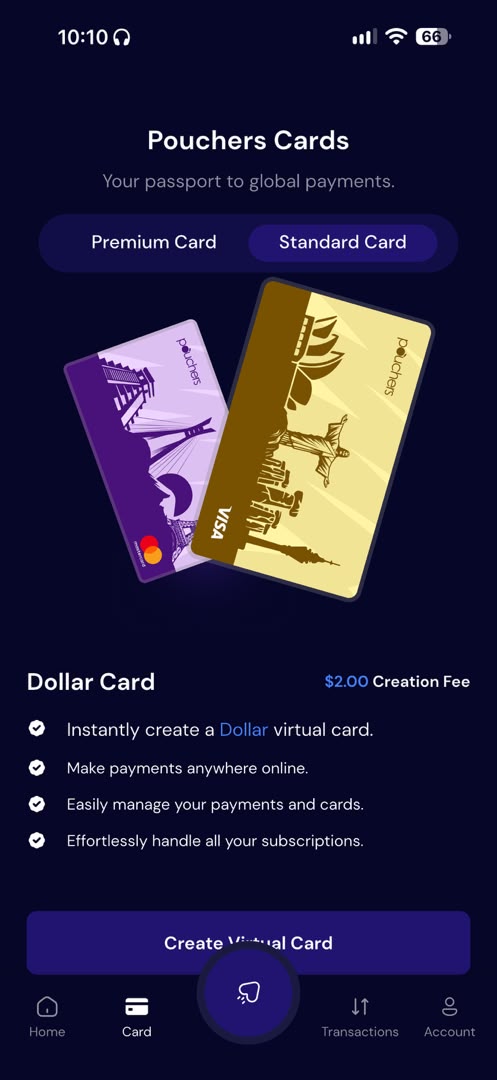
Once you have funded your wallet, open the Virtual Card section in the app and choose the card you want to create. Select your preferred card and card network when prompted. Choose a card colour, enter your address details, and confirm the creation fee.
Step 4: Fund your virtual dollar card
Add enough funds from your Pouchers naira or USD wallet to cover your Facebook Ads payments. To do this: open the Virtual Card section, select your card, and tap Fund Card. Enter the amount you want to add, then choose the wallet you want to fund it from.
Step 5: Add your Pouchers card to Meta Ads Manager
Now that your card is funded, you can add it to your Facebook Ads account.
- Log in to Meta Ads Manager and select the ad account you want to use.
- Open Billing & Payments and go to Payment Settings.
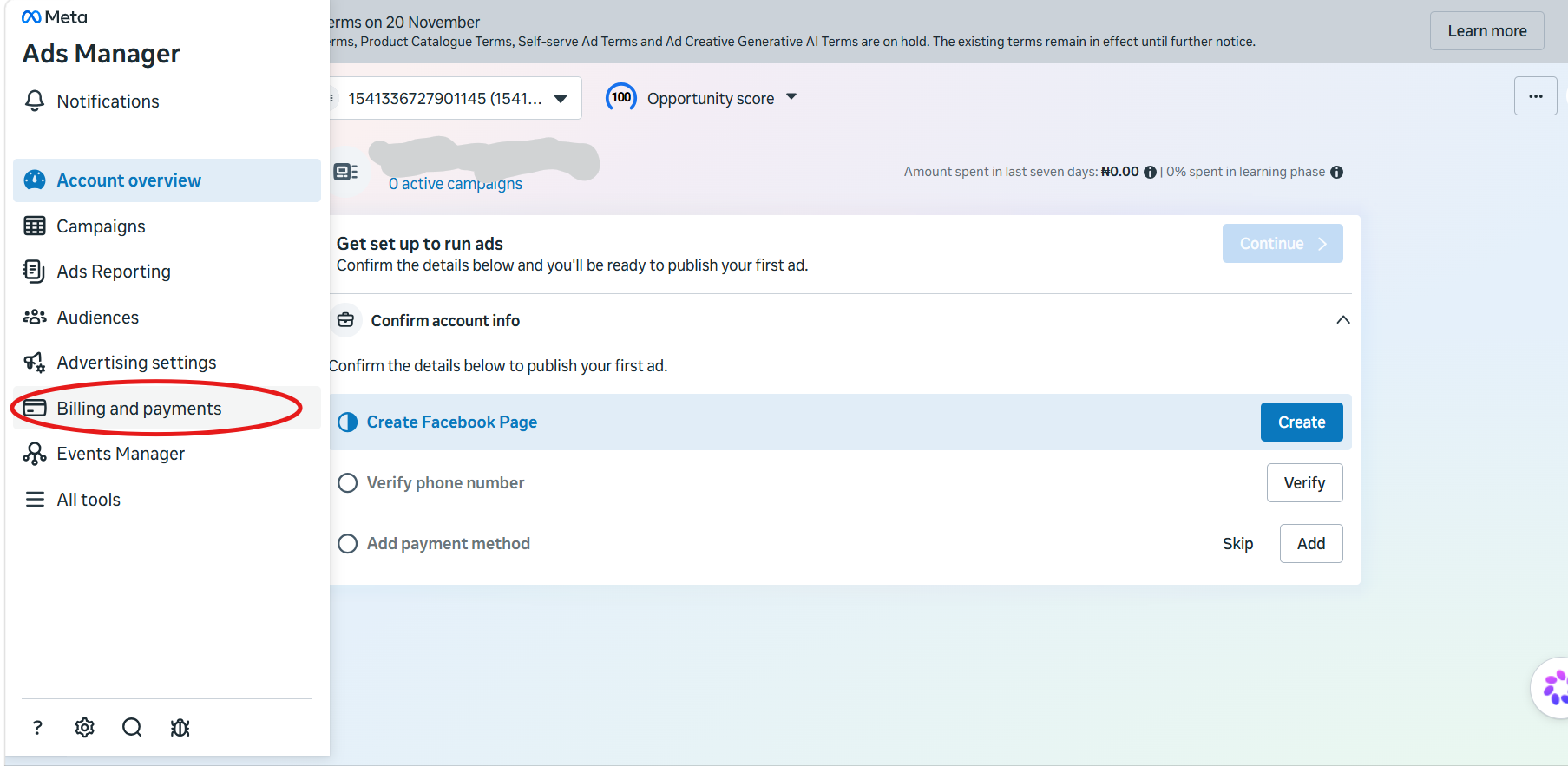
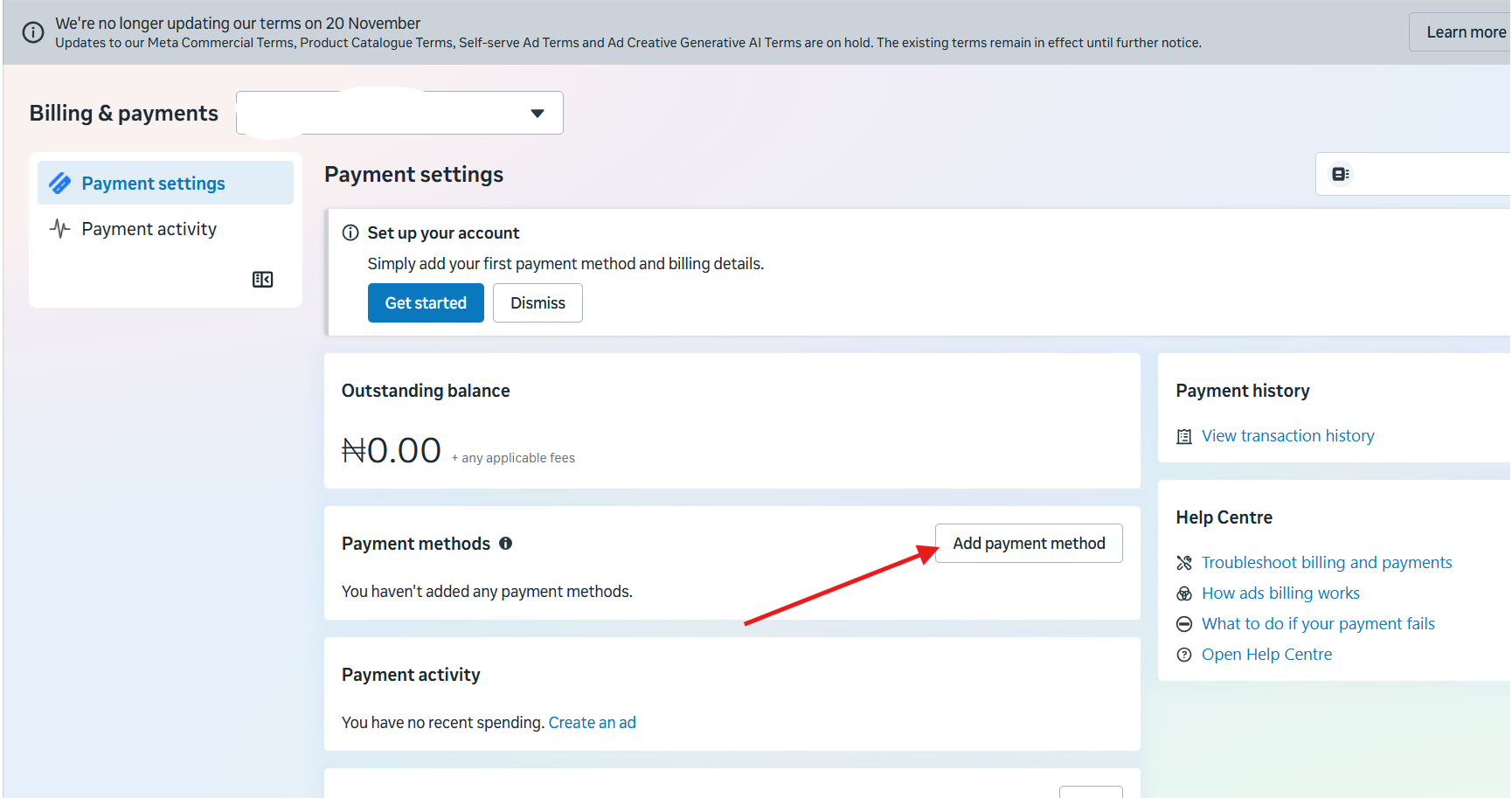
- Under Payment Settings, click Add Payment Method.
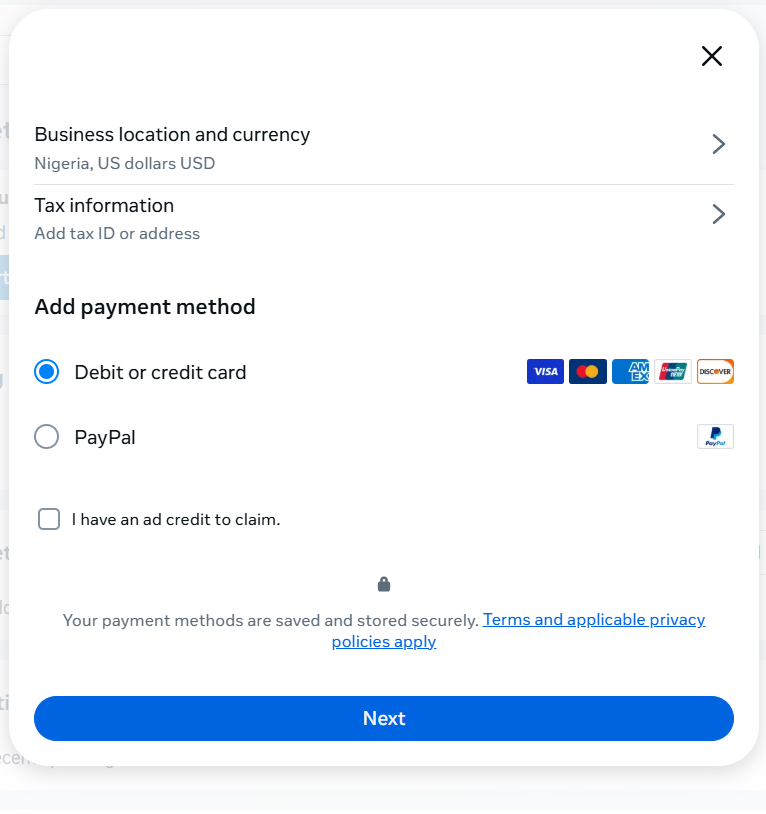
- For the ad account location, select Nigeria and choose USD as the currency if you’re setting up the account to bill in dollars. Then select Credit or debit card as your payment method.
- Copy your card number, expiry date, and CVV from your Pouchers app, enter them into Meta’s payment form, and provide billing information.
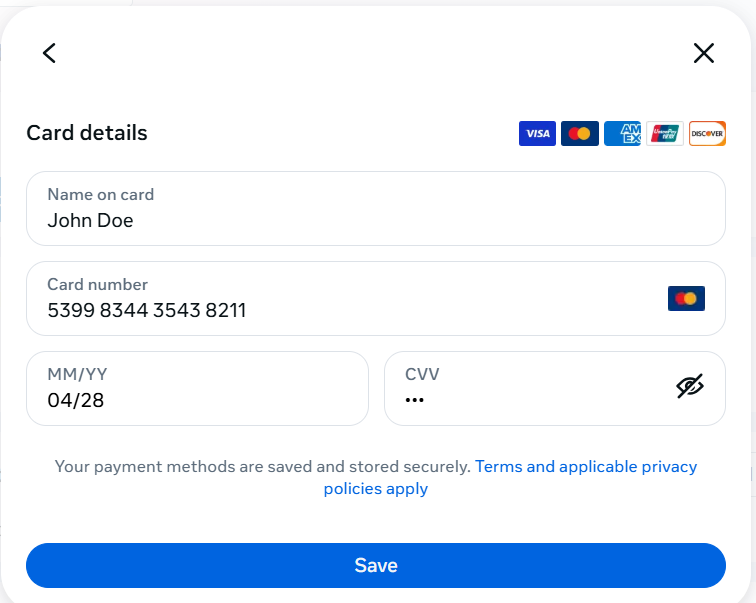
- Click Save to complete the process.
Once Meta accepts your card, it will appear in your ad account’s saved payment methods. You can then use it to pay for your Facebook Ads.
Reasons Your Facebook Ads Payment May Fail
1. Insufficient Funds
Your card may not have sufficient funds to cover your Ads payment. For example, if you have $20 on your card but Meta charges you $25 for your ad spend, the payment will fail. The same can happen if you’ve spent part of your balance on other subscriptions or online purchases and have insufficient balance.
Therefore, it is important to check your available card balance before running your ads, to make sure it can cover the amount Meta intends to charge.
2. Bank Restrictions
Some Nigerian banks limit or disable international online transactions on certain Naira debit cards. This may be due to foreign exchange restrictions, regulatory requirements, or fraud prevention measures. As a result, your card may be declined when you try to pay for Ads, even if you have enough funds in your account.
To be sure your card can handle international online payments, confirm with your bank that the feature is supported and enabled.
3. Billing Currency Incompatibility
Your ad account’s billing currency and your card’s currency can affect how Meta processes your payment. When the two currencies differ, currency conversion may be required.
For example, if your ad account bills in naira but you’re paying with a virtual dollar card, the transaction may need to be converted to USD before your card can process it. Depending on your card provider’s supported currencies and payment rules, this could cause your card to be declined.
4. Payment Verification Issues
Meta may decline your payment if it cannot verify your card. This can happen if your card details are incorrect, your billing information doesn’t match, or Meta needs to confirm that you own the card. Check your card details and billing information, and follow any verification instructions Meta sends you.
5. Meta Account Restrictions
Sometimes, the problem has nothing to do with your card. Meta may restrict your ad account or disable its payment features if it detects unusual activity, policy violations, or suspicious payment attempts.
Check your Account Quality page and Billing & Payments section in Meta Ads Manager for any warnings or outstanding issues. You may need to resolve the issue or request a review before you can make payments again.
Frequently Asked Questions
1. Can I pay for Facebook Ads in Naira?
Yes, you can pay for Facebook Ads in Naira. You can pay with an eligible Naira debit card or use the bank transfer option if Meta makes it available on your ad account.
2. Does Facebook Ads charge automatically?
Yes, Meta can automatically charge your saved payment method when you reach your billing threshold or on your monthly billing date. However, if your account uses manual payments, you need to add funds yourself before running ads.
3. How do I check my outstanding Ads balance?
Log in to Meta Ads Manager and go to Billing & Payments to view your current balance and payment history. You can also check any outstanding amount that Meta is yet to collect.
4. What happens when Facebook cannot collect payment for an ad?
If Meta cannot collect your payment, it may stop your ads from running until you settle the outstanding balance. You may need to update your payment method or resolve the issue before your campaigns can resume.
Pay for Facebook Ads With Pouchers
Getting your Facebook Ads payment sorted makes it easier to focus on reaching the right audience and growing your business. With a Pouchers Virtual Dollar Card, you can pay for your campaigns without relying on your regular Naira bank card or opening a domiciliary account.
Download the Pouchers app and create your virtual dollar card today.
Sources Used
- How Do Meta Ads Work in Nigeria? — Meta Ads SI
- Payment Methods for Facebook Ads in Nigeria — Meta
- Manage Your Payment Methods for Facebook Ads — Meta
- How to Create a Standard Virtual Dollar Card on Pouchers — Pouchers Help Centre
- How to Fund Your Virtual Dollar Card With Naira — Pouchers Help Centre
- How to Fund Your Card With Your USD Account — Pouchers Help Centre
- Naira Debit Cards payment option — UBA