








If you have been using Binance in Nigeria for a while now, you may remember when the platform still supported Naira services, including NGN withdrawals. This changed in 2024, when Binance discontinued those services.
Still, Binance remains a popular choice for crypto users, thanks to its wide range of coins and trading options. So, telling Nigerians to simply stop using the platform is not practical, especially since there is an easier way around the problem.
You can still withdraw your crypto from Binance, but now you need a different route to access the funds locally. This guide walks you through that route, so you can withdraw from Binance in Nigeria and get your funds where you need them.
How Binance Withdrawals Work in Nigeria
Binance withdrawals in Nigeria now work differently from the old Naira withdrawal process. Now, to access your crypto in Naira, you need to transfer it from Binance first to a compatible external wallet or platform.
Then you use that destination to manage your funds or take the next step. This makes the platform or wallet you choose important because it determines what you can do with your crypto after it leaves Binance.
Another option Nigerians use is P2P trading. This can happen through P2P marketplaces or informal channels such as Telegram and WhatsApp groups.
You send your crypto directly from your wallet to the buyer’s wallet and receive Naira in return. However, dealing directly with a stranger can make the process less straightforward and come with risks.
For anyone who wants a simpler way to move crypto from Binance and eventually access the funds in a Nigerian bank account, using a platform that handles the process is the better option.
How to Withdraw From Binance to a Bank Account in Nigeria
Pouchers gives you a way to move crypto out of Binance and manage your funds. You can send USDT or USDC from Binance to your Pouchers Wallet, and then use Pouchers to send the funds to your Nigerian bank account.
If you hold another crypto asset, such as BTC or ETH, just convert it to USDT or USDC on Binance before starting the withdrawal.
Here is how to do it:
How to Withdraw USDT (or USDC) From Binance to Pouchers
Step 1: Create and verify your Pouchers account
- Download the Pouchers App on the Google Play Store or Apple App Store
- Complete your KYC with your BVN and a selfie. This process is quick and should only take a few minutes.
Step 2: Generate your USDT (or USDC) wallet address
- Open your Pouchers app and select the USD wallet.
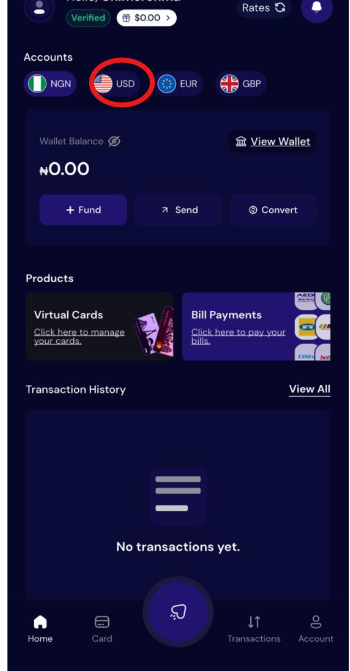
- Click Fund, then select Stablecoin.
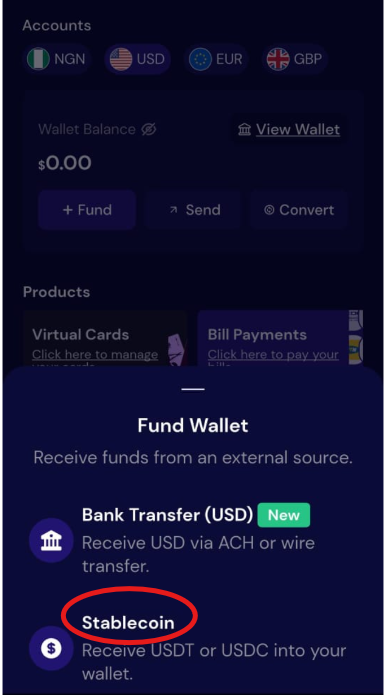
- Choose USDT or USDC, depending on the asset you want to withdraw from Binance.
- Select a network supported for that asset. Pouchers displays the available networks in the app, so use one of the networks shown there.
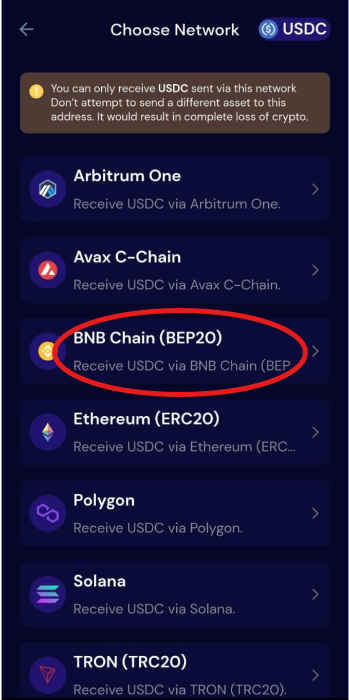
- Generate the wallet address and copy it. You will use this address as the destination for your Binance withdrawal.
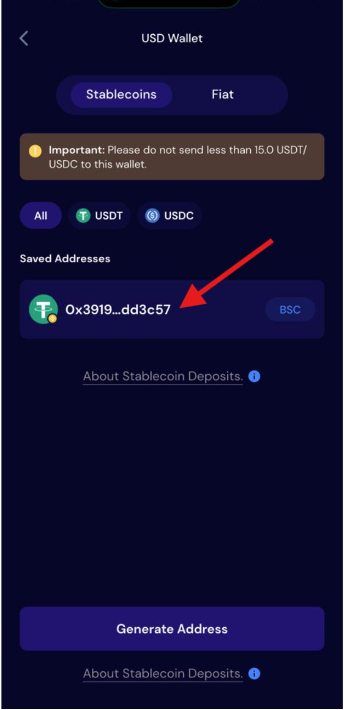
Step 3: Withdraw the USDT (or USDC) from Binance
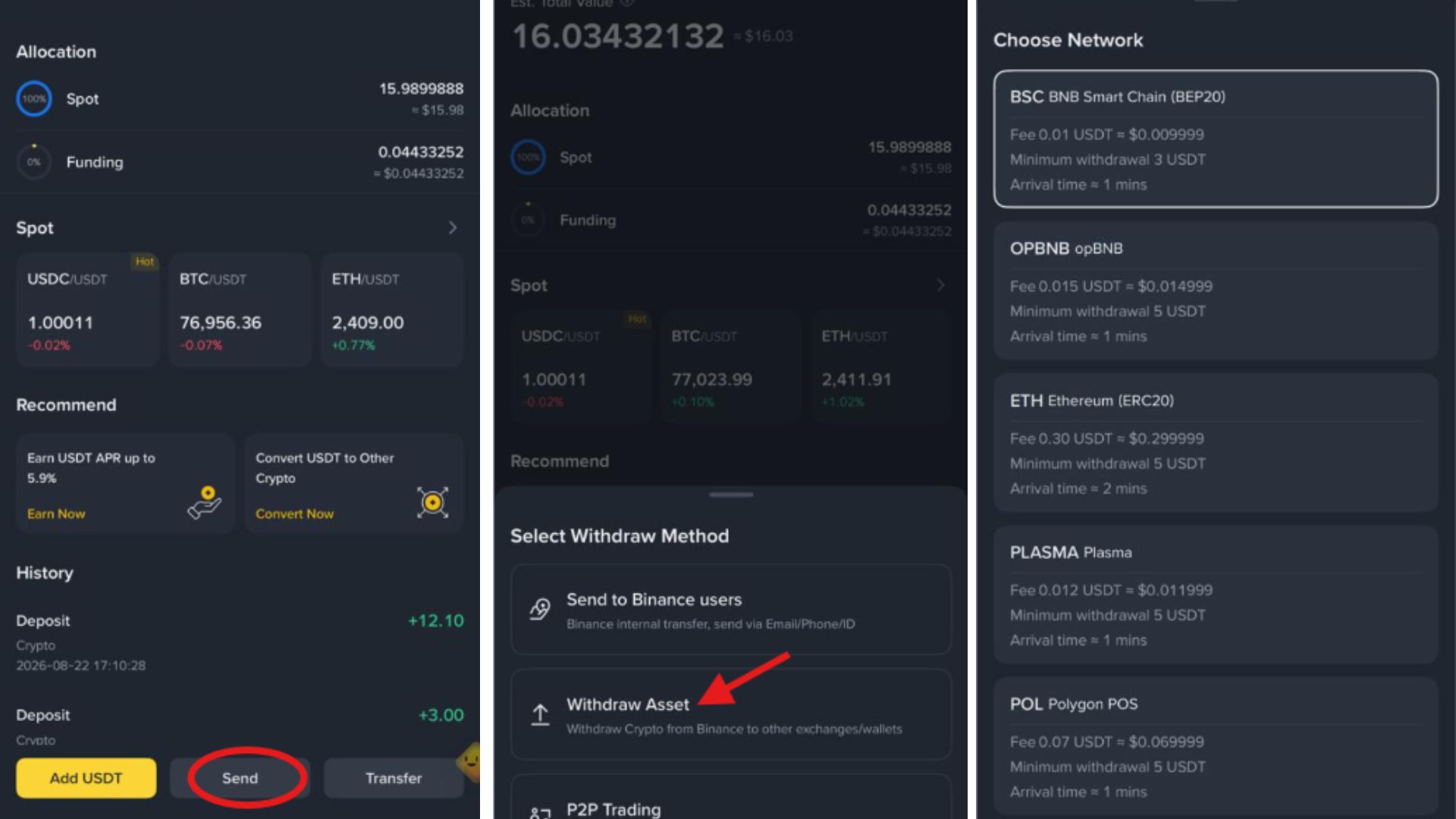
- Open the Assets section in your Binance account and select the asset you want to withdraw, such as USDT or USDC.
- Select Send, then choose Withdraw Asset.
- Select the same network you chose when generating your Pouchers wallet. For example, if you select BNB Chain (BEP20) on Pouchers, select the same network on Binance.
- Paste the Pouchers wallet address you copied earlier.
- Enter the amount you want to send and review the withdrawal details.
- Select Withdraw and complete any security verification required by Binance.
Once Binance processes the transaction, check your Pouchers Wallet to confirm that the funds have arrived before moving on to the next step.
Pro Tip: To save money, select BNB Chain (BEP-20) or TRON (TRC-20) on both Pouchers and Binance. These networks process transactions quickly, with fees typically under $0.20 to $1.00, keeping more of your money in your pocket.
How to Move Your Funds to Your Nigerian Bank Account
Once your funds arrive in your Pouchers account, they will appear as fiat in your USD wallet.
Step 1: Convert USD to Naira
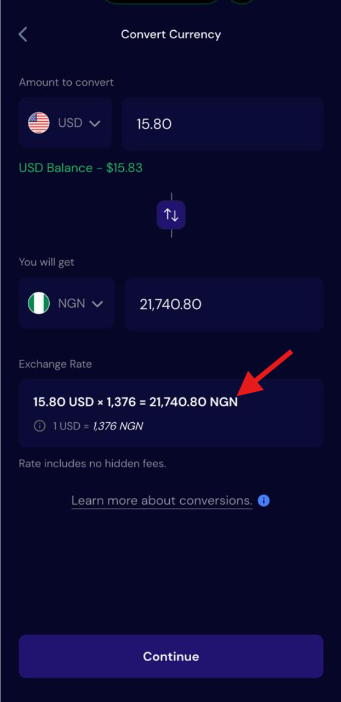
From your Pouchers dashboard, click Convert, select USD and Nigerian Naira, enter the amount you want to convert, and confirm the transaction.
Step 2: Select “Send”
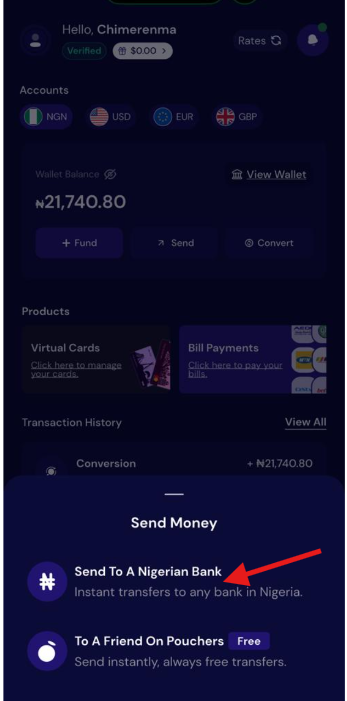
Return to your dashboard and click Send, then select Send to a Nigerian Bank.
Step 3: Enter Your Bank Details
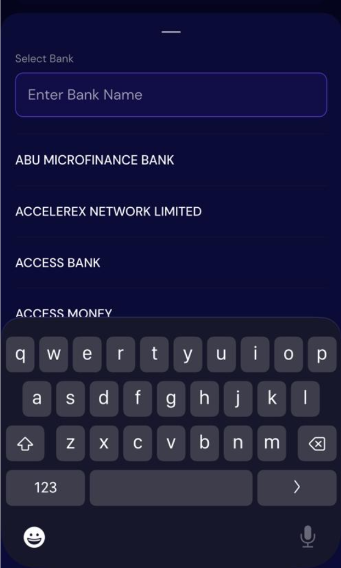
Select your bank, enter your account number and the amount you want to send, then click Continue.
Step 4: Review and Complete the Transfer
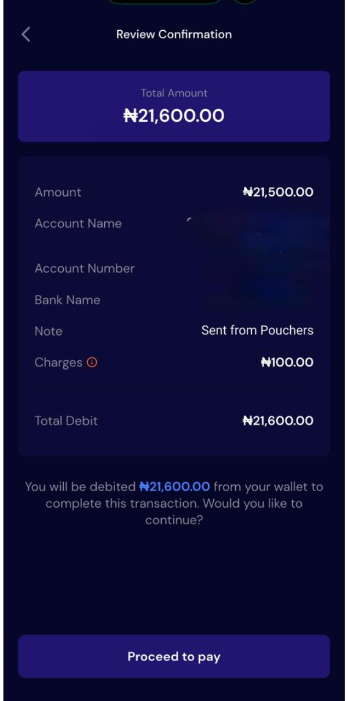
Review the transaction details and click Proceed to Pay to complete the transfer.
That is it. You will see your Naira in your Nigerian bank account.
Why Use Pouchers Instead of P2P?
1. Reduce the risks that come with person-to-person trades
P2P requires you to trust that another person will complete the transaction as agreed. Payment disputes, fake payment confirmations, and scams can make the process stressful, especially when you use informal channels.
Pouchers removes the buyer from the process, so you can move your supported stablecoins into your own wallet and manage them from there.
2. Keep your funds in USD or another supported currency
P2P usually means selling your crypto when you want to receive Naira. With Pouchers, you can keep your funds in USD after moving them from Binance and decide when to convert them to Naira. This can be useful when you do not need to send the money to your Nigerian bank account immediately.
3. Use your funds for more than just cashing out
Pouchers lets you use your balance to fund a Virtual Dollar Card from your wallet and make international payments, subscriptions, online purchases, travel bookings, and payments for services such as Netflix and Amazon.
This means you can use your funds for international spending instead of converting everything to Naira first.
Frequently Asked Questions
1. Can I transfer money directly from Binance to my Nigerian bank account?
No, you cannot transfer NGN directly from your Binance crypto balance to a Nigerian bank account. You need to move your crypto to a compatible platform such as Pouchers before converting it to Naira and sending it to your bank account.
2. How do I withdraw USDT (or USDC) from Binance?
You can withdraw either USDT or USDC from Binance to your Pouchers wallet. The steps outlined earlier in this guide show you how to complete the withdrawal.
4. What is the cheapest network to withdraw USDT from Binance?
BNB Chain (BEP20) and TRC20 are generally cheaper options for withdrawing USDT. However, the withdrawal fee depends on the network and Binance’s current fee for that network, so check the fee shown on Binance before confirming your withdrawal.
5. What is the minimum amount of USDT or USDC I can send to Pouchers?
The minimum amount you can send to Pouchers is 15 USDT or USDC. Make sure you also have a little extra to cover any applicable network or withdrawal fee before confirming the transfer.
6. How long does it take to withdraw from Binance to Pouchers?
The transfer usually takes just a few minutes after Binance processes the transaction, as long as you have your Pouchers wallet address and other details ready. The exact time can vary depending on the network and transaction processing.
Conclusion
Withdrawing from Binance becomes much easier once you understand how the process works and what options are available to you. Take your time to check the details before confirming a transaction, especially the wallet address, network, and fees.
A few careful checks can help you avoid unnecessary delays or costly mistakes and make the entire withdrawal process smoother.
Ready to move your crypto from Binance? You can get started with Pouchers today.